Accounted vs Coconut: Which Sole Trader App Should You Choose?
Accounted vs Coconut: Which Sole Trader App Should You Choose?
Coconut has carved out a niche as a simple, mobile-friendly bookkeeping app for UK sole traders and freelancers. It strips away the complexity that puts many self-employed people off traditional accounting software and offers a clean, approachable experience. For that, it deserves credit.
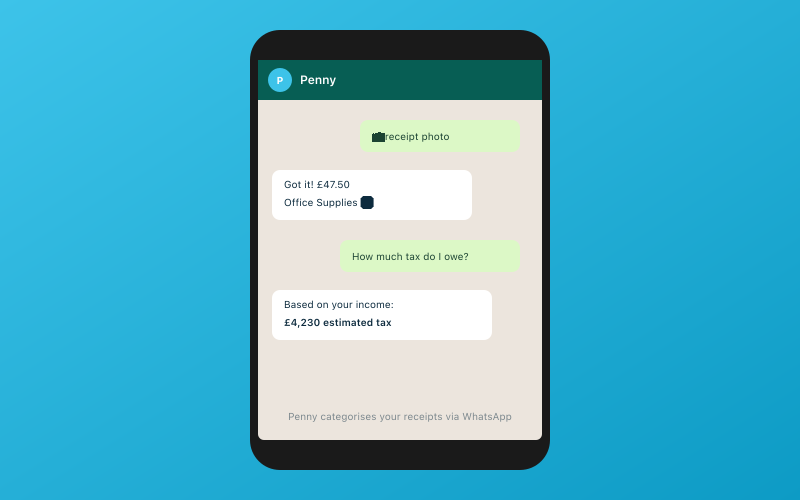 Chat with Penny on WhatsApp — your AI bookkeeper
Accounted takes a different approach — full-featured AI bookkeeping that aims to handle as much of the work as possible on your behalf. But is more always better, or does Coconut's simplicity win out?
Let us compare them fairly.
What Coconut Does Well
Coconut was designed specifically for sole traders, and it shows. The app connects to your bank account, pulls in transactions, and lets you categorise them with a few taps. It calculates your tax estimate in real time, so you always have a rough idea of what you owe HMRC. The interface is clean, the language is jargon-free, and you can be up and running in minutes.
For someone who has never done any bookkeeping before and just needs to track income and expenses, Coconut is a genuinely good starting point. It lowers the barrier to entry significantly.
What Accounted Does Differently
Accounted also connects to your bank and pulls in transactions. But rather than asking you to categorise each one manually, its AI bookkeeper Penny handles categorisation automatically. Each categorisation comes with a confidence score — if Penny is 95% sure a transaction is office supplies, it is processed without your input. If confidence is lower, it gets flagged for your review.
This difference matters more as your transaction volume grows. If you have 20 transactions a month, manual categorisation in Coconut takes a few minutes. If you have 200, it becomes a chore. With Accounted, the workload barely changes because Penny handles the volume.
Feature Comparison
Here is where the two platforms diverge significantly.
Bank Feeds
Both platforms offer bank feeds. Coconut connects to major UK banks, and so does Accounted. No major difference here — both work well.
Receipt Scanning
Coconut allows you to photograph receipts through its mobile app. The app extracts basic data and attaches the image to a transaction. It is functional and straightforward.
Accounted offers receipt scanning through WhatsApp. Send a photo of your receipt to Penny, and the AI extracts the supplier, amount, date, VAT amount, and category. It then matches the receipt to the corresponding bank transaction. No app download required — you use the WhatsApp you already have.
Tax Calculations
Coconut provides a running tax estimate based on your income and expenses. This is helpful for budgeting, though it is relatively basic. It covers Income Tax and National Insurance for straightforward sole trader scenarios.
Accounted calculates tax across a wider range of situations, including multiple income sources, rental income, and capital gains. It supports 11 of 13 Self Assessment schedules, which means you can file directly to HMRC from the platform. Coconut's SA coverage is more limited.
VAT
Coconut offers VAT support on its paid plans, including Making Tax Digital filing. However, its VAT features are relatively basic compared to dedicated accounting software.
Accounted is fully MTD compliant for VAT and supports standard, flat rate, and cash accounting schemes. It is also compliant with MTD for Income Tax, which becomes relevant from April 2026.
Invoicing
Coconut offers basic invoicing. You can create and send invoices from the app, which is useful for freelancers who need a simple way to bill clients.
Accounted also supports invoicing, with the added benefit of AI matching incoming payments to outstanding invoices.
Accountant Access
This is a significant gap. Coconut is designed as a solo tool — there is no accountant portal or collaborative workflow. If you work with an accountant, they cannot log into Coconut to review your books. You would need to export data and share it manually.
Accounted includes a free accountant portal with practice management tools. Your accountant can access your books directly, see only the transactions that need attention through the exception-first workflow, and manage their practice from a single dashboard. If you are likely to work with an accountant at any point, this matters.
Pricing
Coconut offers a free tier with basic features and paid plans starting from around £9 per month. The free tier is limited — you get bank feeds and basic categorisation, but receipt scanning, VAT, and invoicing require a paid plan.
Accounted starts at £14 per month for the Starter plan, with Professional at £24, Business at £34, and Complete at £44. There is no free tier, but every plan includes AI categorisation, receipt scanning through WhatsApp, and tax calculations.
If budget is your primary concern and your bookkeeping needs are minimal, Coconut's free tier is hard to argue with. You genuinely get useful functionality for no money. But if you need more than basic tracking, the paid tiers of both platforms are not far apart in price, and you get significantly more capability with Accounted.
Where Coconut Wins
- Simplicity: Fewer features means less to learn
- Free tier: Genuine value at no cost for basic bookkeeping
- Mobile-first: The app is well-designed and pleasant to use
- Low commitment: Easy to try without financial risk
- Beginner-friendly: Perfect for people doing bookkeeping for the first time
Where Accounted Wins
- AI automation: Penny categorises transactions for you, rather than asking you to do it manually
- Receipt scanning via WhatsApp: No app download needed
- Self Assessment: 11 of 13 SA schedules vs Coconut's limited coverage
- Accountant portal: Free access for your accountant with practice management tools
- MTD for Income Tax: Built for quarterly submissions
- Confidence scoring: Transparency about AI certainty on every transaction
- Scalability: Handles growing transaction volumes without increasing your workload
- CIS support: Critical for construction workers, not available in Coconut
The Growing Pains Problem
Many sole traders start with Coconut because it is simple and cheap. That is a perfectly sensible decision. But as their business grows — more transactions, VAT registration, hiring subcontractors, buying property, working with an accountant — they often outgrow what Coconut can do.
At that point, switching to a more capable platform means migrating data, learning new software, and potentially disrupting your workflow. Starting with a platform that can grow with you avoids that pain.
Who Should Choose Coconut?
If you are a brand-new sole trader with a handful of transactions per month, no VAT registration, no accountant, and you want the absolute simplest way to track income and expenses, Coconut is a solid choice. Its free tier lets you get started without spending anything.
Who Should Choose Accounted?
If you want your bookkeeping to largely take care of itself, if you value time more than the small price difference, if your tax affairs extend beyond basic sole trader income, or if you work with (or plan to work with) an accountant, Accounted is the stronger choice.
Try Accounted free and see how Penny handles your transactions. Most sole traders find that the time saved on categorisation and receipt management pays for the subscription many times over within the first month.
Related Reading
- 25 Features Accounted Has That No Competitor Offers
- Cheapest MTD Software in 2026: Affordable Options That Actually Work
Start your free trial and see how Accounted simplifies your bookkeeping.
Editorial & Research
The Accounted editorial team covers software comparisons, technology, and the tools UK sole traders need to run their businesses efficiently. All software comparisons are based on independent research and publicly available pricing.
Ready to try Accounted?
Join UK sole traders who are simplifying their bookkeeping and tax.
Start your 14-day free trial