Accounted vs TaxCalc: Year-Round Bookkeeping vs Annual Tax Filing
Accounted vs TaxCalc: Year-Round Bookkeeping vs Annual Tax Filing
TaxCalc and Accounted serve overlapping audiences but with very different purposes. TaxCalc is professional tax filing software — it is built to help you (or your accountant) complete and submit tax returns accurately and efficiently. Accounted is a year-round AI bookkeeping platform that includes tax filing as part of a broader workflow.
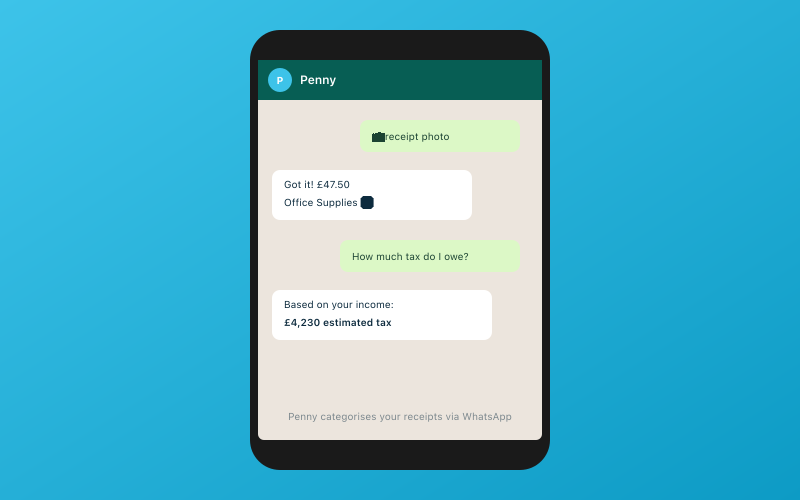 Chat with Penny on WhatsApp — your AI bookkeeper
Comparing them directly is a bit like comparing a finishing tape to a running track. One handles the final step. The other covers the entire journey.
What TaxCalc Does
TaxCalc is a well-respected name in UK tax software. It is used extensively by accountants and tax professionals, and it offers individual licences for people who want to file their own returns. The software covers Self Assessment, Corporation Tax, Partnership Tax, and Trust Tax returns. It connects directly to HMRC for electronic filing and provides detailed calculations, tax planning tools, and compliance checks.
TaxCalc is genuinely good at what it does. Its SA coverage is comprehensive, its calculation engine is thorough, and its compliance checking catches errors before submission. If you are an accountant filing hundreds of returns, TaxCalc is a proven tool.
What Accounted Does
Accounted is a bookkeeping platform that handles the day-to-day financial management of your business — categorising transactions, scanning receipts, tracking income and expenses, managing VAT, and preparing your books for tax filing. Its AI bookkeeper Penny automates most of this work. When tax filing time comes, Accounted uses your year of accurately maintained books to generate and submit your return.
The Fundamental Difference
TaxCalc assumes your books are already done. You arrive at TaxCalc with your income figures, expense totals, capital gains calculations, and rental income summaries already prepared. TaxCalc then helps you put those numbers in the right boxes and submit them to HMRC.
Accounted maintains your books throughout the year and then files the return from those books. There is no separate step where you gather your numbers — they have been building up all year, categorised and verified by AI.
This distinction matters enormously in practice. Many sole traders arrive at January each year with a carrier bag of receipts and a rough idea of what they earned. They then spend days (or pay an accountant to spend hours) reconstructing the year's finances before they can even begin filling in the tax return. TaxCalc does not solve that problem. Accounted does.
Bank Feeds and Receipt Scanning
TaxCalc does not offer bank feeds or receipt scanning. It is not designed to — those are bookkeeping functions, and TaxCalc is a tax filing tool. You need a separate bookkeeping system (even if that system is a spreadsheet) to prepare the data that goes into TaxCalc.
Accounted includes bank feeds from all major UK banks, automatic transaction categorisation via AI, and receipt scanning through WhatsApp. Your financial data flows into the platform continuously, not in a panicked rush before the filing deadline.
Self Assessment Coverage
TaxCalc has excellent SA coverage. As a dedicated tax tool used by professionals, it supports the full range of SA schedules and supplementary pages. This is one of its core strengths.
Accounted supports 11 of 13 SA schedules. For the vast majority of sole traders and landlords, this is comprehensive enough to file directly without needing additional software. The two schedules not covered are highly specialised, and if you need them, a professional tax tool like TaxCalc (or an accountant using one) is the appropriate solution.
MTD Compliance
TaxCalc has been adding MTD capabilities, including support for MTD for Income Tax. As a tax-focused tool, this is a natural extension of its core functionality.
Accounted is fully MTD compliant for both VAT and Income Tax. Because it maintains your books year-round, the quarterly submissions required under MTD ITSA are generated from your existing data. You do not need to do any special preparation — your books are always submission-ready because Penny keeps them up to date.
Pricing
TaxCalc pricing varies by product. Individual licences for Self Assessment start from around £30 to £56 per year (depending on features), with professional practice licences priced higher. This is annual pricing, reflecting its use as a once-a-year filing tool.
Accounted is £14 to £44 per month, which works out to £168 to £528 per year. This is significantly more than TaxCalc alone, but you are comparing a year-round bookkeeping platform with AI automation against a once-a-year filing tool.
The fair comparison is the total cost of bookkeeping plus filing. If you use a spreadsheet for bookkeeping (free but time-consuming) plus TaxCalc for filing, your financial cost is low but your time cost is high. If you use Accounted, your financial cost is higher but your time cost is dramatically lower because Penny handles the bookkeeping throughout the year.
Accountant Tools
TaxCalc offers professional practice management tools, including client management, bulk filing, and practice-wide reporting. These are mature, well-designed tools that many accountancy practices rely on. TaxCalc has been serving accountants for years and understands their workflow well.
Accounted's accountant portal is free and includes practice management features with an exception-first workflow. For bookkeeping review and client management, it is a strong offering. However, for pure tax filing workflow across a large practice, TaxCalc's dedicated tools may be more suitable.
Where TaxCalc Wins
- Tax filing depth: Comprehensive coverage of all SA schedules, Corporation Tax, Trusts, and Partnerships
- Professional pedigree: Trusted by thousands of UK accountants
- Annual cost: Cheaper if you only need a filing tool
- Compliance checking: Thorough error detection before submission
- Complex returns: Better suited for highly complex tax affairs
- Practice management: Mature tools for accountancy practices doing bulk filing
Where Accounted Wins
- Year-round bookkeeping: Keeps your books current every day, not just at year end
- AI automation: Penny handles categorisation, receipts, and tax calculations continuously
- Bank feeds: Automatic transaction import from any UK bank
- WhatsApp receipts: No app, no login — just photograph and send
- MTD quarterly submissions: Books are always ready because they are always up to date
- No year-end panic: Your return is essentially ready to file because your books are maintained throughout the year
- Business owner friendly: Designed for people who are not tax professionals
Can You Use Both?
Some users might consider using Accounted for bookkeeping throughout the year and TaxCalc for the actual filing. This is technically possible, but it introduces unnecessary complexity. Accounted supports 11 of 13 SA schedules and files directly to HMRC, so for most users, there is no need for a separate filing tool.
However, if your tax affairs include the specialised schedules that Accounted does not cover, or if your accountant prefers TaxCalc for filing, using both could make sense. Accounted's data export capabilities ensure your bookkeeping records can feed into TaxCalc without manual re-entry.
Who Should Choose TaxCalc?
If you already have a bookkeeping system you are happy with and you need a powerful, professional-grade tax filing tool — particularly if you are an accountant managing multiple clients — TaxCalc is a proven choice. It does one thing exceptionally well.
Who Should Choose Accounted?
If you want a single platform that handles both your bookkeeping and your tax filing, if you want AI doing the heavy lifting year-round, and if you want to eliminate the annual scramble to get your numbers together, Accounted is the more complete solution.
Start a free trial of Accounted and experience what year-round AI bookkeeping feels like. When January comes around, you will thank yourself for having books that are already done.
Related Reading
- Accounted vs Crunch: AI Software vs Managed Accounting Service
- How to Switch from QuickBooks to Accounted: Step-by-Step
Start your free trial and see how Accounted simplifies your bookkeeping.
Editorial & Research
The Accounted editorial team covers software comparisons, technology, and the tools UK sole traders need to run their businesses efficiently. All software comparisons are based on independent research and publicly available pricing.
Ready to try Accounted?
Join UK sole traders who are simplifying their bookkeeping and tax.
Start your 14-day free trial