Best Bookkeeping Software for Small Businesses in the UK
Bookkeeping is the foundation of everything else in your finances. Get it right and tax returns practically file themselves, cash flow is visible, and your accountant spends their time on advice rather than data entry. Get it wrong and you are paying for a professional to untangle months of miscategorised transactions every year.
For UK small businesses, the choice of bookkeeping software comes down to four core capabilities: bank feeds, transaction categorisation, reconciliation, and receipt capture. Everything else — reporting, tax filing, invoicing — depends on these fundamentals being solid.
This guide compares the main UK options specifically on bookkeeping quality.
Bank Feeds: The Starting Point
Bank feeds automatically import transactions from your bank account into your bookkeeping software. This eliminates manual entry and ensures nothing is missed. Every major platform now offers bank feeds via Open Banking, and connection reliability is broadly similar. Accounted, Xero, QuickBooks, FreeAgent, and Sage all support the major UK banks. This is no longer a differentiator.
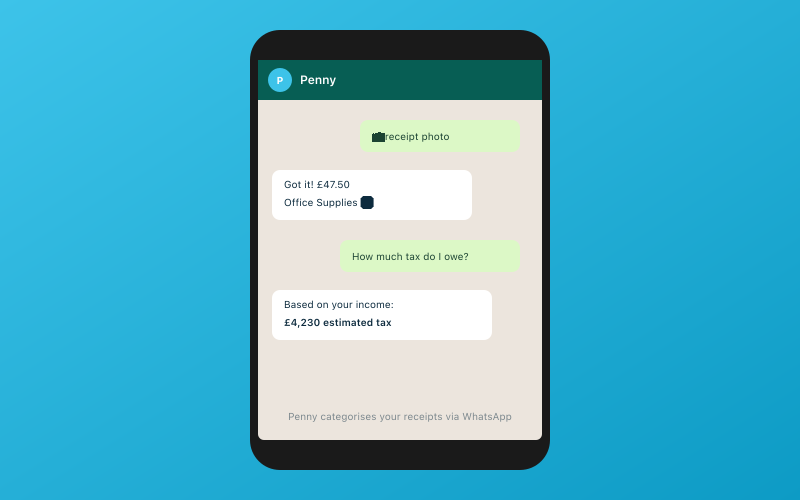 Chat with Penny on WhatsApp — your AI bookkeeper
Transaction Categorisation: Where the Real Differences Are
This is the single most important bookkeeping function and where platforms diverge significantly. Every transaction needs to be assigned to the correct category — office supplies, travel, professional fees, income from client X, and so on. Get the categories wrong and your tax calculations are wrong.
Manual Categorisation (Xero, QuickBooks, Sage)
Xero, QuickBooks, and Sage all use a similar approach. Transactions arrive via bank feeds and sit in a reconciliation queue. You review each transaction, assign a category, and confirm it. Bank rules can automate recurring transactions — if every payment to Shell goes to "Motor Expenses," you can create a rule for that.
This works, but it requires regular attention. If you fall behind, the reconciliation queue grows and catching up becomes a chore. For a business with 100 to 200 transactions per month, expect to spend several hours each month on categorisation if you are doing it yourself.
Xero's bank rules are the most sophisticated. You can create rules based on payee name, amount, reference, or combinations. Once set up, they significantly reduce manual work. But setting them up takes time, and edge cases still require manual intervention.
QuickBooks offers suggested categories based on the payee name, which speeds things up. The suggestions are not always accurate, but they are right often enough to be helpful.
Sage provides basic auto-categorisation but falls behind Xero and QuickBooks in sophistication.
AI Categorisation (Accounted)
Accounted takes a fundamentally different approach. The AI bookkeeper Penny categorises every transaction automatically, learning from your corrections and from patterns across similar businesses. Each categorisation comes with a confidence score — a percentage that tells you how certain the AI is about its choice.
High-confidence categorisations (typically 85% and above) can be accepted without review. Low-confidence items are flagged as exceptions for human review. In practice, this means the majority of transactions are handled automatically, and you spend your time only on the ones that genuinely need attention.
For a business with 200 transactions per month, Penny might categorise 170 with high confidence and flag 30 as exceptions. Compare that to manually reviewing all 200 in Xero or QuickBooks.
The confidence scoring is what makes this practical rather than worrying. If an AI categorised everything and you had no way to know which ones it was unsure about, you would not trust it. The scoring solves that problem.
Semi-Automated (FreeAgent)
FreeAgent sits between manual and AI. It suggests categories based on previous transactions and payee names, and recurring transactions are often handled automatically after the first categorisation. It is less sophisticated than Accounted's AI but more automated than Xero's bank rules.
Reconciliation
Reconciliation is the process of matching your bookkeeping records to your bank statements. It catches errors, identifies missing transactions, and confirms that your books are accurate.
Xero has the most established reconciliation workflow. The bank reconciliation screen shows unreconciled items clearly, and bulk reconciliation on higher plans speeds things up.
QuickBooks handles reconciliation competently with a similar approach.
FreeAgent auto-reconciles many transactions when bank feeds and manual entries match, reducing the manual work.
Accounted approaches reconciliation differently. Because Penny categorises transactions from bank feeds directly, many items are reconciled automatically. The exception-first workflow means your accountant reviews only the items that need attention.
Sage provides standard reconciliation tools that work but lack the refinements of newer platforms.
Receipt Capture: The Forgotten Essential
HMRC requires you to keep receipts for business expenses. In practice, receipts get lost, crumpled, faded, or forgotten. Good receipt capture built into your bookkeeping software solves this.
Accounted — WhatsApp Receipt Scanning
Accounted's approach is unique. You photograph a receipt and send it to Penny via WhatsApp. The OCR extracts the details — date, amount, vendor, VAT — and matches it to the corresponding bank transaction. No app download, no login, no separate interface. You use the messaging app you already have on your phone.
This matters because the friction of opening a separate app is enough to stop many people from capturing receipts consistently. WhatsApp is already open. The barrier is almost zero.
Dext (Third-Party, Works with Xero/QuickBooks/Sage)
Dext (formerly Receipt Bank) is the industry standard for receipt processing. You photograph receipts in the Dext app, or forward email receipts, and Dext extracts the data and pushes it to your accounting software. The OCR is excellent and the extraction accuracy is high.
The downside is cost (from around £25/month) and the fact that it is a separate subscription and a separate app. For practices managing many clients, the cost adds up.
Xero Capture
Xero's built-in receipt scanning lets you photograph receipts in the Xero mobile app. The OCR extracts basic details and matches to bank transactions. It works but is less accurate than Dext and does not extract line-level detail.
QuickBooks Receipt Capture
QuickBooks' mobile app includes receipt capture that works similarly to Xero Capture. Photograph the receipt, and QuickBooks extracts the data and suggests a match. Accuracy is reasonable for clear receipts.
FreeAgent Receipt Capture
FreeAgent allows receipt upload through the mobile app. OCR extraction is basic compared to Dext or Accounted, but it captures the essential information.
The Hidden Cost of Manual Bookkeeping
The price difference between platforms matters less than the time difference. If you spend four hours per month on manual categorisation in Xero (at a fairly conservative estimate for a business with 150+ transactions), that is 48 hours per year. Value your time at even £20 per hour and that is £960 per year in hidden bookkeeping cost — far more than the difference in software subscriptions.
If you pay your accountant to do the categorisation, the cost is even higher. Most accountants charge between £40 and £100 per hour, so 48 hours of bookkeeping work costs between £1,920 and £4,800 annually.
AI categorisation does not eliminate the need for human review, but reducing it from 200 transactions per month to 30 exceptions per month is a significant saving.
What About Accuracy?
The reasonable concern with AI categorisation is accuracy. If the AI gets it wrong, your tax calculations are wrong. This is a legitimate worry, and it is why confidence scoring matters.
Accounted publishes the confidence level for every categorisation. Your accountant (or you) can set a threshold — accept everything above 90% confidence automatically, review everything below. As Penny learns from corrections, the confidence levels improve and the number of exceptions decreases over time.
No system is perfect. Manual categorisation by busy business owners also produces errors — often more than AI, because humans make inconsistent decisions when tired or rushing. The question is not whether errors occur but whether they are caught. Confidence scoring and exception-based review catch them systematically.
Our Recommendation
For bookkeeping specifically, the choice comes down to how you want to spend your time. If you enjoy the process of reviewing and categorising transactions, Xero gives you the most control with the best bank rules. If you want someone else's app to handle receipt processing, Dext plus Xero or QuickBooks is a proven combination.
If you want AI to handle the routine categorisation so you can focus on running your business, Accounted's approach is the most advanced available. WhatsApp receipt scanning removes the friction that stops most people from capturing receipts consistently, and the confidence scoring means you do not have to trust the AI blindly.
Start Your Free Trial
Try Accounted free and see how Penny handles your bookkeeping. Connect your bank, send a few receipts via WhatsApp, and see the difference between reviewing 30 exceptions and manually processing 200 transactions. Your accountant can join through the free portal and see the exception-first workflow in action. Visit accounted.io to get started.
Further Reading
- Accounted is built to comply with Making Tax Digital requirements.
- Good bookkeeping software helps you meet HMRC record-keeping requirements.
Related Reading
- Best Accounting Software for Accountancy Practices in 2026
- Accounted vs GoSimpleTax: AI Bookkeeping + Tax Filing vs Tax Filing Only
Start your free trial and see how Accounted simplifies your bookkeeping.
Editorial & Research
The Accounted editorial team covers software comparisons, technology, and the tools UK sole traders need to run their businesses efficiently. All software comparisons are based on independent research and publicly available pricing.
Ready to try Accounted?
Join UK sole traders who are simplifying their bookkeeping and tax.
Start your 14-day free trial