Best Receipt Scanning Apps for UK Businesses in 2026
Every business owner knows they should keep receipts. HMRC requires it, your accountant asks for them, and without them your expense claims are on shaky ground if you are ever investigated. Yet the reality is that most receipts end up lost, faded, or stuffed in a drawer. The gap between knowing you should capture receipts and actually doing it consistently is where receipt scanning apps earn their value.
The technology behind receipt scanning has improved dramatically. OCR (optical character recognition) can now extract dates, amounts, VAT, vendor names, and even line items from a photograph of a receipt. The question is no longer whether the technology works, but which approach fits best into how you actually live and work.
What Good Receipt Scanning Looks Like
Good receipt scanning should capture quickly (minimal steps), extract accurately (date, amount, VAT, vendor), match to bank transactions automatically, store securely for HMRC compliance, and integrate with your bookkeeping without re-entry.
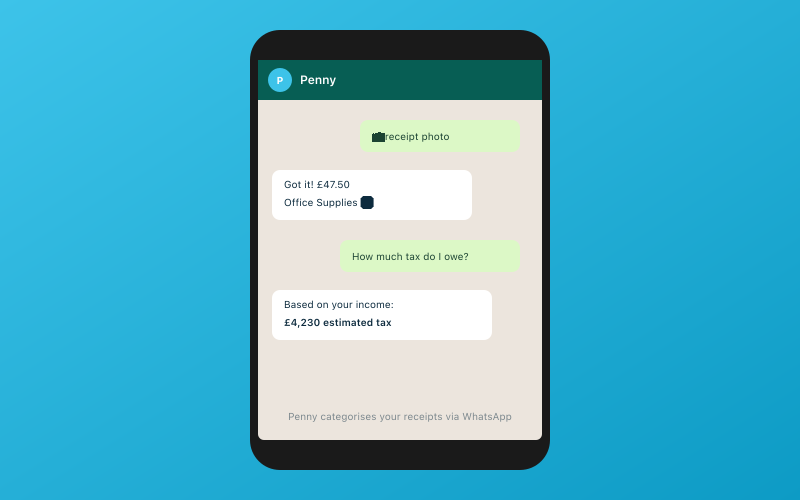 Chat with Penny on WhatsApp — your AI bookkeeper
Accounted (WhatsApp Receipt Scanning)
Included in all plans from £14/month
Accounted's approach to receipt scanning is fundamentally different from every other option on this list. Instead of a dedicated app, you send receipt photos to the AI bookkeeper Penny via WhatsApp. That is it. Photograph the receipt with your phone camera, open WhatsApp, send it to Penny, and the OCR extracts the details and matches it to your bank transaction.
This sounds like a minor difference but it changes behaviour significantly. Opening a dedicated app requires remembering it exists, having it installed, and being logged in. WhatsApp is already on your phone, probably already open.
Penny extracts the date, total, VAT amount, vendor name, and payment method, then matches the receipt to the corresponding bank transaction and categorises the expense. VAT extraction is particularly important for UK businesses — Accounted correctly identifies the VAT treatment from the receipt data.
Strengths: Zero friction — uses an app you already have. No separate download or login. Included in all pricing plans. Automatic matching to bank transactions. VAT extraction. AI categorisation of the expense. Limitations: Requires WhatsApp (though nearly everyone in the UK has it). The receipt photo quality depends on your phone camera and lighting.
Dext (formerly Receipt Bank)
From approximately £25/month
Dext is the industry standard for receipt processing, used by thousands of accountancy practices across the UK. The dedicated app lets you photograph receipts, and you can also email receipts directly to your Dext inbox. The OCR is consistently accurate, and it extracts line-level detail that simpler tools miss.
The accountant workflow is where Dext really shines. Practices can set up processing rules, approval workflows, and automatic publishing to Xero, QuickBooks, or Sage. Dext also handles supplier invoices — forward PDF invoices and it creates draft bills in your accounting software.
Strengths: Best-in-class OCR accuracy. Excellent accountant workflow. Email forwarding for digital receipts. Supplier invoice processing. Integrates with Xero, QuickBooks, and Sage. Line-level data extraction. Limitations: Separate subscription cost on top of your accounting software. Requires downloading and using a dedicated app. The combined cost of Dext plus Xero can be significant for a small business.
AutoEntry (by Sage)
From approximately £12/month
AutoEntry, now owned by Sage, provides similar functionality to Dext at a lower price point. OCR accuracy is good, though not quite at Dext's level for difficult receipts. Integration with Sage is seamless, and it also connects to Xero and QuickBooks.
Strengths: Lower price than Dext. Good OCR accuracy. Sage integration. Email forwarding. Reasonable accountant tools. Limitations: Credit-based pricing can be confusing. OCR slightly less accurate than Dext on difficult receipts. The app is functional but not as polished as Dext.
Xero Capture
Included with Xero subscriptions
Xero Capture is built into the Xero mobile app. If you already pay for Xero, receipt capture is included at no extra cost. It handles basics adequately for low volumes, but accuracy is notably behind Dext and Accounted. VAT extraction is less reliable and matching sometimes requires manual intervention.
Strengths: Included with Xero at no extra cost. No separate app if you already use Xero mobile. Adequate for low volumes. Limitations: OCR accuracy behind dedicated tools. VAT extraction unreliable. No email forwarding. Basic matching. Not suitable for high-volume expense processing.
QuickBooks Receipt Capture
Included with QuickBooks subscriptions
QuickBooks' mobile app includes receipt capture with a polished experience. OCR accuracy has improved noticeably, handling clear receipts well, though difficult receipts still trip it up.
Strengths: Included with QuickBooks. Good mobile app experience. Improving accuracy. Quick capture process. Limitations: Struggles with poor quality receipts. No email forwarding built in. Limited accountant review workflow. VAT extraction could be better.
FreeAgent Receipt Capture
Included with FreeAgent
FreeAgent allows receipt uploads through its mobile app with basic OCR extraction. It works for low volumes but feels less refined than dedicated tools.
Strengths: Included with FreeAgent. Adequate for basic needs. Simple workflow. Limitations: Basic OCR compared to dedicated tools. Limited extraction capability. No matching suggestions. Manual linking to transactions.
The Friction Problem
The fundamental challenge with receipt scanning is not technology — it is human behaviour. Any system that requires extra steps, extra apps, or extra effort will see declining usage over time. You start enthusiastically in January, taper off by March, and by November you are back to the drawer of crumpled paper.
This is why the method of capture matters as much as the accuracy of extraction. Dext's email forwarding partially solves this for digital receipts — forwarding an email is quick and fits into existing behaviour. Accounted's WhatsApp approach solves it for paper receipts — sending a photo via WhatsApp is something you already do without thinking.
The best receipt scanning tool is the one you will actually use consistently for twelve months. If you are the kind of person who maintains a well-organised system of apps, Dext is excellent. If you are the kind of person who has 47 unread notifications on apps you forgot you installed, WhatsApp-based scanning removes the friction that causes systems to fail.
Cost Comparison
| Tool | Monthly Cost | Requires Separate App | Email Forwarding | Bank Matching | VAT Extraction | |---|---|---|---|---|---| | Accounted | From £14 (included) | No (WhatsApp) | No | Automatic | Yes | | Dext | From £25 (standalone) | Yes | Yes | Via integration | Yes | | AutoEntry | From £12 (standalone) | Yes | Yes | Via integration | Yes | | Xero Capture | Included with Xero | No (in Xero app) | No | Basic | Basic | | QuickBooks | Included with QB | No (in QB app) | No | Basic | Basic | | FreeAgent | Included with FA | No (in FA app) | No | Manual | Basic |
For Accountants Managing Client Receipts
If you are an accountant evaluating receipt scanning for your practice, the decision is slightly different. Dext's practice tools are the most mature — client-by-client dashboards, processing rules, approval workflows, and reliable publishing to accounting software. For practices already using Dext, it works and switching has real costs.
However, Accounted's approach eliminates a common pain point: clients not capturing receipts at all. If your clients are already on Accounted, the WhatsApp receipt scanning means they are far more likely to capture receipts consistently, because it requires no effort beyond what they already do daily. The receipts flow into the books automatically, and you review them through the exception-first workflow.
Our Recommendation
If you are already paying for Dext and it works for your practice or business, there is no pressing reason to switch. It is excellent at what it does.
If you are paying for Dext on top of your accounting software and the combined cost feels excessive for a small business, Accounted replaces both. You get bookkeeping software with receipt scanning included, starting at £14 per month for everything.
If your main problem is actually capturing receipts consistently rather than processing them accurately, Accounted's WhatsApp approach solves the behaviour problem that other tools cannot.
Try It Free
Send your first receipt to Penny via WhatsApp and see how quickly it is processed, matched, and categorised. Accounted's free trial lets you test the full receipt scanning workflow without commitment. No app to download, no card required. Start at accounted.io.
Further Reading
- Accounted is built to comply with Making Tax Digital requirements.
- Good bookkeeping software helps you meet HMRC record-keeping requirements.
Related Reading
- Best Accounting Software for Contractors and Freelancers
- Accounted vs QuickBooks: Which is Better for UK Sole Traders?
Start your free trial and see how Accounted simplifies your bookkeeping.
Editorial & Research
The Accounted editorial team covers software comparisons, technology, and the tools UK sole traders need to run their businesses efficiently. All software comparisons are based on independent research and publicly available pricing.
Ready to try Accounted?
Join UK sole traders who are simplifying their bookkeeping and tax.
Start your 14-day free trial