How to Register as Self-Employed With HMRC (Step by Step)
So you've decided to go self-employed. Congratulations — it's an exciting step, whether you're launching a brand-new business, picking up freelance work, or turning a side hustle into something more serious. But before you get too far into the fun stuff, there's one essential task you need to tick off: registering with HMRC.
The good news is that registering as self-employed is straightforward and completely free. The process takes about ten to fifteen minutes online, and once it's done, you're officially on HMRC's radar and ready to start trading properly.
In this guide, we'll walk you through the entire process step by step, explain what happens after you register, and cover the most common questions people ask along the way.
Do You Actually Need to Register?
Before we get into the how, let's cover the when. You need to register with HMRC as self-employed if you've earned — or expect to earn — more than £1,000 in a tax year from self-employment. This is known as the trading allowance.
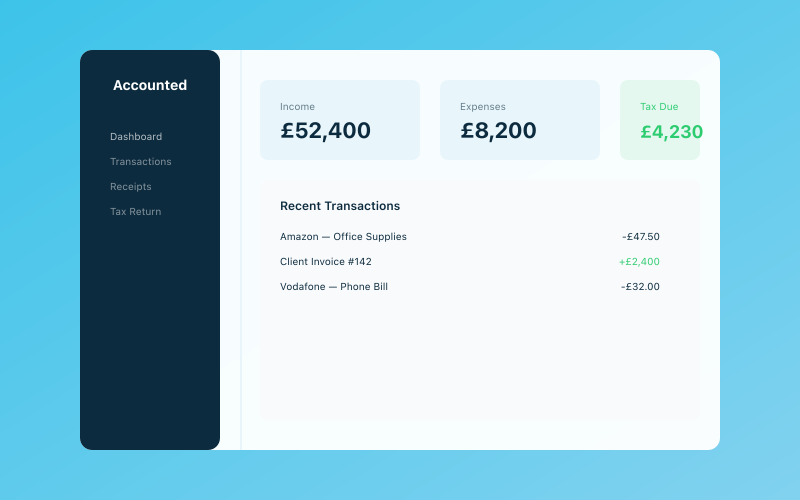 Your Accounted dashboard — income, expenses, and tax at a glance
If your self-employed income stays below £1,000 in a tax year, you don't technically need to register or pay tax on it. But if there's any chance you'll go over that threshold, it's best to register sooner rather than later.
You should register by 5 October following the end of the tax year in which you started trading. So if you started self-employed work in June 2025 (during the 2025/26 tax year, which runs from 6 April 2025 to 5 April 2026), you'd need to register by 5 October 2026 at the latest.
That said, there's no penalty for registering early, and most people find it easier to get it done as soon as they start working for themselves. It avoids the risk of forgetting and gives you time to get your record keeping sorted before your first tax return is due.
Step 1: Create a Government Gateway Account
Everything starts with a Government Gateway account. This is HMRC's online portal, and you'll use it for almost all your tax-related admin going forward.
If you don't already have one, head to the Government Gateway sign-in page and choose "Create sign in details." You'll need:
- Your name
- Your email address
- A UK mobile phone number (for verification codes)
Once you've set up your account, you'll be given a User ID. Keep this safe — you'll need it every time you log in. It's also worth saving it in a password manager, because HMRC User IDs aren't the easiest things to remember.
If you already have a Government Gateway account (for example, from filing a tax return as an employee), you can use the same one. You'll just add the self-employment service to your existing account.
Step 2: Register for Self Assessment
Once you've got your Government Gateway account sorted, the next step is to register for Self Assessment. This tells HMRC that you're self-employed and will be filing a tax return.
Go to the register for Self Assessment page on GOV.UK and follow the prompts. You'll need to provide:
- Your full name and date of birth
- Your National Insurance number — you can find this on old payslips, your P60, or letters from HMRC. If you can't find it, you can request it from HMRC, but this can take a couple of weeks.
- Your address
- Your business start date — this is the date you started (or plan to start) trading, not necessarily the date you're registering
- The nature of your business — a brief description of what you do, like "freelance web design" or "self-employed plumber"
- Your business name — if you're trading under your own name, just put your name. If you've got a trading name, enter that instead.
- Your business address — for most sole traders, this is your home address
- Your business phone number
The form is reasonably straightforward, but take your time and make sure everything is accurate. Mistakes can cause delays later on.
Step 3: Wait for Your UTR Number
After you've submitted your registration, HMRC will send you a Unique Taxpayer Reference (UTR) number. This is a 10-digit number that identifies you for tax purposes. You'll need it when you file your Self Assessment return and for various other dealings with HMRC.
Your UTR will arrive by post — yes, actual physical post — usually within ten working days of registering, though it can sometimes take a bit longer. If you haven't received it after three weeks, contact HMRC to chase it up.
Once your UTR arrives, keep it somewhere safe and easily accessible. You'll use it regularly. Some people save it in their phone contacts or in a secure note in their password manager.
It's worth noting that your UTR stays with you for life, even if you stop being self-employed and then start again later. If you were previously self-employed, check whether you already have one before registering again.
Step 4: Set Up Your Online Tax Account
Once you've got your UTR, you can activate your Self Assessment service through your Government Gateway account. HMRC will send you an activation code (again, by post), which you enter online to link everything together.
After activation, you'll be able to:
- File your Self Assessment tax return online
- View your tax statements and payment history
- Set up payments on account
- Manage your personal tax details
It's a good idea to explore your account once it's set up, just to familiarise yourself with where everything is. You won't need to file your first return for a while, but knowing your way around the system in advance makes life easier when deadline day comes.
Step 5: Get Your Record Keeping in Order
Now that you're officially registered, it's time to start keeping proper records. HMRC requires you to track all your business income and expenses, and you need to keep these records for at least five years after the 31 January filing deadline for the relevant tax year.
At a minimum, you should record:
- All income — every payment you receive for your work, including invoices, cash payments, and bank transfers
- All business expenses — everything you spend to run your business, from equipment and software to travel and phone bills
- Receipts and invoices — both for money coming in and money going out
You can keep paper records if you want, but digital record keeping is strongly recommended — and with Making Tax Digital for Income Tax on the horizon, it will eventually become mandatory for most self-employed people.
This is where Accounted comes in handy. By connecting your bank account, Penny (the AI assistant built into Accounted) can automatically categorise your transactions, flag potential expenses you might have missed, and keep everything organised for when tax return time rolls around. It takes the headache out of bookkeeping and means you're always ready if HMRC comes knocking.
Step 6: Understand Your Tax Obligations
Being registered is one thing; understanding what you actually owe is another. Here's a quick overview of your main tax obligations as a self-employed person:
Income Tax — You pay Income Tax on your business profits (income minus allowable expenses). The rates for 2025/26 are:
- 0% on the first £12,570 (your Personal Allowance)
- 20% on profits between £12,570 and £50,270
- 40% on profits between £50,270 and £125,140
- 45% on anything above £125,140
National Insurance — You pay two types:
- Class 2 NICs — a flat weekly amount (currently £3.45 per week for 2025/26, though this may change)
- Class 4 NICs — a percentage of your profits above a certain threshold
Payments on account — If your tax bill is over £1,000, HMRC may ask you to make advance payments towards next year's bill. These are due on 31 January and 31 July each year. It catches a lot of people off guard the first time, so it's worth planning for. Read more in our guide on what payments on account are and how they work.
VAT — If your turnover exceeds the VAT threshold (currently £90,000 for 2025/26), you must register for VAT. Below that, it's optional.
Common Questions
Can I register as self-employed if I'm also employed? Absolutely. Many people are employed and self-employed at the same time. You'll pay tax through PAYE on your employment income and file a Self Assessment return for your self-employed income. HMRC will work out the total.
What if I've already been trading without registering? Register as soon as possible. HMRC may charge a late registration penalty, but the sooner you sort it out, the smaller any penalty is likely to be. Being upfront and proactive generally works in your favour.
Do I need to register a business name? Not if you're a sole trader trading under your own name. If you use a different trading name, you don't need to register it anywhere, but you must include your real name and trading name on all business correspondence and invoices.
Can I register by phone or post? You can, though online is by far the quickest method. If you can't register online for any reason, call HMRC's Self Assessment helpline on 0300 200 3310.
What about a business bank account? It's not legally required for sole traders, but it's highly recommended. Keeping your business and personal finances separate makes bookkeeping much easier and gives you a clearer picture of how your business is doing. Have a look at our guide on whether you need a business bank account for more detail.
What Happens Next?
Once you're registered and set up, the key milestones to keep in mind are:
- 5 April — end of the tax year
- 31 July — second payment on account due (if applicable)
- 5 October — deadline to register for Self Assessment (for new registrations)
- 31 October — deadline for paper tax returns
- 31 January — deadline for online tax returns and first payment on account
Mark these dates in your calendar and don't leave your tax return to the last minute. Filing early gives you time to plan for your tax bill and avoids the stress (and potential penalties) of missing the deadline.
Getting registered is just the first step, but it's an important one. Once it's done, you can focus on what really matters — building your business and doing great work.
Related Reading
View our pricing and start your free 30-day trial today.
Accounted helps UK sole traders stay on top of their bookkeeping and tax. Start your free 30-day trial at getaccounted.co.uk
Starting out? Accounted is built for UK sole traders from day one — from £14/month. Get started →
Business & Operations Advisors
Our business advisors cover the practical side of running a UK sole trader business — from HMRC registration to managing growth. Content is written for real business owners in plain English, not accountants.
Ready to try Accounted?
Join UK sole traders who are simplifying their bookkeeping and tax.
Start your 14-day free trial