What Is MTD and Do I Need to Worry About It? (The Simplest Guide)
MTD in One Paragraph
Making Tax Digital (MTD) is HMRC's plan to move the UK tax system online. Instead of filing one annual tax return, you'll need to use compatible software to keep digital records and send quarterly updates to HMRC. It's being rolled out gradually, and depending on how much you earn, it might already affect you — or it's coming soon.
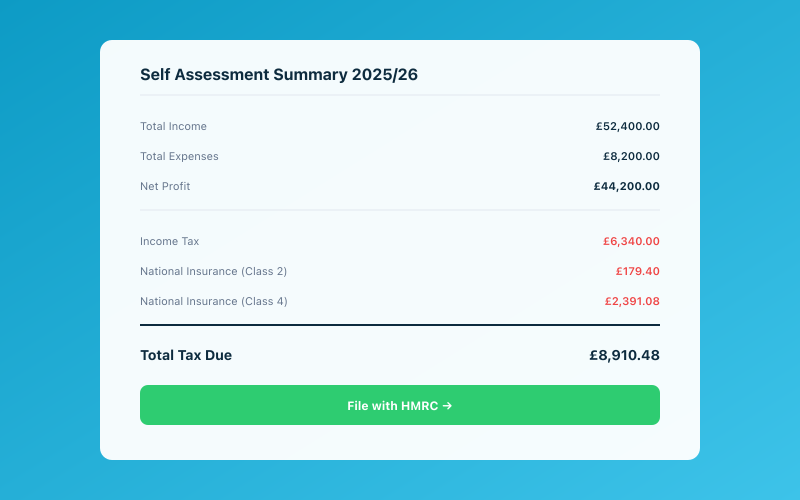 Your Accounted dashboard shows your real-time tax position
That's the summary. Now let's break it down properly, in plain English, with no jargon.
What Is Making Tax Digital, Really?
Think of MTD as HMRC's way of modernising how tax works. Right now, most self-employed people keep their records throughout the year (some better than others), then file a single Self Assessment tax return after the tax year ends — often in January, often in a rush.
MTD changes this in two main ways:
-
Digital records — You must keep your business records using compatible software. A shoebox of receipts and a handwritten notebook won't cut it anymore. Spreadsheets might work, but only if they connect digitally to HMRC.
-
Quarterly updates — Instead of one annual return, you'll send HMRC a summary of your income and expenses every quarter. Think of it as a quick check-in every three months, with a final declaration at the end of the year.
The idea is that HMRC gets a more accurate, real-time picture of what people earn, and taxpayers get fewer surprises when their bill arrives because they've been tracking things throughout the year.
Does MTD Affect Me?
This is the question everyone asks first. Here's the timeline:
From April 2026
MTD for Income Tax becomes mandatory if:
- You're self-employed (sole trader) or a landlord
- Your gross income is over £50,000 per year
"Gross income" means your total income before expenses — not your profit. So if you earn £55,000 but spend £20,000 on business expenses (leaving £35,000 profit), you're still above the threshold because your gross income is £55,000.
From April 2027
The threshold drops to £30,000 gross income. This brings in a much larger group of self-employed people and landlords.
Below £30,000?
If your gross income is under £30,000, MTD for Income Tax doesn't currently apply to you. HMRC has discussed lowering the threshold further in the future, but nothing is confirmed yet. You'll still file Self Assessment as normal for now.
Already in MTD for VAT?
If you're VAT-registered, you've likely been using MTD for VAT since 2019 (for businesses above the £90,000 VAT threshold) or since 2022 (for all VAT-registered businesses). MTD for Income Tax is a separate thing — you may need to comply with both.
What Do I Actually Need to Do?
If MTD applies to you, here's what's required:
1. Use Compatible Software
You need software that HMRC has recognised as MTD-compatible. This software must be able to:
- Store your digital records
- Submit quarterly updates to HMRC
- File your end-of-period statement and final declaration
You can't just email HMRC a spreadsheet. The software needs to communicate directly with HMRC's systems through their API.
2. Keep Digital Records
Your income and expenses must be recorded digitally. For each transaction, you'll typically need to record:
- The date
- The amount
- The category (what the income or expense is for)
If you're already using accounting software or an app like Accounted, you're likely keeping digital records already. If you're using paper records or a basic spreadsheet, you'll need to move to something compatible.
3. Send Quarterly Updates
Every three months, your software will send HMRC a summary of your income and expenses for that quarter. The quarters align with the tax year:
- Quarter 1: 6 April – 5 July (due by 7 August)
- Quarter 2: 6 July – 5 October (due by 7 November)
- Quarter 3: 6 October – 5 January (due by 7 February)
- Quarter 4: 6 January – 5 April (due by 7 May)
These aren't full tax returns. They're summaries — total income and total expenses for the quarter. Your software handles the formatting and submission.
4. File a Final Declaration
After the tax year ends, you'll submit a final declaration. This replaces the current Self Assessment tax return and includes your full-year figures, any adjustments, and your tax calculation.
What Happens If I Don't Comply?
HMRC has introduced a new points-based penalty system for MTD. Here's how it works:
-
Late submissions: Each time you miss a quarterly deadline, you get a penalty point. Once you accumulate a certain number of points (typically 4 for quarterly obligations), you receive a £200 penalty. After that, each additional late submission triggers another £200 penalty.
-
Late payments: If you pay your tax late, you'll face percentage-based penalties. After 15 days late, it's 2% of the outstanding amount. After 30 days, another 2%. After 31 days, 4% per year on the remaining balance.
The points system is designed to be forgiving of the occasional slip-up. One late submission won't cost you anything beyond a point. But a pattern of late submissions adds up quickly.
How to Get Ready Now
Even if MTD doesn't affect you yet, getting prepared early makes life much easier. Here's a simple action plan:
Step 1: Work Out If You're Affected
Check your gross income for the current tax year. If it's over £50,000, you're in the April 2026 group. If it's over £30,000, you're in the April 2027 group. If you're not sure, check your last Self Assessment tax return — your total income figure is what matters.
Step 2: Choose Compatible Software
Pick software that's HMRC-recognised for MTD for Income Tax. The key things to look for:
- HMRC compatibility (this is non-negotiable)
- Ease of use (you'll be using it regularly)
- Receipt capture (you need to keep evidence of expenses)
- Quarterly submission capability
Accounted is built specifically around MTD compliance. Penny, the AI bookkeeper, keeps your records digitally, categorises transactions, and handles your quarterly submissions — all through WhatsApp. You don't need to learn any software or understand accounting.
Step 3: Start Keeping Digital Records Now
Don't wait until the deadline to go digital. Start recording your income and expenses in your chosen software now. This way, when MTD kicks in, you've already got the habit and the records.
Step 4: Get Into the Quarterly Rhythm
Even before MTD is mandatory for you, try doing a quarterly review of your finances. Total up your income and expenses every three months. This gets you used to the rhythm and helps you spot any issues early.
The Easiest Way to Comply
Let's be honest: for many self-employed people, MTD feels like extra admin on top of an already busy life. The thought of quarterly submissions on top of everything else is exhausting.
The good news is that with the right tool, MTD doesn't have to be a burden. The key is choosing software that does most of the work for you.
With Accounted, for example, you just keep doing what you're already doing — photographing receipts, noting expenses, sending invoices. Penny handles the categorisation, record-keeping, and submissions. When it's time for a quarterly update, everything is already in order.
The worst approach is to ignore MTD until the deadline and then scramble. The best approach is to set up something simple now and let it run in the background.
Common MTD Myths Debunked
"MTD means I'll pay more tax"
No. MTD doesn't change how much tax you owe. It changes how you report it. Your tax bill is based on your income and expenses, regardless of whether you report annually or quarterly.
"I'll need an accountant"
Not necessarily. MTD-compatible software can handle the submissions for you. An accountant is always helpful for tax planning and advice, but MTD compliance itself can be managed with the right software.
"Quarterly updates are like filing four tax returns"
They're not. A quarterly update is a simple summary of income and expenses — not a full tax return. It takes minutes, not hours, especially if your software is keeping records as you go.
"I can just use a spreadsheet"
Technically, a spreadsheet can work, but only if it connects to HMRC through compatible bridging software. A standalone Excel file won't meet the requirements. In practice, using proper MTD software is much easier than trying to make spreadsheets work.
"MTD is only for VAT"
MTD for VAT has been around since 2019, but MTD for Income Tax is a separate programme now being rolled out. If you're self-employed, you may need to comply with MTD for Income Tax even if you're not VAT-registered.
"I can opt out if I don't want to do it"
If your income is above the threshold, MTD is mandatory. There's no opt-out. You can apply for an exemption if you have a genuine reason (such as a disability, age, or religious objection to using computers), but these are granted on a case-by-case basis.
A Quick Summary
| Question | Answer | |----------|--------| | What is MTD? | HMRC's system for digital tax records and quarterly reporting | | Who does it affect? | Self-employed people and landlords above income thresholds | | When does it start? | April 2026 (over £50k) and April 2027 (over £30k) | | What do I need? | MTD-compatible software | | How often do I report? | Every quarter, plus a final year-end declaration | | Will I pay more tax? | No — same tax, different reporting | | What's the penalty? | Points-based system leading to £200 fines |
Don't Panic
MTD sounds like a big change, and in some ways it is. But the actual day-to-day impact on your life can be minimal if you set things up properly. Choose good software, keep your records as you go, and the quarterly submissions take care of themselves.
The people who will struggle with MTD are those who leave everything to the last minute. The people who will barely notice it are those who get their systems set up early.
If you're looking for the easiest possible path to MTD compliance, Accounted is designed to make it painless. But whatever tool you choose, the best time to get ready is now.
Related Reading
See how Accounted handles MTD and start your free trial.
Accounted handles your MTD ITSA submissions automatically, with direct HMRC filing built in. See how MTD works in Accounted →
Tax & Compliance Specialists
Our tax specialists have decades of combined experience in UK sole trader and small business taxation, MTD compliance, and HMRC submissions. All content is reviewed against current HMRC guidance before publication and updated quarterly to reflect legislative changes.
Ready to try Accounted?
Join UK sole traders who are simplifying their bookkeeping and tax.
Start your 14-day free trial