What is Making Tax Digital for Income Tax? A Simple Explanation
Making Tax Digital for Income Tax — often shortened to MTD for ITSA or just MTD for Income Tax — is one of the biggest changes to how self-employed people and landlords report their income to HMRC. Despite this, many people who are directly affected still have no clear idea what it actually means for them.
This post explains MTD for Income Tax in plain English. No jargon, no acronym soup, no unnecessary complexity.
What Is It?
Making Tax Digital for Income Tax changes how you report your self-employed or rental income to HMRC. Instead of filing one Self Assessment tax return at the end of the year, you will need to:
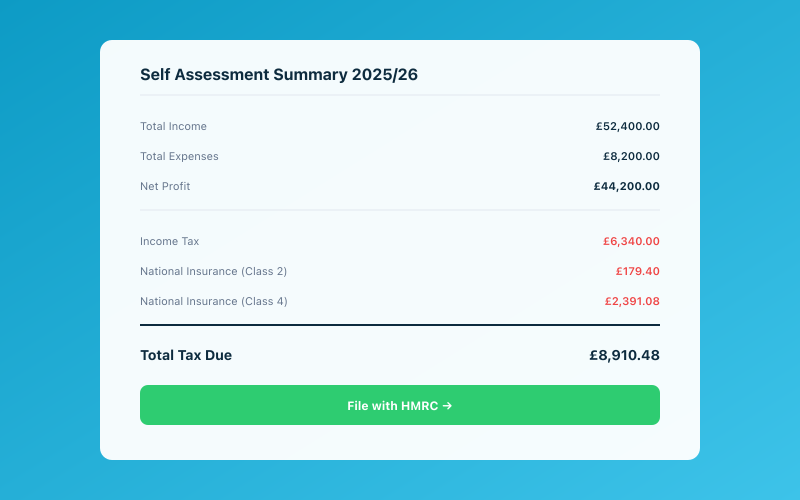 Your Accounted dashboard shows your real-time tax position
- Keep your financial records digitally using compatible software
- Send HMRC a summary of your income and expenses every quarter
- Submit a final declaration at the end of the tax year (this replaces part of the traditional Self Assessment return)
That is the core of it. The annual tax return does not disappear entirely, but a significant chunk of the process shifts to quarterly updates throughout the year.
Who Does It Affect?
MTD for Income Tax applies to individuals with qualifying income above certain thresholds. Qualifying income means self-employment income and/or rental income (before expenses).
The rollout is happening in phases:
- From April 2026: Individuals with qualifying income above £50,000 per year
- From April 2027: Individuals with qualifying income above £30,000 per year
- Below £30,000: The government has indicated that further mandation below £30,000 will be considered in the future, but no firm date has been set
If your self-employment or rental income (gross, before expenses) is above the relevant threshold, MTD for Income Tax applies to you.
Note that the threshold is based on gross income, not profit. If you are a sole trader who turns over £55,000 but only makes £25,000 profit after expenses, you are still caught by the £50,000 threshold.
What Do You Actually Have to Do?
Three things.
1. Use Compatible Software
You need to keep your records using software that HMRC recognises as MTD compatible. A spreadsheet on its own no longer qualifies. The software needs to be able to communicate with HMRC's systems to send your quarterly updates and final declaration.
Accounted is fully MTD compliant for Income Tax, so if you use Accounted for your bookkeeping, this requirement is automatically met.
2. Send Quarterly Updates
Four times a year, your software sends HMRC a summary of your business income and expenses for that quarter. The quarters follow the tax year:
- Quarter 1: 6 April to 5 July — deadline 7 August
- Quarter 2: 6 July to 5 October — deadline 7 November
- Quarter 3: 6 October to 5 January — deadline 7 February
- Quarter 4: 6 January to 5 April — deadline 7 May
These are not tax returns. They are summaries — total income and total expenses split into categories. HMRC uses them to build a picture of your tax position throughout the year rather than waiting until January to find out what you owe.
3. Submit a Final Declaration
After the tax year ends, you submit a final declaration. This confirms your total income and expenses for the year, includes any adjustments, and calculates your tax liability. It replaces the self-employment and property pages of the traditional Self Assessment return.
The deadline for the final declaration is 31 January following the end of the tax year — the same deadline as the current Self Assessment.
What Does It Not Change?
MTD for Income Tax does not change:
- How much tax you pay. Your tax liability is calculated the same way. You are not paying more or less because of MTD.
- When you pay. Payment deadlines remain the same — 31 January and 31 July for payments on account.
- Other parts of Self Assessment. If you have income that is not from self-employment or property (dividends, capital gains, foreign income, etc.), those parts of your Self Assessment continue as before.
What Software Do You Need?
You need software that is on HMRC's list of MTD-compatible products. The software must be able to:
- Store your digital records
- Send quarterly updates to HMRC via their API
- Submit your final declaration
Accounted handles all of this. Penny, Accounted's AI bookkeeper, categorises your transactions throughout the quarter, and when the submission deadline approaches, the quarterly update is ready to send with minimal effort on your part.
Will It Make Things Harder?
The honest answer is: it depends on what you are doing now.
If you currently keep your records in a spreadsheet and file your Self Assessment once a year in January, then yes, there is more to do. You need to move to compatible software and submit updates four times a year instead of once.
But if you are already using cloud accounting software and keeping your records up to date throughout the year, MTD for Income Tax adds very little extra work. The quarterly submissions are generated from data you have already entered. It is a button press, not a new task.
For people who currently leave everything until January and then scramble to find receipts and work out their figures, MTD might actually be an improvement. Keeping on top of things quarterly means no more year-end panic.
What Happens If You Do Not Comply?
HMRC has introduced a points-based penalty system for MTD. Each late quarterly submission earns you a penalty point. Once you accumulate enough points (typically four), you receive a financial penalty. Points expire after a period of compliance.
There are also penalties for late payment of tax, though these apply to all taxpayers and are not specific to MTD.
The best way to avoid penalties is straightforward: use compatible software, keep your records up to date, and submit on time. With software like Accounted handling the heavy lifting, this is genuinely not difficult.
Get Ready Now
Even if MTD for Income Tax does not apply to you until April 2027 (or later), there is no downside to getting set up early. Moving to compatible software now means you are practising the new way of working before it becomes mandatory.
Start your free trial of Accounted, connect your bank, and let Penny manage your bookkeeping. When your MTD start date arrives, you will already be ready — and you will wonder what all the fuss was about.
Related Reading
See how Accounted handles MTD and start your free trial.
Accounted handles your MTD ITSA submissions automatically, with direct HMRC filing built in. See how MTD works in Accounted →
Tax & Compliance Specialists
Our tax specialists have decades of combined experience in UK sole trader and small business taxation, MTD compliance, and HMRC submissions. All content is reviewed against current HMRC guidance before publication and updated quarterly to reflect legislative changes.
Ready to try Accounted?
Join UK sole traders who are simplifying their bookkeeping and tax.
Start your 14-day free trial