HMRC Compatible Software: What Does It Actually Mean?
What Does "HMRC Compatible" Actually Mean?
If you've started looking into Making Tax Digital, you've probably seen the phrase "HMRC-compatible software" thrown around a lot. But what does it actually mean in practice? Is your trusty Excel spreadsheet enough? Does your current accounting app qualify? And how do you even check?
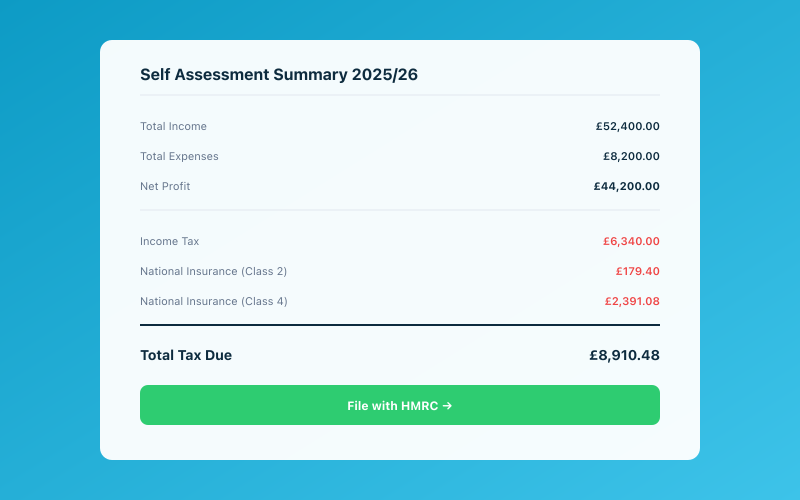 Your Accounted dashboard shows your real-time tax position
Let's clear up the confusion. Because with MTD for Income Tax launching in April 2026, getting this right isn't optional anymore — it's a legal requirement.
HMRC's Software Requirements for MTD
Under Making Tax Digital, HMRC requires that you use software which can:
- Maintain digital records of your business income and expenses
- Submit quarterly updates directly to HMRC's systems
- File your final declaration at the end of each tax year
- Communicate with HMRC via their API — this is the critical bit
That last point is what separates genuinely compatible software from everything else. Your software needs to talk directly to HMRC's servers using their Application Programming Interface (API). Think of it as a secure digital handshake between your bookkeeping tool and HMRC's systems.
This isn't just about keeping records in a digital format. It's about your software being able to send and receive data from HMRC without you having to manually log in to the HMRC website and type things in yourself.
What "HMRC Recognised" Really Means
When HMRC says software is "recognised," they mean it has been through their developer testing process and can successfully connect to the MTD API. The software vendor has to:
- Register as a developer with HMRC's Developer Hub
- Build and test their API integration in HMRC's sandbox environment
- Pass HMRC's production approval process before going live
- Maintain the connection as HMRC updates their API
This is a genuine technical integration, not a rubber stamp. HMRC maintains a list of approved vendors, and if your software isn't on it, it doesn't qualify — regardless of what the marketing says.
How to Check HMRC's Vendor List
You can find HMRC's official list of MTD-compatible software on GOV.UK. The list is searchable and regularly updated. Before committing to any software, check it's on there. If it isn't, it isn't compatible — full stop.
Bridging Software vs Full MTD Software
Here's where it gets a bit nuanced. There are two broad approaches to MTD compliance:
Bridging Software
Bridging software takes data from spreadsheets or other non-compatible tools and submits it to HMRC on your behalf. You keep your records however you like, then the bridging tool pulls the relevant figures and sends them via the API.
Sounds convenient, but there's a catch. Under MTD rules, there must be a digital link between every stage of your record-keeping. That means no manual re-typing of figures. If you're copying numbers from a spreadsheet into bridging software by hand, you're breaking the digital record-keeping requirements.
For bridging software to work compliantly, the data needs to flow automatically — for example, via a direct export from your spreadsheet into the bridging tool. This is possible but fiddly, and it's easy to get wrong.
Full MTD Software
Full MTD software handles everything in one place: your digital records, your categorisation, your quarterly submissions, and your final declaration. There's no bridging step because the records and the submission tool are the same system.
This is simpler, less error-prone, and what HMRC clearly prefers. It's also what we'd recommend for most sole traders, because the fewer manual steps in the process, the less likely you are to make a mistake that triggers a penalty.
Why Spreadsheets Alone Won't Work Anymore
Let's be direct about this: a spreadsheet on its own is not MTD-compatible software.
Excel and Google Sheets cannot connect to HMRC's API. They cannot submit quarterly updates. They cannot file your final declaration. On their own, they don't meet the requirements.
Now, you can continue using a spreadsheet as part of your workflow if you pair it with bridging software and maintain proper digital links. But honestly, for most sole traders, this creates more work and more risk than simply using purpose-built MTD software.
The spreadsheet-plus-bridging approach made more sense in the early days of MTD for VAT, when the software options were limited and expensive. Today, there are affordable, straightforward tools designed specifically for sole traders. The case for clinging to spreadsheets is getting weaker by the month.
What to Look For When Choosing MTD Software
Not all compatible software is created equal. Here's what to consider beyond the basic "is it on HMRC's list?" question:
Ease of Use
You're a sole trader, not an accountant. The software should make sense without an accounting degree. Look for clean interfaces, plain-English explanations, and guided workflows.
Automatic Record Keeping
The less manual data entry, the better. Software that connects to your bank account, categorises transactions automatically, and lets you snap photos of receipts will save you hours.
Quarterly Submission Support
Some software handles record-keeping but makes you jump through hoops to actually submit. Look for a tool where quarterly submissions are a straightforward, guided process — ideally just a few clicks.
Cost
Prices vary wildly. Some tools charge per submission, others monthly. Work out what you'll actually pay over a full year, not just the headline monthly price.
Support
When something goes wrong with an HMRC submission at 11pm on a Sunday, you want help available. Check whether the provider offers in-app guidance, email support, or real-time chat.
Future-Proofing
MTD is expanding. The income threshold is dropping, and HMRC's requirements will evolve. Choose software from a provider that's actively developing their product, not one that built the bare minimum and stopped there.
How Accounted Connects Directly to HMRC's API
Accounted is built from the ground up for MTD compliance. We don't use bridging. We don't bolt on API connections as an afterthought. Our software connects directly to HMRC's Making Tax Digital API to handle:
- Quarterly update submissions — review your figures and submit in a few taps
- Final declarations — replacing your old Self Assessment return
- Obligation tracking — so you always know when your next submission is due and never miss a deadline
Your records are kept digitally from the moment they enter the system. Send a receipt photo via WhatsApp, and Penny — our AI bookkeeper — extracts the details, categorises the expense, and stores it as a fully compliant digital record. Connect your bank account, and transactions flow in automatically. There are no digital link gaps because there's nothing to bridge.
We've gone through HMRC's full developer approval process, and we maintain our API integration as HMRC updates their systems. When you sign up for MTD, Accounted walks you through authorising the connection with your HMRC Government Gateway account — it takes about two minutes.
If you're currently using spreadsheets, a non-compatible tool, or nothing at all, now is the time to get sorted. The April 2026 deadline is close, and getting comfortable with your software before you're legally required to use it is much less stressful than scrambling at the last minute.
Ready to simplify your bookkeeping? Try Accounted free for 14 days →
Related Reading
- The Making Tax Digital Deadline — A Clear, Simple Guide
- What Is MTD and Do I Need to Worry About It? (The Simplest Guide)
See how Accounted handles MTD and start your free trial.
Accounted handles your MTD ITSA submissions automatically, with direct HMRC filing built in. See how MTD works in Accounted →
Tax & Compliance Specialists
Our tax specialists have decades of combined experience in UK sole trader and small business taxation, MTD compliance, and HMRC submissions. All content is reviewed against current HMRC guidance before publication and updated quarterly to reflect legislative changes.
Ready to try Accounted?
Join UK sole traders who are simplifying their bookkeeping and tax.
Start your 14-day free trial