The Making Tax Digital Deadline — A Clear, Simple Guide
Making Tax Digital. Three words that have caused more confusion, anxiety, and head-scratching among UK sole traders than almost anything HMRC has ever introduced. And with the deadline now upon us, the confusion isn't getting any better — it's getting worse.
Part of the problem is that HMRC's own guidance reads like it was written by committee (because it was). Part of it is that the timeline has changed multiple times, leaving people unsure about what's actually happening and when. And part of it is that the whole topic has been wrapped in so much jargon and acronyms that normal people have simply tuned out.
This guide is different. We're going to explain Making Tax Digital in plain English, tell you exactly what you need to do and by when, and help you understand what it means for your business in practical terms. No jargon, no waffle, no panic.
What Is Making Tax Digital, Actually?
At its core, Making Tax Digital (MTD) is very simple. HMRC wants you to:
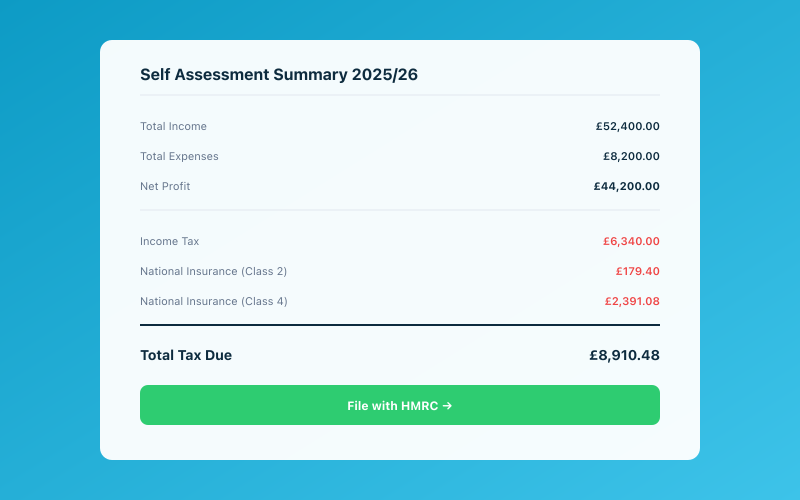 Your Accounted dashboard shows your real-time tax position
- Keep your business records digitally — not in a paper notebook or a shoebox of receipts, but in software
- Submit updates to HMRC more frequently — quarterly instead of annually
- Use compatible software to submit those updates — you can't just email them a spreadsheet
That's it. That's the whole thing. Everything else is detail.
The idea behind MTD is that digital records are more accurate than paper ones, and that more frequent updates give both you and HMRC a better picture of your tax position throughout the year. Whether you agree with those premises is another matter, but those are the goals.
MTD has already been rolled out for VAT — if you're VAT-registered, you've been filing digital VAT returns since 2019. Now it's being extended to Income Tax, which is the part that affects most sole traders and landlords.
The Key Dates You Need to Know
Here's where it gets specific. The dates for MTD for Income Tax are:
April 2026 — MTD for Income Tax becomes mandatory for self-employed individuals and landlords with gross income over £50,000. If your total self-employment and/or property income exceeds this threshold, you must comply from the start of the 2026-27 tax year.
April 2027 — The threshold drops to £30,000. If your gross income exceeds this lower threshold, you must comply from the start of the 2027-28 tax year.
For those with income below £30,000, HMRC has indicated that MTD will eventually apply to you too, but a specific date hasn't been confirmed yet. For now, you're not affected — but getting your digital records in order early is still sensible.
Important note: The £50,000 and £30,000 thresholds are based on gross income (your total turnover), not profit. So if you have a turnover of £55,000 but expenses of £30,000 giving you a profit of £25,000, you're still above the threshold and must comply.
What You'll Actually Have to Do
Let's break down the practical requirements. Under MTD for Income Tax, you'll need to:
Keep digital records of your income and expenses. This means using software — not paper records, not a basic Excel spreadsheet (unless it's linked to compatible software via digital links). Your records need to include your income, allowable expenses, and any adjustments.
Submit quarterly updates to HMRC. Instead of one annual Self Assessment return, you'll submit four quarterly updates throughout the tax year. These are summaries of your income and expenses for each quarter. The quarters follow the tax year:
- Quarter 1: 6 April – 5 July (deadline: 7 August)
- Quarter 2: 6 July – 5 October (deadline: 7 November)
- Quarter 3: 6 October – 5 January (deadline: 7 February)
- Quarter 4: 6 January – 5 April (deadline: 7 May)
Submit a final declaration. After the end of the tax year, you'll submit a final declaration — similar to the current Self Assessment return — confirming your figures and allowing HMRC to calculate your tax liability. The deadline for this is 31 January following the end of the tax year, same as the current Self Assessment deadline.
Use MTD-compatible software. Your software needs to be able to maintain digital records and communicate with HMRC's systems to submit your quarterly updates and final declaration. HMRC maintains a list of compatible software, and Accounted is on it.
What You Don't Have to Do
There's a lot of misinformation floating around about MTD, so let's clear up some things you don't have to do:
You don't have to become an accountant. MTD doesn't change what counts as income or what expenses you can claim. It changes how you record and report that information. If you're already keeping reasonable records, the transition isn't as dramatic as you might fear.
You don't have to pay more tax. MTD doesn't create any new taxes or change tax rates. Your tax bill should be the same under MTD as it would have been under Self Assessment. The only difference is how you report your figures.
You don't have to submit your records to HMRC. A common misconception. Your quarterly updates are summaries — totals of income and expenses by category. HMRC doesn't see your individual transactions or receipts unless they open a specific enquiry.
You don't have to stop using your accountant. MTD doesn't replace accountants. If anything, it makes the administrative side easier (since your records are already digital and up to date), freeing your accountant to focus on advice and planning rather than data processing.
What It Costs
One of the biggest concerns sole traders have about MTD is cost. Do you have to buy expensive software? Will your accountancy fees go up?
The software cost varies. Some providers charge as little as £10-£15 per month, while full-featured platforms might cost £20-£40 per month. Accounted's pricing is designed specifically for sole traders, and it includes MTD compliance as standard — you don't pay extra for it.
Your accountancy fees might change, but not necessarily upwards. If you're keeping good digital records throughout the year (which MTD requires), your accountant has less work to do at year-end. Some accountants are adjusting their fee structures to reflect this — less year-end work, potentially some additional work around quarterly submissions.
The important thing is to have the conversation with your accountant now, before MTD kicks in, so you both understand how the workload and fees will change.
How to Prepare (It's Not as Hard as You Think)
If you're above the threshold and need to comply from April 2026, here's what you should do:
Step 1: Get compatible software. If you're not already using MTD-compatible bookkeeping software, now is the time to set it up. Accounted is designed specifically for sole traders and is fully MTD-compatible. Penny handles the record-keeping requirements automatically, so compliance doesn't add any extra work to your day.
Step 2: Start keeping digital records now. Don't wait until April 2026 to go digital. Start recording your income and expenses digitally now. This gives you time to get comfortable with the system, iron out any teething issues, and build good habits before it becomes mandatory.
Step 3: Talk to your accountant. If you have an accountant, discuss how MTD will affect your working arrangement. Who will handle the quarterly submissions? How will you share data? What changes, if any, will there be to fees? Get this sorted now, not in April.
Step 4: Understand the quarterly rhythm. Get used to the idea of quarterly submissions. In practice, if you're keeping your records up to date (which is much easier with a tool like Accounted, where Penny handles most of the categorisation automatically), the quarterly submissions are straightforward — your records are essentially ready all the time.
Step 5: Don't panic. MTD sounds more complicated than it is. Once you're set up with compatible software and keeping your records digitally, the quarterly submissions are a relatively painless process. It's the setup and habit change that takes effort, not the ongoing compliance.
What Happens If You Don't Comply
HMRC has introduced a new points-based penalty system for MTD. Here's how it works:
Late submission penalties: You receive a penalty point each time you submit a quarterly update late. When you accumulate a certain number of points (typically 4 for quarterly obligations), you receive a £200 fine. Points expire after a period of compliance, but the system is designed to penalise persistent lateness rather than the occasional slip.
Late payment penalties: If you don't pay your tax on time, you'll be charged a penalty based on how late the payment is. There's a short grace period, but after that, penalties accrue.
Interest: HMRC charges interest on late payments from day one, at the Bank of England base rate plus 2.5%.
The penalty regime is more lenient than the old system in some ways (no automatic £100 fine for being one day late) but more persistent (repeated lateness is penalised more heavily). The message is clear: HMRC wants you to submit on time, every time.
You can read a more detailed breakdown of the penalty system in our MTD penalties guide.
The Silver Lining
It's easy to see MTD as just another burden on sole traders — more regulation, more compliance, more hassle. And those frustrations are valid. But there is a genuine upside if you approach it right.
Better visibility of your finances. When your records are always up to date and you're reviewing them quarterly, you have a much clearer picture of how your business is performing. No more end-of-year surprises about how much tax you owe.
No more January panic. The annual Self Assessment scramble — digging out a year's worth of receipts, trying to remember what transactions were for, calculating everything in a rush — becomes a thing of the past. Under MTD, you're keeping records as you go, so year-end is just a final check rather than a massive data entry exercise.
Fewer errors, fewer penalties. Digital records are more accurate than manual ones. Compatible software does the calculations for you, reducing the risk of arithmetic errors. And more frequent submissions mean you catch and correct mistakes earlier.
Potential tax savings. When you can see your tax position in real time, you can make smarter decisions about things like pension contributions, asset purchases, and expense timing. That's much harder to do when you only look at your numbers once a year.
Will MTD be painless? Probably not entirely, especially in the first year as you adjust to new habits. But will it be the catastrophe that some people fear? Absolutely not. With the right software — particularly something like Accounted, where Penny handles the heavy lifting and you just deal with the exceptions — it's genuinely manageable.
Take a breath. Get set up. And get on with running your business.
Related reading:
- Making Tax Digital — The Complete Guide
- Making Tax Digital 2026 Guide
- MTD April 2026 — Are You Deadline Ready?
Accounted helps UK sole traders stay on top of their bookkeeping and tax. Start your free 30-day trial at getaccounted.co.uk.
Related Reading
- MTD for Income Tax — The Complete Timeline of What's Changing
- MTD Software — What to Look For and What to Avoid
See how Accounted handles MTD and start your free trial.
Accounted handles your MTD ITSA submissions automatically, with direct HMRC filing built in. See how MTD works in Accounted →
Tax & Compliance Specialists
Our tax specialists have decades of combined experience in UK sole trader and small business taxation, MTD compliance, and HMRC submissions. All content is reviewed against current HMRC guidance before publication and updated quarterly to reflect legislative changes.
Ready to try Accounted?
Join UK sole traders who are simplifying their bookkeeping and tax.
Start your 14-day free trial