Making Tax Digital: The Complete Guide for UK Sole Traders
What Is Making Tax Digital for Income Tax?
Making Tax Digital (MTD) for Income Tax Self Assessment (ITSA) is HMRC's plan to move the UK tax system from annual paper-based returns to quarterly digital reporting. If you're a sole trader or landlord, this is the biggest change to how you report your income since Self Assessment was introduced back in 1996.
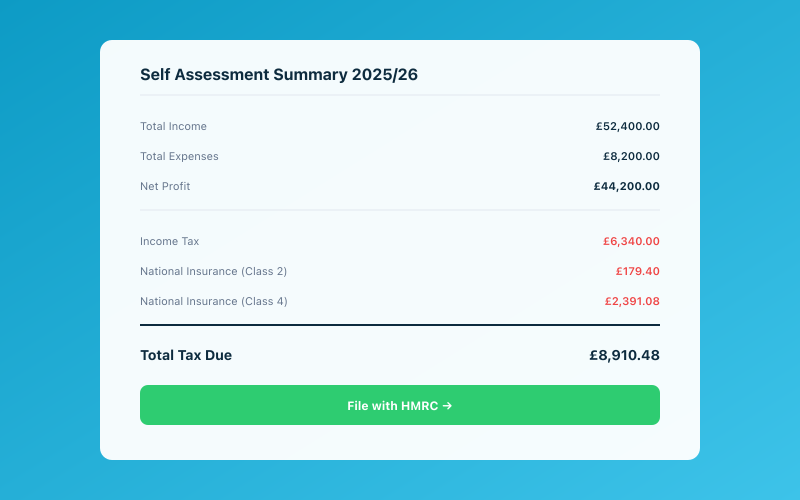 Your Accounted dashboard shows your real-time tax position
Instead of filing one big tax return every January, you'll send HMRC quarterly updates of your income and expenses throughout the year using HMRC-compatible software. The idea is simple: keep digital records as you go, and your tax position stays up to date all year round.
It sounds like more work. But honestly? If you're using the right tools, it's actually less stressful than the annual scramble most of us know too well.
Who Does MTD Affect?
MTD for Income Tax rolls out in phases based on your gross income (that's your total income before expenses, not your profit):
- April 2026: Sole traders and landlords with gross income over £50,000
- April 2027: Sole traders and landlords with gross income over £30,000
- TBC: Those earning under £30,000 — HMRC hasn't confirmed dates yet, but it's coming
If you earn income from both self-employment and property, those figures are combined. So if you earn £35,000 from freelancing and £20,000 from a rental property, your combined £55,000 puts you in the April 2026 group.
Not sure whether the £50k threshold applies to you? We've written a separate breakdown to help you check.
What About Partnerships and Limited Companies?
Partnerships are expected to join MTD from April 2027 at the earliest, though HMRC keeps pushing this back. Limited companies are not affected — they already report digitally through Corporation Tax.
The April 2026 Deadline — What It Actually Means
Let's clear up the confusion. The April 2026 deadline doesn't mean you need to submit anything in April. It means that from 6 April 2026, the new tax year onwards, your record-keeping and reporting must follow MTD rules.
Your first quarterly update won't be due until 5 August 2026 (covering 6 April to 5 July). So you have a few months to get comfortable with the system before anything is actually due.
But — and this is important — you need to be signed up and ready before April. That means having HMRC-compatible software in place and your digital records organised.
Quarterly Updates Explained
Under MTD, you'll submit four quarterly updates per year. Each one covers a three-month period:
| Quarter | Period | Deadline | |---------|--------|----------| | Q1 | 6 April – 5 July | 5 August | | Q2 | 6 July – 5 October | 5 November | | Q3 | 6 October – 5 January | 5 February | | Q4 | 6 January – 5 April | 5 May |
Each update is a summary of your income and expenses for that quarter. You don't need to send every receipt — just categorised totals. Think of it as a mini profit and loss statement every three months.
We've put together a detailed guide on exactly what you need to submit each quarter, including the income and expense categories HMRC expects.
End of Period Statement and Final Declaration
After your four quarterly updates, there are two more steps:
End of Period Statement (EOPS)
This is where you review your figures for the full tax year, make any adjustments (like capital allowances or accounting adjustments), and confirm everything is correct. Think of it as a final check before you submit.
Final Declaration
The final declaration replaces the Self Assessment tax return. It's where you add any other income (employment, dividends, savings interest), claim any remaining reliefs, and confirm your total tax liability. The deadline is 31 January following the tax year — same as the current Self Assessment deadline.
So you're not losing the January deadline. You're just adding quarterly check-ins throughout the year. For a full comparison, read our guide on what's actually changing from Self Assessment to MTD.
Penalties for Non-Compliance
HMRC has introduced a new points-based penalty system for MTD. It's different from the old fixed penalties:
- Each late submission earns you 1 penalty point
- Once you hit the threshold (4 points for quarterly reporters), you get a £200 fine
- Every late submission after that is another £200
- Late payments attract daily interest charges
The good news? Points expire after a period of compliance. But prevention is better than cure. We've written a full breakdown of how the new MTD penalties work so you know exactly what's at stake.
How to Prepare Now: Your 3-Step Action Plan
Step 1: Check Whether You're Affected
Add up your gross income from self-employment and property for the 2024/25 tax year. Over £50,000? You're in the April 2026 group. Over £30,000? You've got until April 2027, but there's no harm in starting early.
Step 2: Sign Up for MTD
You'll need to sign up through HMRC's online service. This involves linking your Government Gateway account to MTD for Income Tax. Don't leave this until the last minute — HMRC systems have a habit of running slowly when everyone rushes at once.
Step 3: Get Your Software Sorted
You need HMRC-compatible software that can maintain digital records and submit quarterly updates. This is where the choice you make really matters. Some tools make MTD feel like extra admin. Others make it invisible.
How Accounted Automates the Entire MTD Process
We built Accounted specifically for sole traders facing MTD. Here's how it works:
Digital record-keeping happens automatically. Snap a photo of a receipt, forward an invoice, or connect your bank account — Accounted categorises everything using Penny, your AI bookkeeper. Your records are always digital, always organised, and always HMRC-compliant.
Quarterly submissions are prepared for you. When a quarter ends, Penny reviews your transactions, flags anything that needs your attention, and prepares your quarterly update. You review it, tap submit, and it goes straight to HMRC.
No spreadsheets. No shoebox of receipts. Just a running conversation with Penny on WhatsApp that keeps your books in order all year round.
The whole point of MTD is to make tax easier and more accurate. With the right software, that's genuinely what it becomes — not more paperwork, but less.
Ready to simplify your bookkeeping? Try Accounted free for 14 days →
Related Reading
- Making Tax Digital: Everything UK Sole Traders Need to Know Before April 2026
- HMRC's Making Tax Digital Penalties — The New Points-Based System
See how Accounted handles MTD and start your free trial.
Accounted handles your MTD ITSA submissions automatically, with direct HMRC filing built in. See how MTD works in Accounted →
Tax & Compliance Specialists
Our tax specialists have decades of combined experience in UK sole trader and small business taxation, MTD compliance, and HMRC submissions. All content is reviewed against current HMRC guidance before publication and updated quarterly to reflect legislative changes.
Ready to try Accounted?
Join UK sole traders who are simplifying their bookkeeping and tax.
Start your 14-day free trial