MTD Quarterly Submissions: What You Need to Send and When
The Shift from Annual to Quarterly
Under Making Tax Digital for Income Tax, the days of totting everything up once a year are numbered. From April 2026, sole traders and landlords earning over £50,000 will need to send HMRC a summary of their income and expenses every three months.
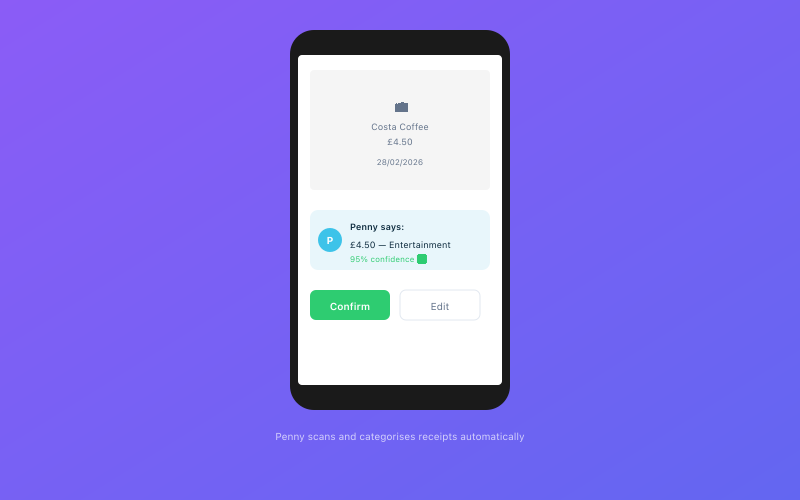 Penny scans and categorises your receipts automatically via WhatsApp
If that sounds like a lot more work, take a breath. A quarterly update isn't a full tax return — it's closer to a categorised summary of what came in and what went out. If your bookkeeping is reasonably up to date, each submission should take minutes, not hours.
Here's everything you need to know about what to send and when.
The Quarterly Reporting Calendar
Your MTD year follows the standard tax year, running from 6 April to 5 April. It's split into four quarters:
| Quarter | Period | Submission Deadline | |---------|--------|---------------------| | Q1 | 6 April – 5 July | 5 August | | Q2 | 6 July – 5 October | 5 November | | Q3 | 6 October – 5 January | 5 February | | Q4 | 6 January – 5 April | 5 May |
You have exactly one month after each quarter ends to submit your update. Miss the deadline and you'll pick up a penalty point under HMRC's new points-based system.
Can You Choose Different Quarter Dates?
Yes. HMRC allows you to use calendar quarters (Jan-Mar, Apr-Jun, Jul-Sep, Oct-Dec) instead. You'll need to elect this when you sign up for MTD. Most sole traders stick with the standard quarters to keep things aligned with the tax year.
What Data HMRC Expects Each Quarter
Each quarterly update is essentially a profit and loss summary for that three-month period. HMRC wants to see your income and expenses broken down into specific categories.
Income Categories
You'll need to report your income across these categories:
- Turnover — your main business income from sales or services
- Other business income — anything that isn't your core trading income (e.g., ad-hoc consultancy, commissions)
- Turnover from construction industry (CIS) — if applicable, reported separately
For landlords, property income has its own set of categories covering rental income, premiums on lease grants, and reverse premiums.
Expense Categories
HMRC's expense categories for MTD closely mirror what you'd see on a Self Assessment return:
- Cost of goods sold — materials, stock, direct costs
- Construction industry costs — CIS-specific subcontractor costs
- Premises costs — rent, rates, insurance, utilities for business premises
- Admin costs — phone, stationery, postage, software subscriptions
- Travel costs — business mileage, public transport, parking
- Advertising and marketing — website costs, advertising, promotional materials
- Professional fees — accountant fees, legal fees, professional subscriptions
- Interest and bank charges — business loan interest, bank fees
- Other expenses — anything that doesn't fit neatly into the above
If you work from home, you can claim a proportion of household expenses under premises costs — or use HMRC's simplified flat-rate allowance.
What About Capital Expenditure?
Capital allowances (for equipment, vehicles, etc.) aren't claimed in quarterly updates. Those are dealt with in the End of Period Statement and Final Declaration at year end. Your quarterly updates focus purely on revenue income and revenue expenses.
What Counts as a "Digital Record"
This is where some sole traders get tripped up. MTD requires you to maintain digital records — but what does that actually mean?
A digital record is any record stored electronically that can be shared with HMRC through compatible software. This includes:
- Bank transactions imported via Open Banking or bank feeds
- Invoices created or stored in your accounting software
- Receipt images captured digitally and linked to transactions
- Expense entries recorded in an app or software tool
What it does not mean:
- You don't need to scan every piece of paper you've ever received
- You don't need to ditch paper receipts entirely (but the record of them must be digital)
- A spreadsheet alone is not sufficient — your records must be in HMRC-compatible software that can submit to HMRC via their API
The key requirement is a digital trail from source document to categorised record to quarterly submission, all held within compatible software. For a deeper look, read our guide on digital record-keeping requirements.
Common Mistakes to Avoid
From helping sole traders prepare for MTD, here are the mistakes we see most often:
1. Mixing Personal and Business Transactions
If you're using one bank account for everything, your quarterly update will be a nightmare to prepare. Open a separate business account — it makes categorisation infinitely easier.
2. Guessing Categories
Putting everything under "other expenses" is a red flag for HMRC. If you're unsure what you can claim, our guide to sole trader expenses covers every common deduction.
3. Leaving Everything Until the Deadline
If you're doing three months of bookkeeping in the last week before a deadline, you're more likely to make errors or miss the submission window entirely.
4. Forgetting to Reconcile
Simply importing transactions isn't enough. You need to confirm each transaction is correctly categorised. Unreconciled transactions won't appear in your submission.
5. Not Keeping Source Documents
If HMRC opens an enquiry, they'll want to see the invoices, receipts, and contracts behind your numbers. Store these digitally alongside your transaction records.
How Penny Prepares Your Quarterly Submission Automatically
This is where Accounted takes the stress out of MTD. Penny, your AI bookkeeper, works in the background throughout the quarter to keep your records submission-ready.
Here's what happens:
During the quarter: Penny categorises transactions as they come in and prompts you via WhatsApp when something needs your input. Snap a receipt, confirm a category — it takes seconds.
At quarter end: Penny checks for uncategorised transactions, missing receipts, and unusual figures. Each item gets a confidence score so you know how reliable your numbers are.
Submission time: Your quarterly update is pre-populated and ready. Review, confirm, and submit directly to HMRC. Five minutes.
Step-by-Step: Submitting via Accounted
- Quarter closes — Penny sends you a WhatsApp message letting you know your update is ready
- Review your summary — Check your income and expense totals by category
- Resolve any flags — Penny highlights uncategorised transactions or unusual amounts
- Confirm and submit — Tap submit, and it goes directly to HMRC via their MTD API
- Get your confirmation — HMRC sends back a receipt ID, stored automatically
No spreadsheets. No logging into three different systems. Just clean records in, quarterly update out.
Ready to simplify your bookkeeping? Try Accounted free for 14 days →
Related Reading
Related reading: MTD for Landlords: Property Income Reporting.
For step-by-step guidance, see our article on How to Set Up Making Tax Digital for Business.
Related reading: What Happens If You Miss the MTD Deadline.
Related reading: How Accountants Should Prepare Clients for MTD.
Related reading: MTD and VAT: How the Two Systems Work Together.
You may also find our MTD Bridging Software vs Full Software Explained helpful.
For more on this topic, read MTD Digital Record Keeping: HMRC Requirements.
Related reading: MTD Exemptions: Who Doesn't Need to Comply.
For more on this topic, read MTD Final Declaration: Replacing the Tax Return.
Related reading: MTD Digital Links: Connecting Your Records.
You may also find our MTD for Self-Employed: Step-by-Step Setup Guide helpful.
For more on this topic, read Making Tax Digital Timeline: Every Deadline.
See how Accounted handles MTD and start your free trial.
Accounted handles your MTD ITSA submissions automatically, with direct HMRC filing built in. See how MTD works in Accounted →
Tax & Compliance Specialists
Our tax specialists have decades of combined experience in UK sole trader and small business taxation, MTD compliance, and HMRC submissions. All content is reviewed against current HMRC guidance before publication and updated quarterly to reflect legislative changes.
Ready to try Accounted?
Join UK sole traders who are simplifying their bookkeeping and tax.
Start your 14-day free trial