Making Tax Digital 2026: The Complete Guide for Self-Employed
What Is Making Tax Digital?
Making Tax Digital — commonly shortened to MTD — is HMRC's programme to move the UK tax system from annual paper returns to quarterly digital submissions. The idea is straightforward: instead of scrambling to file one massive Self Assessment return each January, you'll send HMRC a summary of your income and expenses every three months using compatible software.
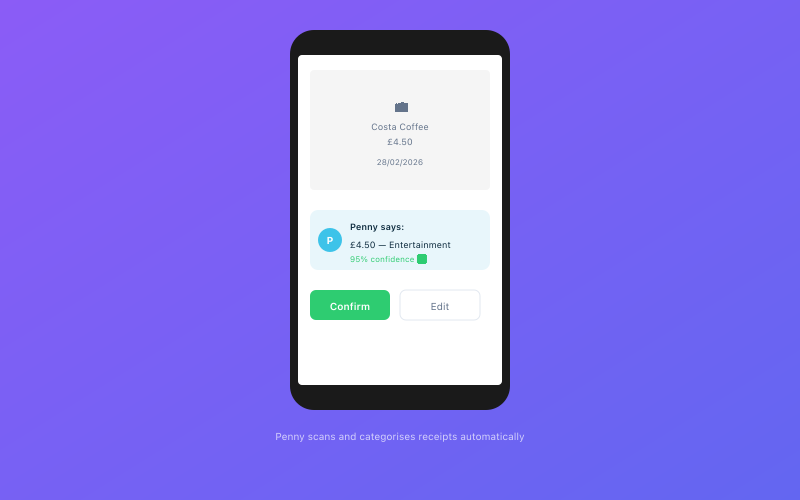 Penny scans and categorises your receipts automatically via WhatsApp
MTD has already been live for VAT-registered businesses since April 2019. Now HMRC is rolling it out to Income Tax Self Assessment, and that's where the vast majority of sole traders, freelancers, and landlords come in.
This isn't optional. If you meet the income thresholds, you'll be legally required to comply.
Who Does MTD Affect?
From April 2026: Sole Traders and Landlords Earning Over £50,000
If your gross self-employment or property income exceeds £50,000 in a tax year, you'll need to start keeping digital records and submitting quarterly updates from 6 April 2026. This is based on your total business turnover, not your profit — so expenses don't reduce the figure for threshold purposes.
From April 2027: The Threshold Drops to £30,000
A year later, the net widens. Anyone with gross income above £30,000 will be brought into MTD. HMRC has indicated that thresholds below £30,000 may follow in future years, though no firm dates have been announced.
Who's Exempt?
If your self-employment and property income combined stays below the active threshold, you're not required to join MTD — though you can sign up voluntarily. Certain groups may also claim exemption on religious grounds or due to digital exclusion (age, disability, or remote location without reliable internet).
What Are Quarterly Submissions?
Under MTD, the tax year is split into four quarterly periods:
- Quarter 1: 6 April – 5 July
- Quarter 2: 6 July – 5 October
- Quarter 3: 6 October – 5 January
- Quarter 4: 6 January – 5 April
After each quarter, you have roughly one month to submit your update to HMRC through MTD-compatible software. The update summarises your income and expenses for that period. It doesn't trigger a tax payment — it's an information submission.
After the four quarterly updates, you'll also need to submit:
- An End of Period Statement (EOPS): Confirms your figures for the full year, including any accounting adjustments.
- A Final Declaration: Replaces the current Self Assessment tax return. This is where you add personal allowances, other income, and calculate your final tax liability.
That's six submissions per year in total. It sounds like a lot, but each quarterly update is relatively simple if your records are kept up to date. The quarterly submissions guide breaks down exactly what each one involves.
Compatible Software: What You'll Need
HMRC requires you to use software that's been recognised as MTD-compatible. You cannot submit quarterly updates manually through the HMRC website. The software must be able to:
- Store digital records of your income and expenses
- Submit quarterly updates directly to HMRC via their API
- File your End of Period Statement and Final Declaration
Spreadsheets alone won't cut it. If you use a spreadsheet for record-keeping, you'll need "bridging software" that can pull your data and submit it to HMRC — but honestly, at that point you're better off using proper accounting software that handles everything in one place.
Accounted is fully MTD-compatible and handles quarterly submissions automatically. Your bank transactions are categorised throughout the quarter, so when submission time arrives, there's very little left to do.
Free vs Paid Software
HMRC does offer a limited free tool for very simple tax affairs, but it's designed for people with a single income source and no complications. If you have multiple income streams, property income, or CIS deductions, you'll almost certainly need a paid solution.
Penalties for Non-Compliance
HMRC has introduced a new points-based penalty system for MTD. The key details:
- Late submissions earn you penalty points. Once you accumulate 4 points (for quarterly reporters), you'll receive a £200 fine. Every subsequent late submission after that is another £200.
- Late payments are penalised separately, starting at 2% of the tax owed after 15 days, with additional charges at 30 days and a daily rate of 4% per annum thereafter.
- Interest accrues on all unpaid tax and penalties from the due date.
A single missed deadline won't ruin you — the system gives you breathing room. But multiple missed submissions stack up fast. Our MTD penalties guide walks through the full calculation with worked examples.
The penalty points reset to zero after 24 months of full compliance, so getting back on track does clear the slate.
How to Prepare: A Practical Checklist
1. Check Whether You're Affected
Look at your gross income for the 2024/25 tax year. If it's above £50,000 from self-employment or property, you'll be in scope from April 2026. If it's between £30,000 and £50,000, you have until April 2027 — but there's no harm in getting ready early.
2. Sign Up for MTD
You'll need to register for MTD for Income Tax through your HMRC online account. This is separate from your existing Self Assessment registration. HMRC will send you confirmation once you're enrolled.
3. Choose Compatible Software
Pick software that connects to HMRC's MTD API and suits how you work. Consider whether you need bank feeds, receipt scanning, property income tracking, or CIS support. The right tool should make quarterly submissions feel effortless, not like extra admin.
4. Connect Your Bank Account
Digital record-keeping is far easier when your bank transactions flow into your software automatically. Open banking connections mean every payment in and out is captured without manual entry.
5. Start Keeping Digital Records Now
Don't wait until April. The sooner you move to digital record-keeping, the smoother the transition will be. HMRC requires you to keep digital records from the start of the first MTD tax year — that means 6 April 2026 for the first cohort.
6. Understand What to Submit and When
Familiarise yourself with the quarterly deadlines and what each submission involves. Mark the dates in your calendar. Set reminders. Better yet, use software that handles the deadline tracking for you.
Common Concerns
"I already file Self Assessment — why do I need this?"
Self Assessment isn't going away immediately, but for those above the threshold, MTD replaces the annual return with quarterly updates plus a Final Declaration. The information you provide is broadly the same — it's just submitted more frequently and through software rather than HMRC's website.
"Will I have to pay tax quarterly?"
Not necessarily. The quarterly updates are information submissions, not payment demands. However, if you already make payments on account, those continue as normal. HMRC may eventually align payment dates with quarterly submissions, but that hasn't been confirmed.
"What if my income fluctuates around the threshold?"
HMRC uses your qualifying income from the previous tax year to determine whether you're in scope. If your income dips below the threshold one year, you won't automatically exit MTD — HMRC will assess on a case-by-case basis.
"I have a property business and a sole trade — do they combine?"
Yes. Your gross income from all self-employment and property sources is added together when assessing the threshold. If your sole trade earns £35,000 and your rental income is £20,000, your combined figure of £55,000 puts you above the £50,000 threshold.
The Bottom Line
MTD is happening. The deadlines are fixed, the thresholds are confirmed, and HMRC's penalty system is ready to go. The sole traders who'll have the easiest time are those who get set up now — well before the first quarterly deadline lands.
The good news is that once you're set up with the right software, MTD actually simplifies things. No more end-of-year scramble. No more trying to reconstruct twelve months of transactions from memory. Just steady, quarterly check-ins that keep your tax affairs in order year-round.
Get Started with Accounted
Accounted is built specifically for UK sole traders navigating MTD. Your bank transactions are categorised automatically, receipts are captured via WhatsApp, and quarterly submissions are prepared for you — just review and send. Start your free trial today — no credit card required.
Related Reading
- Making Tax Digital: Everything UK Sole Traders Need to Know Before April 2026
- MTD for Landlords: What Property Income Owners Need to Know
Accounted handles your MTD ITSA submissions automatically, with direct HMRC filing built in. See how MTD works in Accounted →
Tax & Compliance Specialists
Our tax specialists have decades of combined experience in UK sole trader and small business taxation, MTD compliance, and HMRC submissions. All content is reviewed against current HMRC guidance before publication and updated quarterly to reflect legislative changes.
Ready to try Accounted?
Join UK sole traders who are simplifying their bookkeeping and tax.
Start your 14-day free trial