Xero Pricing in 2026 — The Complete Breakdown
Xero Pricing in 2026 — What You're Actually Paying For
If you've been looking at accounting software recently, you've almost certainly come across Xero. It's one of the biggest names in cloud accounting, and for good reason — it's powerful, well-designed, and packed with features. But here's the thing: working out what Xero actually costs isn't as straightforward as you might think.
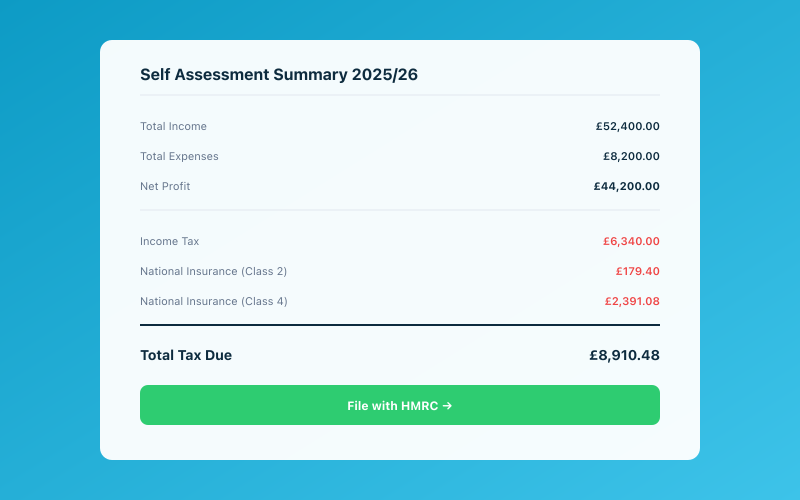 Your Accounted dashboard shows your real-time tax position
Between the different plan tiers, add-on modules, and a few sneaky costs that aren't immediately obvious, your monthly bill can end up looking quite different from the headline price. So let's break it all down properly.
The Three Xero Plans
Xero offers three main pricing tiers in the UK. Here's what each one includes as of early 2026.
Starter — £15/month (+VAT)
The Starter plan is Xero's entry-level option, and it's fairly limited. You get:
- Send up to 20 quotes and invoices per month
- Enter up to 5 bills per month
- Reconcile bank transactions
- Capture bills and receipts with Hubdoc
- Short-term cash flow forecasting
- MTD-compatible VAT returns
The 20-invoice and 5-bill caps are the big limitations here. If you're a freelancer sending out a handful of invoices each month and not dealing with many supplier bills, it might be enough. But it doesn't take much growth before you hit those limits.
Standard — £30/month (+VAT)
The Standard plan removes those transaction limits, which is why most Xero users end up here. You get everything in Starter, plus:
- Unlimited quotes and invoices
- Unlimited bills
- Bulk reconciliation
- Multi-currency support (but read the fine print below)
This is the plan Xero really wants you on. It's where the software starts to feel complete, and for many small businesses, it does the job well.
Premium — £42/month (+VAT)
The Premium plan adds multi-currency properly and is aimed at businesses that deal with international clients or suppliers. On top of everything in Standard, you get:
- Full multi-currency accounting
- Expenses management (with Xero Expenses)
- Track projects (with Xero Projects)
If you're a UK-based sole trader or small business working entirely in pounds, you're unlikely to need this tier.
The Add-On Costs Most People Miss
Here's where Xero pricing gets a bit more complicated. The base plan prices don't tell the whole story.
Payroll — From £7/month (+VAT)
Xero's payroll module isn't included in any plan. If you have employees, you'll need to add this on. The cost scales with the number of employees, starting at around £7 per month for a small team. If you're running payroll for even a handful of staff, this adds up over the year.
Xero Projects — Included in Premium Only
If you want to track time and costs against specific projects or clients, you'll need the Premium plan. There's no way to add this to Starter or Standard.
Xero Expenses — Included in Premium Only
The expenses feature — where employees can snap receipts and submit claims — is also locked to Premium. If you're on Standard and want this, you're looking at a £12/month jump.
Analytics Plus — £7/month (+VAT)
Xero's advanced reporting and business snapshot tools sit behind an additional paywall. The standard reports are decent, but if you want deeper financial analysis, budgeting, or custom reporting, you'll pay extra.
Hubdoc — Included (Sort Of)
Hubdoc, Xero's document capture tool, is included with all plans. However, it has its own limitations on the number of documents you can process, and the OCR (optical character recognition) isn't always reliable. You may find yourself manually correcting entries, which somewhat defeats the purpose.
Price Increases Over Time
One thing worth flagging: Xero has increased its prices multiple times over the past few years. Back in 2020, the equivalent of the Standard plan was around £22 per month. It's now £30 — a 36% increase in just a few years. And Xero typically increases prices annually.
This matters because when you're choosing accounting software, you're not just paying today's price. You're committing to a platform, and switching later is painful. If Xero continues raising prices at this rate, your monthly bill in three years could look quite different.
Hidden Costs to Watch For
Beyond the headline prices and add-ons, there are a few costs that catch people out.
Bank Feed Charges
Xero connects to your bank to pull in transactions automatically. This is one of its best features, but some banks charge for automated feeds. If your bank doesn't support a direct feed, you may need to use a third-party connection, which can add cost or hassle.
Multi-Currency on Standard
Xero's Standard plan technically supports invoicing in foreign currencies, but it doesn't do full multi-currency accounting. If you receive payments in dollars or euros, the Standard plan will convert them, but you won't get proper currency gain/loss tracking or foreign bank account reconciliation. For that, you need Premium.
Accountant or Bookkeeper Fees
Xero is designed to work alongside an accountant. Many features — like year-end journals, advanced reporting, and tax planning — really require professional input. While Xero makes collaboration with your accountant easier, it doesn't replace them. Budget for accountancy fees on top of your Xero subscription.
Training Time
Xero is well-designed, but it's still full accounting software. There's a learning curve, especially if you've never used double-entry bookkeeping tools before. The time you spend learning and maintaining Xero is a real cost, even if it doesn't show up on a bill.
Who Is Xero Best For?
Xero genuinely shines for certain types of businesses:
- Growing small businesses with employees, multiple income streams, and complex needs
- Businesses working with accountants who use Xero's advisor tools
- Companies needing multi-currency support for international trade
- Established businesses that need detailed reporting and project tracking
It's a proper, full-featured accounting platform. If you need all of that power, Xero delivers.
When Xero Is Overkill
Here's the honest truth: for a huge number of sole traders, freelancers, and small self-employed businesses, Xero is more than you need. And more than you need means more than you should pay for.
If you're a sole trader earning under the VAT threshold, you probably don't need double-entry accounting, project tracking, or multi-currency. You need to:
- Track your income and expenses
- Keep HMRC-compliant records
- File your tax return (and soon, MTD quarterly submissions)
- Store your receipts
That's it. Paying £30+ per month for Xero to do those basic tasks is like buying a Range Rover to pop to the shops.
Xero vs Accounted — A Different Approach
This is where we should mention Accounted, because it takes a fundamentally different approach to bookkeeping for sole traders and small businesses.
Rather than giving you a complex accounting dashboard and expecting you to learn how it works, Accounted uses Penny — an AI bookkeeper that works through WhatsApp. You snap a photo of a receipt, forward an invoice, or ask a question, and Penny handles the categorisation, record-keeping, and MTD compliance for you.
There's no software to learn. No double-entry to understand. No reconciliation screens to stare at.
For a sole trader on Xero's Standard plan, you're paying £30/month (+VAT) and doing all the work yourself. With Accounted, you're paying less and the work is done for you. That's a meaningful difference, especially when your time is better spent actually running your business.
Of course, if you need Xero's advanced features — payroll, multi-currency, project tracking — then Xero might be the right choice. But if you're a sole trader who just wants their books sorted without the faff, it's worth comparing the two properly.
How to Decide
Ask yourself these questions:
- Do I have employees? If yes, you'll need payroll — Xero can do this, but it's an add-on cost.
- Do I invoice internationally? If yes, Xero Premium's multi-currency is useful.
- Do I need project tracking? If yes, Xero Premium handles this well.
- Am I comfortable with accounting software? If no, you'll spend hours learning Xero — or pay an accountant to help.
- Am I a sole trader who just needs records and MTD compliance? If yes, simpler tools like Accounted will save you time and money.
The Bottom Line
Xero is excellent accounting software, but it's not cheap — especially once you add payroll, expenses, and the inevitable annual price increases. For businesses that need its full feature set, it's worth the investment. But for sole traders and freelancers who just need solid bookkeeping and MTD compliance, there are simpler, more affordable options that get the job done without the complexity.
If you're weighing up your options, take a proper look at what you actually need before committing to a plan. Your future self (and your bank balance) will thank you.
Related Reading
Compare Accounted with other platforms and start your free trial.
See how Accounted compares to Xero, Sage, QuickBooks and more — and why sole traders are switching. See the full comparison →
Editorial & Research
The Accounted editorial team covers software comparisons, technology, and the tools UK sole traders need to run their businesses efficiently. All software comparisons are based on independent research and publicly available pricing.
Ready to try Accounted?
Join UK sole traders who are simplifying their bookkeeping and tax.
Start your 14-day free trial