Switching From Coconut to Accounted — What to Expect
Coconut made a name for itself as one of the simpler options for freelancers and sole traders who wanted to combine banking with basic bookkeeping. The idea was appealing — one app for your business bank account and your tax records. But as the product has evolved (and as Making Tax Digital has changed what sole traders actually need from their software), a growing number of Coconut users are looking elsewhere.
If you're one of them, this guide covers what to expect when switching from Coconut to Accounted, how to handle the migration, and why the move might be smoother than you think.
Why People Are Moving Away From Coconut
Coconut started as a fintech experiment — a business current account with built-in bookkeeping. It was novel, and for a while it worked well enough for freelancers with straightforward finances. But several things have shifted.
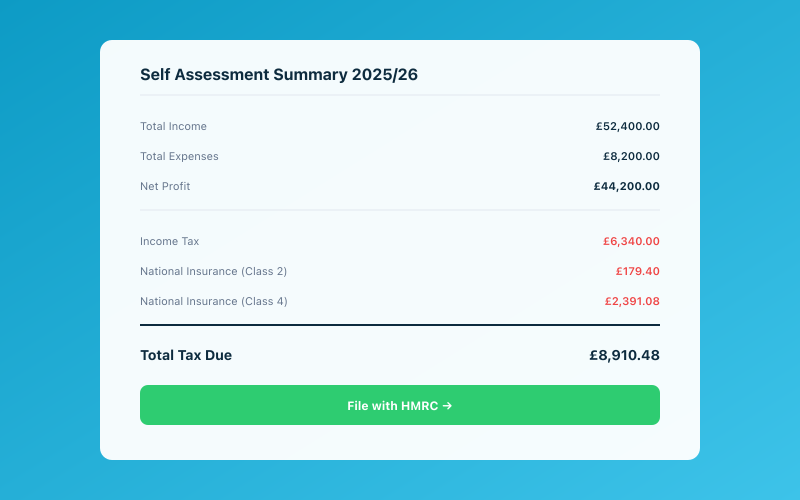 Your Accounted dashboard shows your real-time tax position
First, the product direction. Coconut has gone through ownership changes and pivots, and not all users have felt confident about where it's heading. When you rely on a tool for your tax records, stability matters. Nobody wants to migrate in a panic because a platform is winding down or changing its terms overnight.
Second, the bookkeeping features have always been fairly basic. Coconut handles income and expense categorisation reasonably well, but it was never designed to be a full accounting platform. As HMRC's requirements have become more specific — particularly around Making Tax Digital for Income Tax — many users have found that Coconut doesn't quite go far enough.
Third, there's the question of flexibility. Because Coconut tied banking and bookkeeping together, switching banks meant switching your entire bookkeeping setup. If you found a better deal on a business account elsewhere, you were stuck choosing between a better bank and keeping your records in one place. That's not a trade-off anyone should have to make.
For a detailed feature comparison, our Accounted vs Coconut article breaks things down side by side.
What You'll Need to Do Before Switching
Migrating from Coconut isn't complicated, but a bit of preparation goes a long way. Here's what to do before you make the move:
Export your transaction history. Coconut should allow you to download your bank and transaction data. Grab everything — ideally as a CSV file covering at least the current and previous tax years. This is your safety net and your reference point.
Download any tax summaries or reports. If Coconut has generated tax estimates or income/expense summaries for you, save those as PDFs. Even if the numbers are approximate, they're useful to have when setting up your new system.
Save your receipts. If you've been uploading receipts within Coconut, check whether you can download them. If there's no bulk download option, you may need to save them individually. Going forward, Accounted makes this much easier — Penny, the AI bookkeeper, captures receipts via WhatsApp, so you'll always have them stored and categorised automatically.
Note your current bank details. If you plan to keep using the same bank account, great. If you're also switching banks (since Coconut's banking and bookkeeping were bundled), make sure your new business account is set up and ready before you start migrating.
Let your accountant know. If you work with an accountant, tell them you're switching. They may want to review your records before the move, and they'll need to know where to find your books going forward.
Setting Up Accounted — Step by Step
Getting started with Accounted is quick, and you don't need to be technically minded. Here's the process:
Sign up for a free trial. Go to getaccounted.co.uk and create your account. You'll enter your business details — trading name, what you do, and your UTR number if you have one.
Connect your bank account. Accounted uses Open Banking to connect to most UK banks. This means your transactions flow in automatically, regardless of which bank you use. If you were tied to Coconut's own banking, this is a genuine upgrade — you can now use any bank you like and still have automatic transaction imports.
Set up Penny on WhatsApp. This is the part that makes Accounted genuinely different from Coconut (and from most other accounting tools). Penny is an AI bookkeeper that lives in WhatsApp. You can photograph a receipt and send it to Penny, ask tax questions in plain English, or request a quick summary of where your finances stand. It's like having a bookkeeper in your pocket, without the cost.
Categorise your transactions. Once your bank feed is connected, you'll see your transactions appear in Accounted. Penny will suggest categories for many of them based on the merchant and description. You approve or adjust, and they're done. For Coconut users, this will feel familiar — but the categories in Accounted are aligned directly with HMRC's Self Assessment and MTD requirements, so there's no guesswork about whether your records will be right at tax time.
Set up invoicing. If you invoice clients, Accounted has clean, professional invoicing built in. You can create and send invoices in minutes, and they're automatically matched to payments when they arrive in your bank feed.
Handling Your Historical Records
One question that comes up a lot: what happens to my old data?
Your Coconut records don't vanish when you switch. You've exported them (as described above), and those files are your permanent record. HMRC requires you to keep business records for at least five years, so store your exports somewhere secure — Google Drive, Dropbox, or even a USB drive as a backup.
For the current tax year, Accounted will pull in your bank transactions through Open Banking. Depending on your bank, this may go back several months, so there's often overlap with what you had in Coconut. You can categorise any older transactions that haven't been processed yet, ensuring your records are complete.
If you're switching at the start of a tax year (April is ideal), it's even simpler. Coconut covers everything up to 5 April, and Accounted takes over from 6 April onwards. Clean and tidy.
What's Better in Accounted
Let's be straightforward about the differences you'll notice:
MTD readiness. Accounted is HMRC-recognised for Making Tax Digital for Income Tax. You can submit your quarterly updates and end-of-period statements directly from the platform. If MTD compliance was a concern with Coconut, this puts that worry to rest. For more on what's coming, our MTD for Income Tax guide covers the timeline and requirements.
Bank independence. With Accounted, your bookkeeping isn't tied to any particular bank. Use Starling, Monzo, Tide, Barclays, HSBC — it doesn't matter. Your accounting software and your banking are separate concerns, as they should be.
Penny. There's nothing in Coconut that compares to having an AI bookkeeper available via WhatsApp. Penny handles receipt capture, answers tax questions, helps with categorisation, and can even give you a snapshot of your tax position. It's the kind of feature that makes you wonder how you managed without it.
Depth of features. Coconut was designed to be simple, which is admirable. But there's a difference between simple and limited. Accounted is also simple to use, but it has the depth to handle mileage tracking, home office claims, capital allowances, and proper invoicing. You get simplicity without sacrificing capability.
Reporting. Accounted gives you clear profit and loss reports, tax estimates, and expense breakdowns that are ready for your Self Assessment or MTD submission. Coconut's reporting was always a bit thin by comparison.
What You Might Miss
In the interest of fairness, here are a couple of things Coconut did that Accounted handles differently:
Integrated banking. If you liked having your bank account and bookkeeping in one app, that's not how Accounted works. You'll have a separate banking app and Accounted for your books. Most people find this is actually better — it means you're not locked in and you can choose the best bank for your needs. But if you valued the all-in-one approach, it's a change.
The Coconut card. If you used Coconut's debit card with instant categorisation, you'll lose that specific feature. However, Accounted's bank feed achieves the same result — transactions come in and get categorised — just with a slight delay rather than instantly.
Practical Tips for a Smooth Switch
Here's advice from sole traders who've already made this move:
-
Keep Coconut active for a few weeks after switching. Don't close your Coconut account the same day you sign up for Accounted. Give yourself time to cross-reference figures and make sure everything has transferred properly.
-
Switch at a natural break point. The start of a tax year (6 April) or the beginning of a quarter are ideal times. This keeps your records clean and avoids the fuss of splitting a period across two systems.
-
Start using Penny immediately. The biggest advantage Accounted has over Coconut is Penny. Get into the habit of photographing receipts and sending them via WhatsApp from day one. It'll transform how you handle your books.
-
Review the comparison guides. If you want more context on how Accounted stacks up against other options, check out our Xero alternatives for UK users or the best bookkeeping software roundup.
Time to Make the Switch?
Moving from Coconut to Accounted doesn't need to be stressful. The process is straightforward — export your data, sign up, connect your bank, and you're away. Most people have Accounted up and running within an hour, and the ongoing experience is simpler, more capable, and better suited to what HMRC expects from April 2026 onwards.
If Coconut served you well for a time, that's fine. But your needs have moved on, and your software should too.
Accounted helps UK sole traders stay on top of their bookkeeping and tax. Start your free 30-day trial at getaccounted.co.uk
Related reading:
- Accounted vs Coconut — Full Comparison
- Making Tax Digital — Complete Guide
- Best Bookkeeping Software UK
Related Reading
- Is FreeAgent Really Free with NatWest? The Fine Print
- Sage vs Accounted — Which Suits Sole Traders Better?
- Xero Pricing in 2026 — The Complete Breakdown
Compare Accounted with other platforms and start your free trial.
See how Accounted compares to Xero, Sage, QuickBooks and more — and why sole traders are switching. See the full comparison →
Editorial & Research
The Accounted editorial team covers software comparisons, technology, and the tools UK sole traders need to run their businesses efficiently. All software comparisons are based on independent research and publicly available pricing.
Ready to try Accounted?
Join UK sole traders who are simplifying their bookkeeping and tax.
Start your 14-day free trial