Sage vs Accounted — Which Suits Sole Traders Better?
Sage is one of the oldest names in UK accounting software. It's been around since the 1980s, and for many small businesses, "doing the books" and "using Sage" were practically synonymous. But the accounting software landscape has changed dramatically, and being well-known doesn't always mean being the best fit — particularly for sole traders.
Accounted, by contrast, is newer and built specifically for sole traders and landlords. It doesn't try to be everything to everyone. Instead, it focuses on making bookkeeping and tax simple for people who work for themselves.
This comparison looks at how the two stack up, particularly for sole traders who want something straightforward, affordable, and ready for Making Tax Digital.
A Brief History of Sage (And Why It Matters)
Understanding Sage's background helps explain why it is the way it is. Sage started as a desktop accounting package for small businesses. It grew, added payroll, added invoicing, added CRM, added HR tools, and eventually moved to the cloud. Along the way, it accumulated features, plans, and pricing tiers that reflect decades of evolution rather than a clean, focused design.
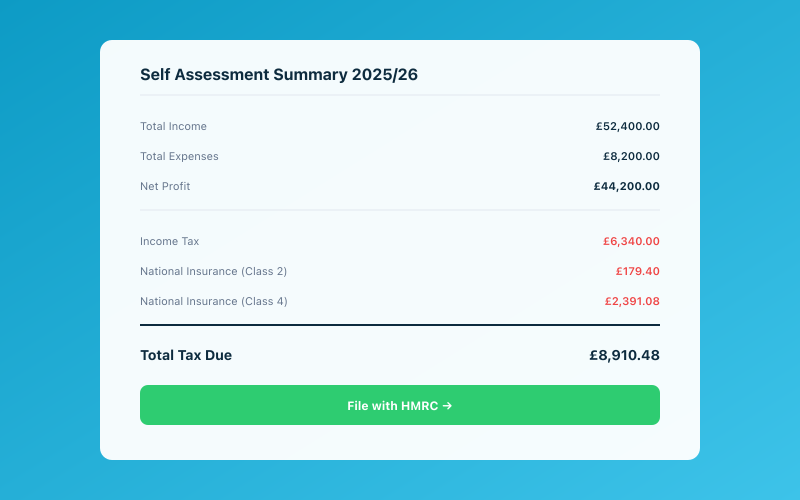 Your Accounted dashboard shows your real-time tax position
Today, Sage offers several products aimed at different segments:
- Sage Business Cloud Accounting (formerly Sage One) — for small businesses
- Sage 50 — the classic desktop product, now with some cloud features
- Sage Intacct — for larger organisations
- Various payroll and HR products
For sole traders, Sage Business Cloud Accounting is the relevant product. But even this carries some of the complexity of Sage's broader ambitions.
Accounted, meanwhile, was designed from scratch for one specific audience: UK sole traders and small landlords. Every decision about features, interface, and pricing was made with this group in mind. There's no legacy to work around and no features inherited from enterprise products.
Ease of Use
Let's start with the most practical question: how easy is each platform to use?
Sage has improved its interface over the years, but it still carries some complexity. The terminology can be confusing for non-accountants (what's a nominal code? why are there so many account categories?), and the navigation isn't always intuitive. Sole traders report spending time learning features they'll never use, simply because those features are there, taking up space in the interface.
Setting up Sage involves quite a few decisions about your chart of accounts, tax settings, and business structure. For someone who's never used accounting software before, this can feel overwhelming.
Accounted is designed to be approachable from the first moment. The setup takes minutes — you enter your business details, connect your bank, and you're off. There's no chart of accounts to configure (Accounted uses HMRC-aligned categories by default), no nominal codes to understand, and no features to click past because they don't apply to you.
And then there's Penny. Accounted's AI bookkeeper lives in WhatsApp, which means much of your bookkeeping can happen without opening a web app at all. Photograph a receipt, send it to Penny, and it's captured and categorised. Ask Penny what your estimated tax bill is. Get a summary of your expenses for the month. It's bookkeeping through conversation, and most people find it remarkably natural.
Features That Matter for Sole Traders
Not all features are created equal. Here's how the two compare on the things sole traders actually care about:
Bank Feeds
Both platforms connect to UK banks via Open Banking. Transactions flow in automatically, which eliminates manual data entry.
Sage handles bank feeds competently, with automated matching and categorisation suggestions. The reconciliation workflow is functional, though it uses accounting terminology that can confuse newcomers.
Accounted also has automatic bank feeds, but adds Penny's AI categorisation on top. Penny learns from your patterns — if you regularly buy fuel at Shell, she'll start categorising those transactions as motor expenses without you needing to confirm each time. The result is faster reconciliation with less effort.
Receipt Management
Sage includes built-in receipt scanning through its mobile app. You can photograph a receipt, and the OCR extracts the key details and auto-categorises the expense. It's a capable, well-integrated feature.
Accounted handles receipts through WhatsApp via Penny. You send a photo, Penny reads it (using OCR and AI), extracts the key details, and attaches it to the matching transaction. There's no separate app to open, no extra steps — just a message in the chat app you already use every day.
Invoicing
Both platforms include invoicing. Sage offers customisable invoice templates, automatic payment reminders, and payment tracking. It's a solid invoicing tool.
Accounted also provides clean, professional invoicing with automatic payment matching. When a client pays an invoice and the payment appears in your bank feed, Accounted matches them automatically. For most sole traders, the invoicing experience is comparable between the two — this isn't a major differentiator.
MTD for Income Tax
This is where the rubber meets the road. From April 2026, sole traders earning over £50,000 will need to submit quarterly updates to HMRC through MTD-compatible software.
Sage supports MTD for Income Tax, and as a major established player, its compliance credentials are solid. The submission process works through the existing Sage interface.
Accounted was designed with MTD as a core consideration. Quarterly submissions flow directly from your ongoing bookkeeping — review the figures Penny has helped you maintain, confirm they're correct, and submit. Because your records are continuously maintained, there's minimal last-minute preparation.
Both handle MTD. The difference is in how much effort the quarterly process requires, and that largely depends on how well your day-to-day bookkeeping is maintained.
Mileage and Home Office
Sage handles mileage claims and working-from-home expenses, though the workflows aren't always the most intuitive. You may need to set up the right expense categories and ensure you're using HMRC's approved rates.
Accounted has purpose-built mileage tracking that uses HMRC's simplified mileage rates, and home office expense claims are guided — you're walked through what you can claim and the calculations are done for you. For sole traders who work from home or drive for business, these built-in guides save time and reduce errors.
Pricing
This is where the comparison gets interesting.
Sage pricing for sole traders starts at a reasonable level for the basic plan, but costs increase as you add features. The plan you'll actually need (with bank feeds, invoicing, and MTD functionality) is likely to be more expensive than the headline "from" price suggests. Additionally, some features require higher-tier plans, and Sage has historically been prone to price increases.
Accounted uses simple, all-inclusive monthly pricing. Everything is included — bank feeds, invoicing, receipt capture, Penny, mileage tracking, MTD submissions, and Self Assessment filing. There are no add-ons and no hidden costs. For sole traders watching their expenses, knowing exactly what you'll pay each month is valuable.
When comparing pricing, make sure you're comparing like for like. Sage's cheapest plan might look attractive, but check whether it includes everything you need. Our Accounted vs Sage comparison has more detail on the pricing nuances.
Support
Sage offers support through various channels — phone, chat, email, and a knowledge base. Response times and quality can vary depending on your plan level. Some users report that getting through to a knowledgeable support agent takes time.
Accounted provides email support and a knowledge base, plus Penny handles many common queries instantly. If you have a tax question or need help with a feature, asking Penny is often faster than waiting for a support queue. For questions that Penny can't answer, the support team is available and responsive.
Who Should Choose Sage?
Sage might be the right choice if:
- You're already using Sage and your records are well-established there
- You plan to grow into a limited company and want software that can grow with you
- Your accountant uses Sage and prefers to work within that ecosystem
- You need payroll alongside your sole trader bookkeeping (for example, if you have an employee)
- You're comfortable with a more traditional accounting interface
Who Should Choose Accounted?
Accounted is likely the better fit if:
- You're a sole trader or landlord and want software designed specifically for you
- You value simplicity and don't want to wade through features built for larger businesses
- You'd rather manage your bookkeeping through WhatsApp than a web app
- Transparent, all-inclusive pricing matters to you
- You want MTD submissions to be as painless as possible
- You're switching from spreadsheets and want something that doesn't feel like a big learning curve
For sole traders considering a switch from Sage specifically, our switching from Sage guide walks through the migration process step by step.
The Bottom Line
Sage is a capable, well-established platform with decades of heritage. For certain businesses, particularly those with complex needs or plans to incorporate, it makes sense. But for sole traders with straightforward finances, Sage often delivers more than needed at a price that's higher than necessary.
Accounted is focused, simple, and built for the way sole traders actually work. With Penny handling the day-to-day bookkeeping through WhatsApp and MTD submissions baked into the workflow, it removes friction from a process that most sole traders would rather not think about.
Your bookkeeping software should make your life easier, not give you another system to learn and manage. Choose accordingly.
Accounted helps UK sole traders stay on top of their bookkeeping and tax. Start your free 30-day trial at getaccounted.co.uk
Related reading:
Related Reading
- Free Accounting Software — What You Get and What You Lose
- Spreadsheet to Accounting Software — Making the Jump
- Why Accountants Are Switching Clients From Xero — The Real Reasons
Compare Accounted with other platforms and start your free trial.
See how Accounted compares to Xero, Sage, QuickBooks and more — and why sole traders are switching. See the full comparison →
Editorial & Research
The Accounted editorial team covers software comparisons, technology, and the tools UK sole traders need to run their businesses efficiently. All software comparisons are based on independent research and publicly available pricing.
Ready to try Accounted?
Join UK sole traders who are simplifying their bookkeeping and tax.
Start your 14-day free trial