Free Accounting Software — What You Get and What You Lose
Free accounting software. Two words that make every sole trader's ears prick up. When you're watching every pound, the idea of getting your bookkeeping done without paying a subscription is incredibly appealing. And to be fair, there are some genuinely useful free options out there.
But "free" in accounting software rarely means "no cost." There are limitations, trade-offs, and hidden costs that aren't immediately obvious. Some of them are inconvenient. Others could actually cost you money when it comes to tax time or HMRC compliance.
This article takes an honest look at what free accounting software gives you, what it doesn't, and how to decide whether free is genuinely good enough — or whether you'd be better off investing a modest amount in a paid tool that does the job properly.
What Free Accounting Software Typically Offers
Let's start with the positives. Free accounting tools generally provide:
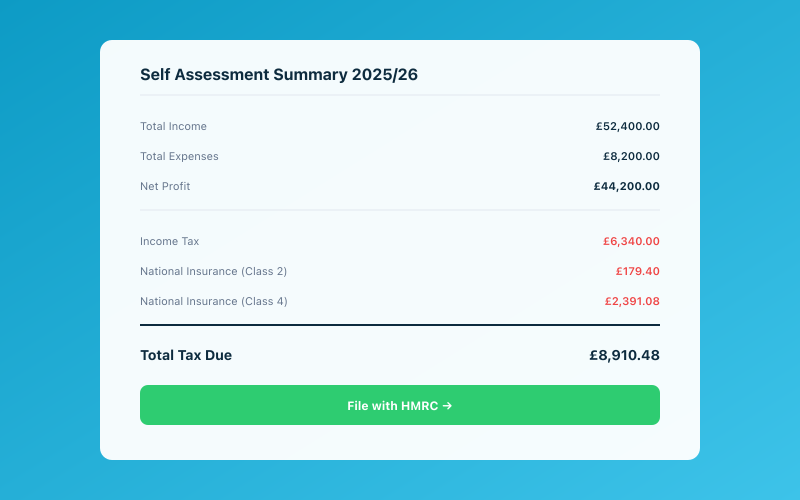 Your Accounted dashboard shows your real-time tax position
Basic income and expense tracking. You can record what you've earned and what you've spent. This is the fundamental building block of bookkeeping, and most free tools handle it adequately.
Simple invoicing. Many free platforms let you create and send invoices to clients. The templates might be basic, and you may be limited in how many you can send per month, but the core functionality is there.
Tax estimates. Some free tools calculate a rough estimate of your tax liability based on your income and expenses. This gives you a ballpark figure, though accuracy varies.
Basic reporting. You'll usually get a simple profit and loss view and perhaps an income/expense breakdown by category. Nothing fancy, but enough to get a general picture of your finances.
Cloud access. Most modern free tools are cloud-based, so you can access them from any device. This is a genuine improvement over the spreadsheet-on-your-laptop approach.
So far, so reasonable. For someone just starting out as a sole trader with minimal income and very simple finances, a free tool can get you through the basics. But here's where things get more nuanced.
What You Typically Lose With Free Software
Bank Feeds
This is often the first feature to be restricted or removed in free plans. Automatic bank feeds — where your bank transactions flow into your accounting software via Open Banking — are enormously valuable. They eliminate manual data entry, reduce errors, and keep your records up to date with minimal effort.
Many free tools either don't offer bank feeds at all or limit them significantly (perhaps to one bank account, or with a delay). Without bank feeds, you're back to entering transactions manually, which is time-consuming and error-prone. It's essentially doing what a spreadsheet does, but in a different interface.
Paid tools like Accounted include bank feeds as standard. Transactions appear automatically, and Penny — the AI bookkeeper — suggests categories for each one. The time saving is substantial and compounds over the year.
Receipt Management
Free tools rarely include proper receipt management. You might be able to upload a photo of a receipt, but automatic data extraction (OCR), intelligent categorisation, and matching receipts to transactions are typically reserved for paid tiers.
This matters more than you might think. HMRC requires you to keep evidence of your expenses, and come an investigation, "I know I had a receipt somewhere" won't cut it. Good receipt management isn't a luxury — it's a compliance requirement.
With Accounted, receipt management happens through Penny on WhatsApp. Photograph a receipt, send it, and Penny extracts the details, categorises the expense, and stores the image. No extra app, no additional cost, no filing cabinet of paper receipts.
MTD Compliance
Here's the big one. Making Tax Digital for Income Tax requires sole traders earning over £50,000 (from April 2026) and over £30,000 (from April 2027) to submit quarterly updates to HMRC through compatible software. Free accounting tools overwhelmingly do not include MTD submission capability.
If you're above the threshold and using free software, you'll need to either:
- Pay for a separate MTD bridging tool (which adds cost and complexity)
- Upgrade to a paid plan that includes MTD
- Switch to different software entirely
In other words, "free" stops being free the moment HMRC's requirements kick in. And since MTD is now a reality rather than a future possibility, this is a limitation that affects a significant number of sole traders today.
For full details on the MTD requirements and timeline, our Making Tax Digital complete guide has everything you need to know.
Self Assessment Filing
Some free tools help you prepare your Self Assessment figures but don't actually file the return with HMRC. You'd need to either file through HMRC's own interface (which is functional but not pleasant) or use a separate filing tool.
Paid platforms like Accounted handle the filing process end to end — your figures flow from your bookkeeping into the return, you review and confirm, and the submission goes directly to HMRC.
Meaningful Support
When you don't pay for a product, you generally can't expect much support. Free tools might offer a knowledge base, a community forum, or email support with slow response times. If you're stuck on a tax question or can't figure out how to categorise a transaction, you're largely on your own.
This is particularly problematic for sole traders who are new to bookkeeping. Questions like "Can I claim this as an expense?" or "How do I handle a refund?" need answers, and getting them quickly can save you from making mistakes that cost money.
Accounted's Penny is essentially built-in support available around the clock. Ask Penny a question in plain English on WhatsApp, and you'll get an immediate, relevant answer. It's not a replacement for professional tax advice on complex matters, but for day-to-day queries, it's invaluable.
Multi-Device and Mobile Access
Some free tools restrict access to desktop only, or their mobile apps lack key features. If you want to manage your bookkeeping on the go — photographing receipts at the point of purchase, checking your figures between meetings, or invoicing a client from your phone — a limited mobile experience is a real drawback.
Data Security and Reliability
Free software needs a business model. If you're not paying with money, consider what you might be paying with. Some free tools monetise through advertising, upselling, or data usage. Check the privacy policy and terms of service carefully.
There's also the question of longevity. Free tools are more likely to shut down, pivot, or dramatically change their terms. If a free platform closes and you haven't exported your data, you could lose your records. HMRC won't be sympathetic.
The "Freemium" Trap
Many accounting tools advertise as free but are actually freemium — meaning the free tier is deliberately limited to push you towards a paid plan. This isn't inherently dishonest, but it can be frustrating.
Common freemium limitations include:
- Transaction limits — you can only enter a certain number of transactions per month before you need to upgrade
- Invoice limits — perhaps you can send five or ten invoices a month for free
- Single user — no accountant access or collaboration
- Basic categories — limited expense categories that don't align well with HMRC requirements
- No automation — everything is manual
- Branding — your invoices carry the software's logo
You start using the tool, get comfortable with it, and then hit a limit that forces you to pay. By that point, switching to a different platform feels like too much effort, so you upgrade. The "free" tool was really a marketing funnel.
There's nothing wrong with paid software — it costs money to build and maintain good tools, and developers deserve to be compensated. The issue is when "free" is used as bait rather than a genuine offering.
When Free Actually Makes Sense
To be fair, there are situations where free accounting software is perfectly adequate:
- You're just starting out and have minimal income (perhaps under the Personal Allowance)
- Your finances are extremely simple — a handful of clients, very few expenses, no VAT
- You're testing the waters with self-employment and aren't sure if it'll become your main income
- You're below the MTD threshold and happy to file Self Assessment manually through HMRC
If any of these describe your situation, a free tool can bridge the gap while you get established. Just be aware that you'll likely outgrow it, and planning your migration before you're forced into one is much less stressful.
When You Should Pay for Software
You should seriously consider paid software if:
- You earn over £30,000 from self-employment or property (MTD is coming for you)
- You have regular invoicing needs and want payments tracked automatically
- You want bank feeds to eliminate manual data entry
- Receipt management matters — you have business expenses and need proper records
- You value your time — even £15 a month is worth it if it saves you hours of manual bookkeeping
- You work with an accountant and need to share access to your books
- You want tax estimates that are accurate and current, not rough guesses
The maths is straightforward. If paid software saves you two hours a month of bookkeeping time, and your time is worth £25 an hour, that's £50 of value for a £15 subscription. You're ahead by £35 every month. Over a year, that's £420 in recovered time.
The Value Sweet Spot
The best accounting software for sole traders isn't the most expensive or the cheapest. It's the one that gives you everything you need — bank feeds, invoicing, receipt management, MTD compliance, tax filing — at a price that makes sense for a sole trader budget.
Accounted sits in this sweet spot. It's not free, but it's priced for sole traders, not for enterprises. Everything is included — there are no tiers to navigate, no add-ons to buy, no per-transaction charges. And with Penny handling the heavy lifting via WhatsApp, you're getting AI-powered bookkeeping that would have cost thousands a year from a human bookkeeper.
For a broader comparison of where different platforms land on the price-value spectrum, our best bookkeeping software UK guide covers the main options. And if you're currently on a free tool and considering an upgrade, our switching from spreadsheets guide covers many of the same migration principles.
The Real Question
The question isn't "Can I find free accounting software?" — you can. The question is "What does free cost me?"
If the answer is a few hours of extra manual work each month, limited compliance features, and the risk of inadequate records when HMRC comes knocking — then "free" isn't really free at all. It's just a different way of paying.
Good bookkeeping software is an investment in your business, not an expense. It saves you time, keeps you compliant, reduces stress at tax time, and gives you a clear picture of your finances. For a few pounds a month, that's a remarkable return.
Choose wisely.
Accounted helps UK sole traders stay on top of their bookkeeping and tax. Start your free 30-day trial at getaccounted.co.uk
Related reading:
- Best Bookkeeping Software UK
- Making Tax Digital — Complete Guide
- Xero Alternatives for UK Users in 2026
Related Reading
- ANNA Money Review — Pros, Cons, and Alternatives
- How to Export Your Data From Xero
- Switching From FreeAgent to Accounted — Complete Migration Guide
Compare Accounted with other platforms and start your free trial.
See how Accounted compares to Xero, Sage, QuickBooks and more — and why sole traders are switching. See the full comparison →
Editorial & Research
The Accounted editorial team covers software comparisons, technology, and the tools UK sole traders need to run their businesses efficiently. All software comparisons are based on independent research and publicly available pricing.
Ready to try Accounted?
Join UK sole traders who are simplifying their bookkeeping and tax.
Start your 14-day free trial