Switching From FreeAgent to Accounted — Complete Migration Guide
If you've been using FreeAgent and it's no longer quite right for your business, you're not alone. Plenty of sole traders and freelancers have found that what once felt like a solid choice has become overcomplicated, overpriced, or simply more than they need. Switching accounting software can feel daunting, but the reality is far less dramatic than you might think — especially when you're moving to something built specifically for the way you work.
This guide walks you through the entire process of migrating from FreeAgent to Accounted, step by step. By the end, you'll have a clear picture of what's involved and how to make the switch without losing sleep (or data).
Why Sole Traders Are Leaving FreeAgent
FreeAgent has been around for a long time and it's built a decent reputation, particularly among freelancers and small limited companies. But over the years, quite a few users have started to feel the pinch.
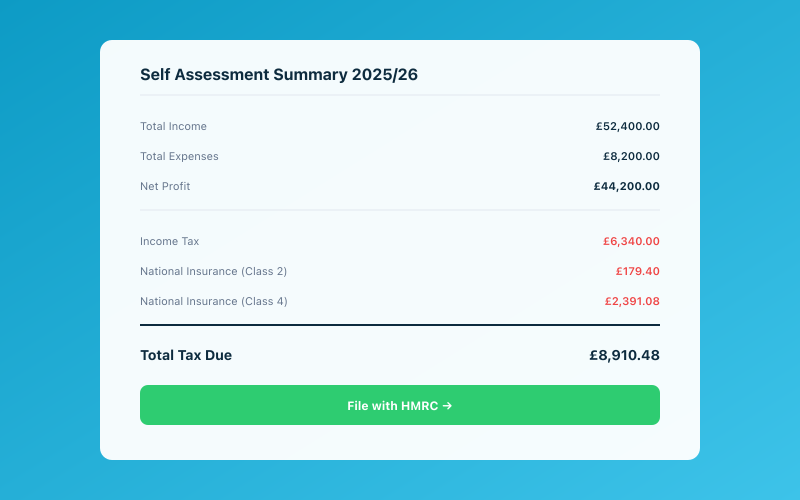 Your Accounted dashboard shows your real-time tax position
The pricing is one thing — FreeAgent isn't cheap, and unless you're getting it bundled through a NatWest or Royal Bank of Scotland business account, you could be paying well over £30 a month. For a sole trader who just needs to track income, log expenses, and submit tax returns, that's a lot of money for features you'll never touch.
Then there's the complexity. FreeAgent was designed to handle limited company accounting, payroll, multi-currency invoicing, and project management. If you're a sole trader, half the interface is irrelevant. You end up clicking past dashboards and menus that have nothing to do with your business, which wastes time and creates confusion.
There's also the matter of Making Tax Digital. With MTD for Income Tax arriving in April 2026, many sole traders are reassessing their software choices. If you need something that handles quarterly submissions simply and without fuss, it makes sense to look at tools purpose-built for that workflow.
Before You Switch — What to Prepare
Before you do anything, take a breath. You don't need to rush this. Here's a checklist of things to sort out before you leave FreeAgent:
Check your current billing cycle. FreeAgent bills monthly or annually. If you're mid-contract on an annual plan, check whether you'll lose money by cancelling early. Some users find it makes sense to switch at the end of a billing period.
Download your data. FreeAgent lets you export quite a bit of information, but you'll want to do this before you close your account. More on this in the next section.
Note your current tax year figures. If you're partway through a tax year, jot down your year-to-date income and expenses. This gives you a reference point to make sure nothing's been missed after migration.
Check for integrations. If you've connected FreeAgent to your bank, Stripe, PayPal, or any other service, make a note of these. You'll want to set up the same connections in Accounted.
Tell your accountant. If you work with an accountant, give them a heads-up. They may want to run a final report before you make the move. If they're already frustrated with FreeAgent's pricing, they might be delighted — have a look at why accountants are switching their clients for some context on that trend.
How to Export Your Data From FreeAgent
FreeAgent provides several ways to get your data out. Here's how to grab what you need:
Contacts and clients. Go to the Contacts section and use the export option to download a CSV of your clients and suppliers. This is handy if you invoice regularly and want to set up the same contacts in Accounted.
Invoices. You can export your invoice history as a CSV file. This gives you a record of every invoice you've raised, including dates, amounts, and payment status. You can also download individual invoices as PDFs for your records.
Bank transactions. Navigate to your bank accounts and export your transaction history. FreeAgent lets you download this as a CSV, which is useful as a backup even if you plan to reconnect your bank feed directly in Accounted.
Expenses. Your expense claims can also be exported. If you've been diligent about categorising expenses in FreeAgent, you'll have a clean record to refer to.
Profit and loss / tax reports. Before you go, generate and download your key reports — profit and loss, balance sheet (if applicable), and any Self Assessment or VAT summaries. These serve as your official records for the current and previous tax years.
Receipts and attachments. FreeAgent stores uploaded receipts against transactions and expenses. Unfortunately, there's no bulk download for these. You may need to download them individually if you haven't kept copies elsewhere. Going forward, Accounted makes receipt management painless — Penny, the AI bookkeeper, can handle receipt capture through WhatsApp, so you'll never have to manually upload again.
Setting Up Accounted
Once you've got your FreeAgent data backed up, it's time to get started with Accounted. The setup process is refreshingly quick:
Create your account. Head to getaccounted.co.uk and sign up for a free trial. You'll be asked a few basic questions about your business — your trading name, what you do, and your UTR number if you have one handy.
Connect your bank. Accounted supports Open Banking connections with most UK banks. Linking your account takes a couple of minutes and your transactions will start flowing in automatically. If you've been using FreeAgent's bank feed, you'll find this works in much the same way.
Set up your categories. Accounted uses HMRC-aligned expense categories, so everything maps directly to your Self Assessment or MTD submissions. If you've been using custom categories in FreeAgent, you'll find the transition straightforward — most of the same categories exist, just with clearer names.
Import your contacts. If you exported a CSV of your clients from FreeAgent, you can bring them into Accounted. For most sole traders, though, it's just as quick to create contacts as you raise new invoices.
Meet Penny. This is where things get genuinely different from FreeAgent. Penny is Accounted's AI bookkeeper, available through WhatsApp. You can send Penny a photo of a receipt, ask a quick tax question, or get a summary of your finances — all from your phone, without opening a web app. It's a completely different way of doing your books, and most people find it dramatically faster.
What About Your Historical Data?
One of the biggest worries people have when switching is losing their history. Let's put that concern to rest.
Your FreeAgent data doesn't disappear just because you cancel your subscription. You've already exported your records (you did follow the steps above, right?), so you've got everything backed up. HMRC requires you to keep business records for at least five years, so store those exports somewhere safe — a cloud drive like Google Drive or Dropbox works perfectly.
For your current tax year, Accounted will pick up from wherever you are. If you switch mid-year, your bank feed will pull in historical transactions, and you can categorise anything that's outstanding. There's no need to re-enter months of data manually.
If you're switching at the start of a new tax year (April is a natural time), it's even simpler. You start fresh in Accounted and your FreeAgent records cover everything up to that point.
For a broader overview of how migration works from other platforms, our guide to switching from spreadsheets covers some of the same principles around getting your records in order.
Common Concerns When Switching
"Will I lose my MTD connection?" No. You'll set up MTD through Accounted instead. Accounted is HMRC-recognised for Making Tax Digital, so your quarterly submissions and end-of-period statements are fully covered.
"What if my accountant doesn't know Accounted?" Accounted has an accountant portal that gives your accountant read-only (or full) access to your books. Most accountants find it simpler to navigate than FreeAgent, particularly for sole trader clients. If your accountant is curious, point them to our guide for accountants considering the switch.
"Is it really cheaper?" Yes. Accounted is priced specifically for sole traders and small landlords, without the overhead of features designed for limited companies. You're not paying for payroll, multi-currency support, or project tracking you don't use.
"Can I still do everything I did in FreeAgent?" For sole trader bookkeeping, invoicing, expense tracking, and tax submissions — absolutely. FreeAgent does have solid ML-powered categorisation that learns from your corrections, and Accounted's Penny offers a similar capability through a different interface — learning your patterns and auto-categorising with high accuracy over time. If you were using FreeAgent's project management, time tracking, or limited company features, those won't be in Accounted because they're not relevant to sole traders. That's by design, not a limitation.
Making the Switch Smooth — Practical Tips
Here are a few tips from people who've already made the move:
-
Switch at the start of a quarter. If you're already submitting MTD quarterly updates, switching at the beginning of a quarter means you can submit the previous quarter from FreeAgent and start the new one in Accounted. Clean break, no overlap.
-
Don't cancel FreeAgent immediately. Keep your FreeAgent account active for a month after you've set up Accounted. This gives you time to cross-reference figures and make sure everything lines up. Once you're confident, cancel.
-
Use Penny from day one. The sooner you start sending receipts and queries to Penny via WhatsApp, the sooner you'll realise how much easier your bookkeeping can be. Most switchers say this is the single biggest improvement over FreeAgent.
-
Check the comparison guides. If you want a side-by-side look at features, our Accounted vs Xero vs QuickBooks comparison gives a broader picture of where Accounted fits in the market. You might also find the best bookkeeping software for the UK roundup useful.
Ready to Make the Move?
Switching from FreeAgent to Accounted isn't a leap of faith — it's a practical decision that thousands of sole traders have already made. The process takes an afternoon at most, and the ongoing time savings are substantial. No more navigating menus built for limited companies. No more paying for features you don't need. Just clean, simple bookkeeping with an AI assistant that actually helps.
Accounted helps UK sole traders stay on top of their bookkeeping and tax. Start your free 30-day trial at getaccounted.co.uk
Related reading:
- Switching From FreeAgent — Full Guide
- Why Accountants Are Switching Clients to Accounted
- Best Bookkeeping Software UK
Related Reading
- Is FreeAgent Really Free with NatWest? The Fine Print
- Spreadsheet to Accounting Software — Making the Jump
- Xero Pricing in 2026 — The Complete Breakdown
See our detailed comparison: Accounted vs Quickfile: UK Accounting Compared.
Related reading: Best Accounting Software for Construction UK.
Related reading: Best Bookkeeping Apps for Self-Employed UK 2026.
Related reading: Best CIS Software for Contractors UK 2026.
Related reading: Best Free Tools for UK Sole Traders 2026.
Related reading: Best Invoice Software for Small Businesses UK.
Related reading: Best Payroll Software for Small Businesses UK.
Related reading: Best Personal Finance Apps for Self-Employed UK.
Related reading: Best Receipt Scanning Apps UK 2026.
For more on this topic, read Best Tax Management Software for Sole Traders.
You may also find our Best Tools for Managing Tax UK: 2026 Guide helpful.
Related reading: Cheapest Accounting Software UK 2026: Prices.
See our detailed comparison: Free vs Paid Accounting Software: What You Need.
Related reading: Hnry UK Review: Is 1% of Income Worth It?.
Related reading: How Accounted Compares to Spreadsheet Bookkeeping.
You may also find our Self-Employed Accounting Software UK: Full Guide helpful.
Compare Accounted with other platforms and start your free trial.
See how Accounted compares to Xero, Sage, QuickBooks and more — and why sole traders are switching. See the full comparison →
Editorial & Research
The Accounted editorial team covers software comparisons, technology, and the tools UK sole traders need to run their businesses efficiently. All software comparisons are based on independent research and publicly available pricing.
Ready to try Accounted?
Join UK sole traders who are simplifying their bookkeeping and tax.
Start your 14-day free trial