Spreadsheet to Accounting Software — Making the Jump
There's a certain pride in running your finances on a spreadsheet. You built it yourself, you know where everything is, and it cost you nothing. For years, plenty of sole traders have managed perfectly well with a carefully maintained Excel file or Google Sheet, tracking every invoice, receipt, and expense in neat little columns.
But things change. HMRC's Making Tax Digital for Income Tax is arriving in April 2026, and with it comes a requirement for digital record-keeping and quarterly submissions that spreadsheets simply can't handle on their own. Even setting MTD aside, there comes a point where a spreadsheet starts costing you more in time than it saves you in money.
If you're weighing up whether to make the jump from spreadsheets to proper accounting software, this guide covers everything — what you'll gain, what you'll lose, and how to make the transition without chaos.
Why Spreadsheets Stop Working
Let's be clear: spreadsheets aren't bad. Excel and Google Sheets are extraordinarily powerful tools, and if you've been running your sole trader finances on one, you've probably built something that works. The problem isn't the spreadsheet itself — it's what happens as your needs grow.
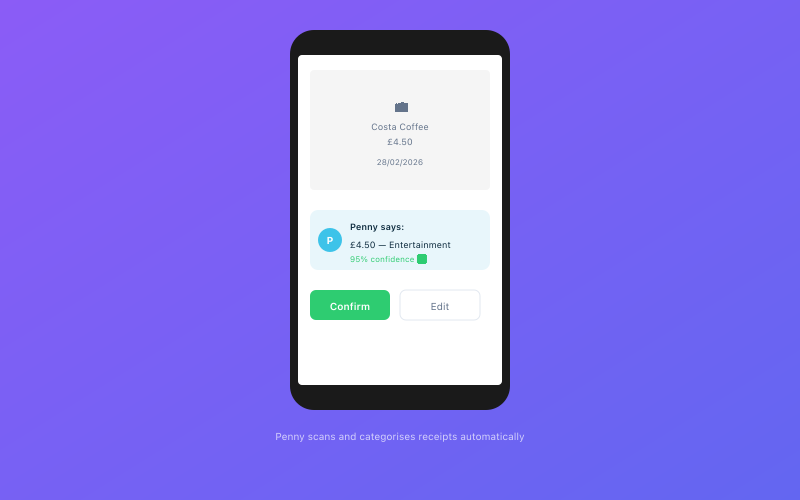 Penny scans and categorises your receipts automatically via WhatsApp
Human error is inevitable. One mistyped formula, one row accidentally deleted, one cell referencing the wrong column — and your entire tax calculation could be off. Spreadsheets don't validate your data. They do exactly what you tell them to, even when what you tell them is wrong. HMRC won't accept "I had a formula error" as a reasonable excuse for an incorrect return.
Bank reconciliation is manual. Every transaction needs to be typed in by hand or copied from a bank statement. That's fine when you have ten transactions a month. When you have fifty or a hundred, it becomes a genuine time drain — and every manual entry is another opportunity for a mistake.
No MTD compliance. This is the big one. From April 2026, sole traders earning over £50,000 will need to submit quarterly updates to HMRC through MTD-compatible software. Spreadsheets alone don't qualify. You can use them alongside bridging software, but that's an extra cost and an extra step that rather defeats the purpose.
Receipt management is a nightmare. Where do you keep your receipts? In a folder? A shoebox? Attached to emails? A spreadsheet can record that you spent £45.99 at Screwfix, but it can't store the actual receipt. When HMRC asks to see proof of a claim, you need to be able to find it.
Tax calculations aren't automatic. Your spreadsheet might estimate your tax bill, but it won't know about the latest allowance changes, threshold adjustments, or National Insurance rates unless you update it manually. And if you get those wrong, your estimates are meaningless.
What You'll Gain by Switching
Moving to dedicated accounting software isn't just about ticking HMRC's boxes. It genuinely makes your life easier in several practical ways:
Automatic bank feeds. Most modern accounting software connects to your bank via Open Banking. Transactions appear automatically, which eliminates manual data entry and dramatically reduces errors. In Accounted, for instance, your bank transactions flow in daily and Penny — the AI bookkeeper — suggests categories for each one. You just confirm, and it's done.
Receipt capture. Instead of filing paper receipts or saving PDFs to random folders, you can photograph a receipt and attach it directly to the relevant transaction. With Accounted, you can send a photo to Penny via WhatsApp, and it's captured, categorised, and stored automatically. No more digging through shoeboxes.
MTD compliance built in. Accounted is HMRC-recognised for Making Tax Digital. Your quarterly updates and end-of-period statements can be submitted directly from the software. No bridging tools, no workarounds, no extra costs.
Real-time tax estimates. Good accounting software calculates your estimated tax bill based on your actual figures, updated in real time. This means no more end-of-year surprises and much better cash flow planning.
Professional invoicing. If you've been creating invoices in Word or a spreadsheet template, switching to software with built-in invoicing is a revelation. You create an invoice, send it, and the system automatically matches the payment when it arrives in your bank feed.
Audit trail. Every change is logged. If HMRC ever queries your records, you have a complete, timestamped trail of every transaction, categorisation, and submission. Spreadsheets don't offer this.
What You'll Lose (And Why It's Fine)
Switching from a spreadsheet does involve giving up a few things:
Total customisation. Your spreadsheet was yours. You could add columns, build pivot tables, and format things exactly how you wanted. Accounting software is more structured. But that structure is a feature, not a bug — it ensures your records meet HMRC's requirements and that nothing falls through the cracks.
The illusion of free. Spreadsheets are free (well, Excel isn't, but Google Sheets is). Accounting software costs money — typically £10 to £30 a month for sole trader plans. But consider what your time is worth. If you're spending five hours a month on bookkeeping that software could do in one, the maths is clear. And if the software also handles your MTD submissions, you're saving the cost of bridging software or an accountant doing it for you.
Offline access. If your spreadsheet lives on your local drive, you can access it without an internet connection. Most accounting software is cloud-based, so you need to be online. In practice, this is rarely an issue in 2026, but it's worth mentioning.
How to Make the Switch — Step by Step
Right, here's the practical bit. Moving from a spreadsheet to accounting software is more straightforward than you might fear.
Step 1: Choose your software. If you're a sole trader, you want something built for sole traders — not a scaled-down version of enterprise software. Accounted is designed specifically for UK sole traders and landlords, with MTD compliance, AI-powered bookkeeping through Penny, and pricing that reflects the simplicity of what you need. For comparisons with other options, our best bookkeeping software guide covers the main choices.
Step 2: Export your spreadsheet data. Save your current spreadsheet as a CSV file. Make sure it includes all your transactions for at least the current tax year, with dates, descriptions, amounts, and categories. This is your reference document.
Step 3: Sign up and connect your bank. Create your account, then connect your bank via Open Banking. This takes a couple of minutes. Once connected, your transactions will start appearing automatically. Depending on your bank, you may get several months of historical data, which could overlap with what's in your spreadsheet.
Step 4: Categorise your transactions. Go through your transactions and assign them to the right categories. In Accounted, Penny will suggest categories based on the merchant name and transaction description. For most transactions, the suggestion will be spot on — you just tap to confirm. This is dramatically faster than manually typing categories into a spreadsheet column.
Step 5: Upload any historical receipts. If you have digital copies of receipts from the current tax year, upload them against the relevant transactions. Going forward, just send receipt photos to Penny on WhatsApp.
Step 6: Verify your figures. Compare your software's income and expense totals against your spreadsheet for the same period. They should match. If there's a discrepancy, investigate — it's usually a transaction that was in the spreadsheet but not in the bank feed, or vice versa. Once the figures align, you can be confident that your new system is correct.
Step 7: Archive your spreadsheet. Don't delete it. HMRC requires you to keep records for at least five years. Save your spreadsheet to a cloud drive or external storage, clearly labelled with the tax years it covers. You probably won't need it again, but it's there if you do.
For a more detailed walkthrough of the spreadsheet migration process, our switching from spreadsheets guide goes into even more depth.
When's the Best Time to Switch?
The best time is now, frankly — but if you want a clean transition, the start of a tax year (6 April) is ideal. Your spreadsheet covers everything up to 5 April, and your accounting software takes over from 6 April. No overlap, no confusion.
The second-best time is the start of a quarter, particularly if you're already thinking about MTD. Aligning your switch with a quarterly period means your first MTD submission from the new software covers a complete quarter.
The third-best time? Genuinely, whenever you stop procrastinating. The longer you wait, the more catching up you'll have to do.
The MTD Factor
Let's address the elephant in the room. If you earn over £50,000 from self-employment or property, you'll need to comply with Making Tax Digital for Income Tax from April 2026. Those earning over £30,000 will follow in April 2027.
MTD requires you to keep digital records and submit quarterly updates to HMRC. Spreadsheets can technically be used for record-keeping, but only if they're linked to compatible bridging software — and that adds cost and complexity.
Purpose-built accounting software like Accounted handles the entire MTD workflow. Your records are digital by default, your quarterly submissions happen with a few clicks, and you don't need additional tools. If MTD is the reason you're finally making the jump, you're making the right call. For full details, have a look at our complete MTD guide.
You've Outgrown the Spreadsheet — And That's a Good Thing
Moving on from a spreadsheet isn't admitting defeat. It's recognising that your business has grown, that your time has value, and that your energy is better spent on actual work than on data entry. The spreadsheet got you here. Now let something else take the strain.
Accounted helps UK sole traders stay on top of their bookkeeping and tax. Start your free 30-day trial at getaccounted.co.uk
Related reading:
- Switching From Spreadsheets — Full Guide
- Making Tax Digital — Complete Guide
- Best Bookkeeping Software UK
Related Reading
- Free Accounting Software — What You Get and What You Lose
- Sage vs Accounted — Which Suits Sole Traders Better?
- Why Accountants Are Switching Clients From Xero — The Real Reasons
Compare Accounted with other platforms and start your free trial.
See how Accounted compares to Xero, Sage, QuickBooks and more — and why sole traders are switching. See the full comparison →
Editorial & Research
The Accounted editorial team covers software comparisons, technology, and the tools UK sole traders need to run their businesses efficiently. All software comparisons are based on independent research and publicly available pricing.
Ready to try Accounted?
Join UK sole traders who are simplifying their bookkeeping and tax.
Start your 14-day free trial