How to Switch from FreeAgent to Accounted: Why and How
FreeAgent has been a popular choice among UK freelancers and sole traders for years, and for good reason. It was one of the first cloud accounting platforms genuinely designed for small UK businesses. But circumstances change — both yours and FreeAgent's — and a growing number of users are finding that Accounted is now a better fit.
This guide covers the reasons people switch and walks you through the migration process step by step.
Why FreeAgent Users Are Looking Elsewhere
The NatWest Free Deal
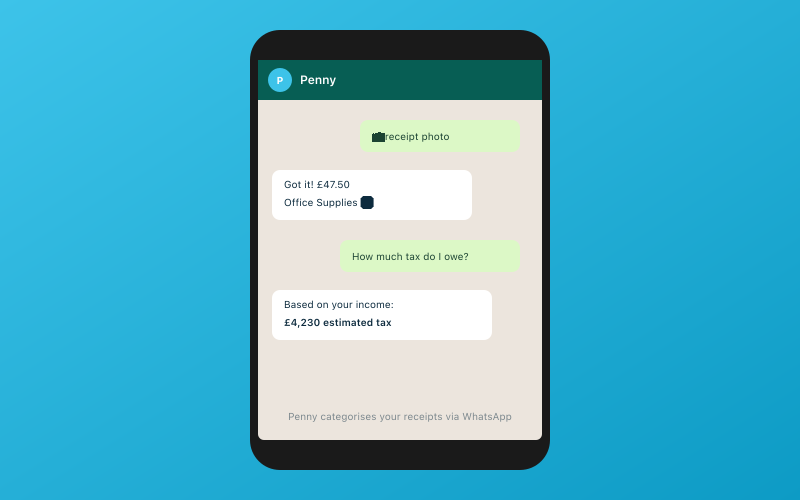 Chat with Penny on WhatsApp — your AI bookkeeper
For several years, NatWest (and previously RBS) offered FreeAgent free to their business banking customers. This was an excellent deal, and it brought thousands of sole traders and small businesses onto the platform.
However, banking partnerships change. If you are a NatWest customer who has been using FreeAgent for free, there is a possibility that this arrangement may not continue indefinitely. When it comes time to pay the full FreeAgent subscription, it makes sense to compare what is available rather than defaulting to what you already know.
Self Assessment Coverage
FreeAgent handles basic Self Assessment filing well, particularly for straightforward sole trader returns. But if your tax affairs are more complex — rental income, foreign income, capital gains, pension contributions, student loan repayments — you may have found gaps.
Accounted supports 11 of 13 SA schedules. That covers sole trade income, rental income (UK and foreign), dividends, interest, pensions, capital gains, and more. If you have been using FreeAgent for your main trade but filing other schedules separately or through your accountant, Accounted can bring it all into one place.
Pension Tracking
If you are self-employed and contributing to a personal pension or SIPP, you need your bookkeeping software to handle pension contributions properly. This includes tracking contributions, calculating tax relief, and ensuring the figures flow through to your Self Assessment correctly.
FreeAgent's pension handling is limited. Accounted tracks pension contributions as part of your normal bookkeeping workflow, and Penny ensures they appear on the right SA schedule.
WhatsApp Receipt Scanning
FreeAgent has a mobile app for receipt scanning, which works reasonably well. But Accounted takes a different approach — you send receipts to Penny via WhatsApp. No app download, no separate login, no switching between apps. Just photograph the receipt and send it as you would send a photo to a friend.
This approach works particularly well for people who find they never quite get round to opening the FreeAgent app to snap their receipts.
Accountant Portal
FreeAgent offers accountant access, but Accounted's free accountant portal goes further. It provides a dedicated dashboard where accountants can see all their Accounted clients, review books, make adjustments and submit tax returns. If your accountant works with multiple clients on Accounted, they benefit from a streamlined workflow.
What You Will Need for the Migration
Before starting:
- Your FreeAgent login credentials
- Access to your online banking
- Your accountant's email address
- About 30 to 45 minutes
Keep FreeAgent active for a couple of weeks after migrating so you can cross-check figures.
Step 1: Export Your Data from FreeAgent
FreeAgent provides data export tools, though they are spread across different parts of the software.
Chart of Accounts and Categories
FreeAgent uses a simplified category system rather than a traditional chart of accounts. You can export your category list from the reporting section by running a Profit and Loss report with full detail and exporting as CSV.
Bank Transactions
Go to Banking in FreeAgent, select each bank account, and export the transactions. FreeAgent allows you to export bank statement lines along with their explanations (categorisations).
Contacts
Export your contact list from Contacts > Export. This brings across customer and supplier details.
Invoices
Go to Work > Invoices and export your invoice list. Do the same for bills under Work > Bills.
Reports for Verification
Run and export the following reports:
- Profit and Loss for the current and previous tax year
- Balance Sheet as at the migration date
- Aged Debtors and Aged Creditors
- VAT Returns history if you are VAT registered
Step 2: Import into Accounted
Log in to Accounted or start a free trial. Go to Settings > Migration and select FreeAgent as your source platform.
Upload your exported files. Accounted's migration engine understands FreeAgent's data structure and maps categories automatically. FreeAgent uses its own naming conventions for expense and income categories, and the migration engine translates these to Accounted's chart of accounts.
Penny analyses your imported transaction history and learns your categorisation patterns. If you were consistent in how you categorised expenses in FreeAgent, Penny picks up on that consistency and applies it going forward.
The import typically completes within a few minutes. The migration engine flags any items it could not map confidently, and you resolve those manually — usually just a handful of transactions.
Step 3: Verify Your Data
Compare Key Reports
Run the same reports in Accounted that you exported from FreeAgent — Profit and Loss, Balance Sheet, and aged reports. The figures should match.
Check Tax Calculations
If you are in the middle of a tax year, compare the estimated tax position in both platforms. Small differences can arise from rounding or timing, but the figures should be very close.
Review VAT History
If you are VAT registered, check that the VAT figures for recent periods match between FreeAgent and Accounted. This is particularly important if your next VAT return is due soon.
Spot-Check Categorisations
Look at 20 or 30 transactions across different months to make sure the category mapping is accurate. Correct anything that looks wrong — Penny learns from your corrections.
Step 4: Connect Bank Feeds
Go to Banking > Connect Account in Accounted and link your bank via Open Banking. Transactions flow in automatically from that point.
One advantage over FreeAgent is that Accounted's AI categorisation is active from the start, trained on your FreeAgent history. You should find that most transactions are categorised correctly without any intervention.
If you banked with NatWest and had automatic FreeAgent access through them, your bank feed setup in Accounted will be the same Open Banking process as with any other bank. There is no dependency on a banking partnership.
Step 5: Set Up the Features FreeAgent Did Not Have
This is the part where the switch starts to feel worthwhile.
WhatsApp Receipts
Go to Settings > WhatsApp and link your phone number. From now on, photograph any receipt and send it to Penny on WhatsApp. She reads it, extracts the details, and matches it to the right transaction. No more opening an app and waiting for the camera to load.
Full Self Assessment
If you previously had to file some SA schedules separately because FreeAgent did not support them, check the SA section in Accounted. With 11 of 13 schedules supported, you may find that everything can now be handled in one place.
MTD for Income Tax
If MTD for Income Tax applies to you, Accounted handles the quarterly submissions and end-of-period statements that HMRC requires. This is built in, not an add-on.
Accountant Portal
Invite your accountant from Settings > Accountant Access. If they are not already familiar with Accounted, the portal is self-explanatory. They pay nothing to use it.
Step 6: Cancel FreeAgent
Once you are happy with Accounted — give it two to three weeks — cancel your FreeAgent subscription. If you were on the NatWest free deal, there is nothing to cancel on the payment side, but you should still formally close your FreeAgent account so old data is handled properly.
Download a final export from FreeAgent before closing for your records.
Common Questions
I am on the free NatWest deal. Is it worth switching now?
If the deal still works for you and FreeAgent meets your needs, there is no urgency. But if you need better SA coverage, MTD for Income Tax support, or WhatsApp receipts, it is worth trying Accounted alongside FreeAgent. The free trial lets you compare without commitment.
Will Penny be as good as FreeAgent's categorisation from day one?
She will be very close. Penny learns from your FreeAgent history during migration, so she starts with your existing patterns rather than guessing from scratch.
What about projects and time tracking?
FreeAgent includes project management and time tracking features that Accounted does not replicate. If you rely on those, you may want to use a dedicated project tool alongside Accounted.
Try It for Yourself
The best way to see whether Accounted is the right move is to try it. Start your free trial, run the migration from FreeAgent, and spend a couple of weeks letting Penny handle your bookkeeping. Most people find the combination of WhatsApp receipts, broader Self Assessment support and AI categorisation makes the switch a clear improvement.
Related Reading
- Best CIS Software for Construction Businesses in 2026
- Best Self Assessment Software 2026: File Your Tax Return Online
Start your free trial and see how Accounted simplifies your bookkeeping.
Editorial & Research
The Accounted editorial team covers software comparisons, technology, and the tools UK sole traders need to run their businesses efficiently. All software comparisons are based on independent research and publicly available pricing.
Ready to try Accounted?
Join UK sole traders who are simplifying their bookkeeping and tax.
Start your 14-day free trial