ANNA Money Review — Pros, Cons, and Alternatives
What Is ANNA Money?
ANNA (Absolutely No-Nonsense Admin) is a UK business account that combines banking with invoicing, expense tracking, and basic tax tools. The idea is appealing: instead of having a separate bank account and separate accounting software, ANNA puts everything in one place.
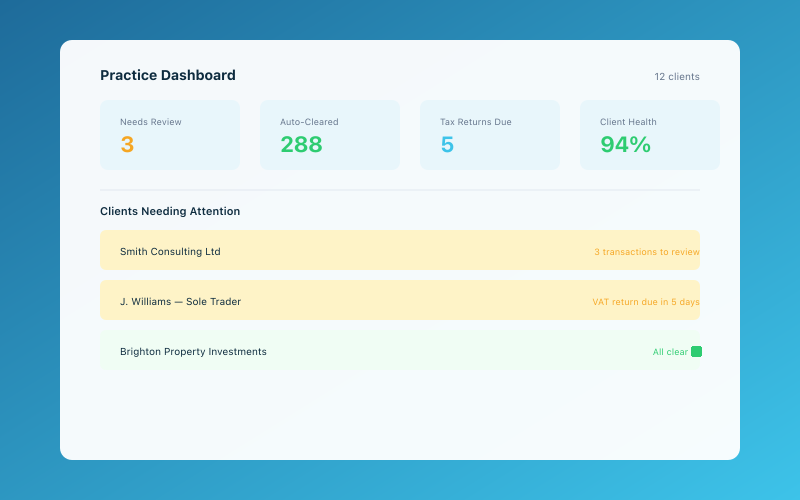 The Accounted practice dashboard — manage all your clients in one place
It launched with a focus on making business admin easier for small businesses and sole traders. And in many ways, it delivers on that promise. But "easier" isn't always the same as "better," and there are some important limitations worth understanding before you sign up.
Let's take an honest look at what ANNA does well, where it falls short, and who it's actually best for.
ANNA Money Pricing
ANNA offers several tiers, and the pricing has evolved over the years.
Free Plan — £0/month
The free tier gives you:
- A business current account
- Basic invoicing
- Auto-categorisation of transactions
- Limited support
It's genuinely free for basic use, though there are transaction limits and you'll see fewer features than on paid plans.
Small Business — £12.90/month
This adds:
- Unlimited transactions
- Tax calculation pots
- Priority support
- More advanced invoicing features
Business — £24.90/month
The top tier includes:
- Everything in Small Business
- Multi-user access
- Advanced integrations
- Enhanced support
Transaction Fees
Beyond the monthly subscription, ANNA charges fees for certain transactions. Cash deposits, international transfers, and some payment types carry additional costs. These can add up if you handle a lot of cash or international business.
What ANNA Does Well
Banking and Bookkeeping in One Place
ANNA's biggest selling point is integration. Because your bank account and your business tools live in the same app, transactions are automatically captured and categorised. There's no bank feed to set up, no reconciliation to do, and no delays. Your spending shows up in your records instantly.
This is genuinely convenient. If you've ever spent an afternoon reconciling bank feeds in Xero or QuickBooks, you'll appreciate the simplicity.
Tax Savings Pots
ANNA automatically estimates your tax liability and lets you set aside money in a separate pot. This is a brilliant feature for self-employed people who struggle with the discipline of saving for their tax bill.
When your quarterly or annual tax bill arrives, the money is already there. For anyone who's ever been caught short by a Self Assessment bill, this is genuinely useful.
Simple Invoicing
You can create and send invoices directly from the ANNA app. When a customer pays, the payment is automatically matched to the invoice. It's clean, simple, and works well for straightforward invoicing needs.
Auto-Categorisation
ANNA uses basic AI to categorise your transactions. When you buy fuel, it recognises the merchant and tags it as travel. When you pay for software, it categorises it accordingly. It's not perfect, but it reduces the manual categorisation work significantly.
The Interface
ANNA's app is well-designed. It's clean, colourful, and easy to navigate. For people who find traditional accounting software intimidating, ANNA feels much more approachable. It feels more like a modern banking app than an accounting tool — because that's essentially what it is.
Where ANNA Falls Short
It's Not Full Accounting Software
This is the fundamental limitation. ANNA is a banking product with bookkeeping features layered on top. It's not a complete accounting solution.
There's no double-entry bookkeeping. No proper profit and loss reports. No balance sheet. No detailed expense analysis. No year-end accounts preparation. If your accountant asks for a trial balance, ANNA can't produce one.
For very simple businesses — say, a sole trader with one income stream and straightforward expenses — this might not matter. But as soon as your finances get even slightly complex, you'll feel the limitations.
Reporting Is Basic
ANNA gives you a spending breakdown and some basic charts, but that's about it. If you want to understand your profit margins, track income trends over time, or produce management accounts, you'll need to export your data and use something else.
Compare this to even basic accounting software like FreeAgent or Xero, where you can generate profit and loss statements, cash flow reports, and aged debtors lists at the click of a button.
MTD Compliance Is Limited
With Making Tax Digital becoming mandatory for sole traders earning over £50,000 from April 2026, MTD compliance is crucial. ANNA has been working on MTD features, but as of early 2026, its MTD capabilities are more limited than dedicated accounting software.
If you need to submit quarterly updates to HMRC, you'll want to make sure ANNA can handle this for your specific situation. For many users, a dedicated MTD-compliant tool will be more reliable.
You're Locked Into ANNA's Banking
When your banking and bookkeeping are bundled together, switching either one becomes complicated. If you find a better bank account or want to move to proper accounting software, you can't easily separate the two.
With standalone accounting software, you can switch banks without touching your bookkeeping. With ANNA, everything is intertwined. This creates a form of lock-in that's worth thinking about before you commit.
No Receipt OCR
This surprised us. ANNA doesn't offer optical character recognition (OCR) for receipts. You can photograph a receipt and attach it to a transaction, but the app won't automatically read the amount, date, and vendor from the image. You'll need to enter those details manually.
In 2026, when tools like Accounted's Penny can read a receipt from a WhatsApp photo and automatically categorise it, create the record, and file it — no manual entry required — this feels like a significant gap.
Limited Integration Ecosystem
ANNA integrates with some popular tools, but its ecosystem is much smaller than Xero's or QuickBooks'. If you use specific CRM, project management, or e-commerce platforms, check ANNA's integration list before committing.
Who Is ANNA Best For?
ANNA works well for a specific type of business owner:
- Brand new sole traders who want the simplest possible setup
- Very simple businesses with one income stream and straightforward expenses
- People who hate accounting and want everything in one app
- Cash-based businesses that benefit from the tax pots feature
If that sounds like you, ANNA can be a perfectly adequate starting point. Just be aware that you may outgrow it.
Who Should Look Elsewhere?
ANNA is probably not the right choice if you:
- Need proper bookkeeping records for HMRC
- Want detailed financial reporting
- Have multiple income streams or complex expenses
- Need MTD compliance you can rely on
- Work with an accountant who needs access to your books
- Plan to grow your business significantly
Better Alternatives for Serious Bookkeeping
If ANNA's simplicity appeals to you but you need more substance underneath, here are some alternatives worth considering.
Accounted
If what you like about ANNA is the simplicity, Accounted offers something even simpler — with proper bookkeeping underneath. Penny, the AI bookkeeper, works through WhatsApp. You send photos of receipts, forward invoices, and ask questions in plain English. Penny handles categorisation, record-keeping, and MTD compliance.
Unlike ANNA, Accounted keeps proper HMRC-compliant records, offers intelligent categorisation, and is built specifically for MTD. And you're not locked into a specific bank account — use whatever bank you like.
FreeAgent
If you want traditional accounting software that's still relatively easy to use, FreeAgent is a good middle ground. It's UK-focused, handles self-assessment, and is MTD-compliant. It's more complex than ANNA, but it's a proper accounting tool.
Xero Starter
If you need proper double-entry bookkeeping but want to keep costs down, Xero's Starter plan at £15/month (+VAT) gives you basic accounting with a 20-invoice limit. It's more capable than ANNA on the accounting front, though less convenient on the banking side.
ANNA vs Accounted — A Direct Comparison
| Feature | ANNA | Accounted | |---------|------|-----------| | Banking included | Yes | No (use any bank) | | Receipt OCR | No | Yes (via WhatsApp) | | Auto-categorisation | Basic | AI-powered | | MTD compliance | Limited | Full | | Reporting | Basic | Comprehensive | | Double-entry bookkeeping | No | Handled by AI | | Your time required | Moderate | Minimal | | Bank lock-in | Yes | No |
The Verdict
ANNA Money is a clever product that solves a real problem: the hassle of managing separate banking and bookkeeping tools. For very simple businesses, it can be a convenient all-in-one solution.
But convenience has limits. ANNA's bookkeeping features are surface-level, its reporting is basic, and its MTD compliance isn't as robust as dedicated accounting tools. As your business grows — or as HMRC's requirements become more demanding — you're likely to outgrow ANNA.
If simplicity is what you're after, Accounted with Penny offers the same ease of use with proper bookkeeping underneath. And you get to keep whatever bank account you like.
Related Reading
See our detailed comparison: Accounted vs Quickfile: UK Accounting Compared.
Related reading: Best Accounting Software for Construction UK.
Related reading: Best Bookkeeping Apps for Self-Employed UK 2026.
Related reading: Best CIS Software for Contractors UK 2026.
Related reading: Best Free Tools for UK Sole Traders 2026.
Related reading: Best Invoice Software for Small Businesses UK.
Related reading: Best Payroll Software for Small Businesses UK.
Related reading: Best Personal Finance Apps for Self-Employed UK.
Related reading: Best Receipt Scanning Apps UK 2026.
For more on this topic, read Best Tax Management Software for Sole Traders.
You may also find our Best Tools for Managing Tax UK: 2026 Guide helpful.
Related reading: Cheapest Accounting Software UK 2026: Prices.
See our detailed comparison: Free vs Paid Accounting Software: What You Need.
Related reading: Hnry UK Review: Is 1% of Income Worth It?.
Related reading: How Accounted Compares to Spreadsheet Bookkeeping.
You may also find our Self-Employed Accounting Software UK: Full Guide helpful.
See our detailed comparison: Accounted vs Pandle: Free vs AI-Powered.
See our detailed comparison: Accounted vs TaxScouts: Software vs Accountant.
Related reading: QuickBooks Alternatives for UK Businesses.
Compare Accounted with other platforms and start your free trial.
See how Accounted compares to Xero, Sage, QuickBooks and more — and why sole traders are switching. See the full comparison →
Editorial & Research
The Accounted editorial team covers software comparisons, technology, and the tools UK sole traders need to run their businesses efficiently. All software comparisons are based on independent research and publicly available pricing.
Ready to try Accounted?
Join UK sole traders who are simplifying their bookkeeping and tax.
Start your 14-day free trial