Coconut App Review — Is It Worth It in 2026?
Coconut at a Glance
Coconut has been around since 2017, and it carved out a niche as the "simple accounting app for freelancers." The pitch is straightforward: combine a business bank account with basic accounting, so everything happens in one place without the complexity of traditional software.
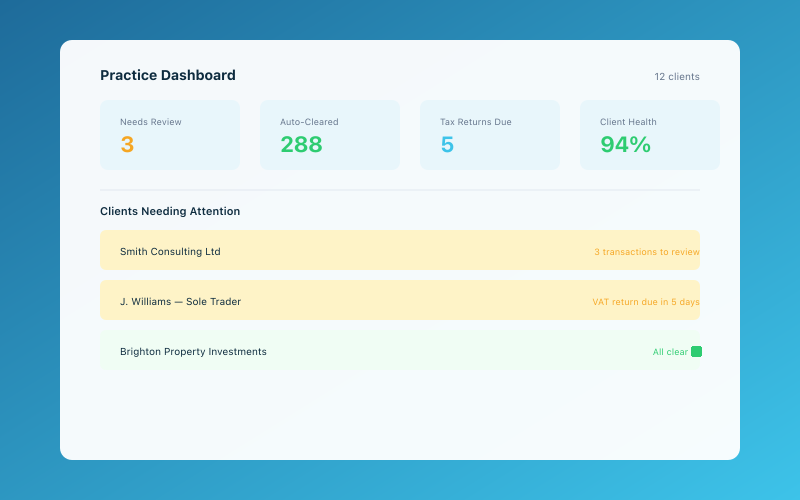 The Accounted practice dashboard — manage all your clients in one place
It's a nice idea. And for a very specific type of user, Coconut can work well. But as we head deeper into 2026 — with Making Tax Digital deadlines looming and AI-powered tools raising the bar — the question is whether Coconut still holds up.
Let's find out.
What Coconut Does
Coconut is part banking product, part accounting tool. When you sign up, you get a business bank account (provided by a partner bank), and the Coconut app sits on top of it, tracking your income and expenses automatically.
The core features include:
- Business bank account — A real account with a sort code and account number
- Automatic categorisation — Transactions are sorted into tax categories
- Tax estimates — The app estimates what you owe based on your income and expenses
- Tax pot — Set aside a percentage of income for your tax bill
- Basic invoicing — Create and send simple invoices
- HMRC integration — Submit your Self Assessment via the GoSimpleTax integration
The idea is that by combining banking and bookkeeping, you never need to do a manual bank reconciliation. Every transaction is already in your books.
Coconut Pricing
Coconut offers two main options:
Free Plan — £0/month
The free tier gives you:
- A business bank account
- Basic income and expense tracking
- Tax category suggestions
- Limited invoicing
Premium — From £7/month
The paid plan adds:
- Tax estimates and calculations
- Tax submission tools
- Priority support
- More advanced categorisation
- Integration with HMRC
At £7 per month, Coconut is one of the cheapest paid options on the market. For what it does, the price is fair.
What Coconut Does Well
Genuine Simplicity
Coconut's biggest strength is that it's simple. Really simple. If you've ever opened Xero or QuickBooks and felt overwhelmed by the dashboard, Coconut is the antidote. There are no confusing accounting terms, no reconciliation screens, and no multi-tab interfaces.
You open the app, see your balance, see your transactions, and see an estimate of your tax. That's it. For someone who just wants to know where they stand financially, this simplicity is genuinely appealing.
Tax Estimates in Real Time
As money comes in and goes out, Coconut recalculates your estimated tax bill. This gives you a running picture of what you'll owe HMRC, which is enormously useful for planning.
Many sole traders get an unpleasant surprise when their Self Assessment bill arrives. Coconut's real-time estimates help prevent that.
The Tax Pot
Linked to the tax estimates, Coconut lets you automatically set aside a percentage of your income in a separate pot. The money sits there, earmarked for your tax bill, so you're not scrambling to find it when January rolls around.
This is a simple feature, but it's one of the most practically useful things any financial tool can offer a sole trader.
No Reconciliation
Because Coconut is the bank account, there's no bank feed to set up and no transactions to reconcile. Everything is automatic. This eliminates one of the most tedious tasks in traditional bookkeeping.
Low Cost
At £7/month for the premium plan, Coconut is significantly cheaper than Xero (from £15+VAT), FreeAgent (from £14.50), or QuickBooks (from £12+VAT). If budget is your primary concern, Coconut is hard to beat on price.
Where Coconut Falls Short
No Receipt OCR
This is a significant gap in 2026. Coconut lets you photograph receipts and attach them to transactions, but it doesn't read the receipt. You need to manually verify the amount, date, and category.
Compare this to Accounted, where you can snap a photo of a receipt on WhatsApp and Penny — the AI bookkeeper — automatically reads it, extracts the details, categorises the expense, and files it. The difference in time and effort is substantial, especially if you have a lot of receipts.
Basic Reporting
Coconut shows you your income, expenses, and estimated tax. That's about the extent of its reporting. There's no profit and loss statement, no cash flow analysis, no expense breakdowns by category over time, and no comparison reports.
If you just want a rough picture of where you stand, that's fine. But if you want to actually understand your business finances — where your money goes, which months are most profitable, which expenses are growing — you'll need more.
Limited Categorisation
Coconut uses basic categories aligned with HMRC's Self Assessment categories. This covers the essentials, but it's not flexible. You can't create custom categories, split transactions, or handle complex expenses like mixed personal/business use.
MTD Compliance Questions
With Making Tax Digital for Income Tax arriving from April 2026, MTD compliance is essential. Coconut has been working towards MTD support, but as of early 2026, its MTD capabilities are less comprehensive than dedicated tools.
If you're earning over £50,000 and need to submit quarterly updates to HMRC, you'll want to verify that Coconut can handle this reliably. For many users, a purpose-built MTD solution will be more dependable.
You're Locked Into Their Banking
Like ANNA Money, Coconut ties your bookkeeping to a specific bank account. If you want to switch banks, you lose the bookkeeping integration. If you want to switch bookkeeping tools, you're still stuck with (or need to close) the Coconut bank account.
This bundling is convenient at first, but it becomes a limitation as your needs change.
Limited Invoicing
Coconut's invoicing is basic. You can create and send invoices, but there's no recurring invoice support, no advanced customisation, and no automated payment reminders. If invoicing is a significant part of your workflow, you'll likely need a separate tool.
Limited Accountant Access
Coconut does offer an accountant portal, so your accountant or bookkeeper can log in and view your records. However, the functionality is basic compared to dedicated practice management tools. Accountants get read access to your transactions and categories, but collaboration features like transaction notes, year-end pack generation, and data export to tools like Xero or Sage are not available.
Who Is Coconut Best For?
Coconut works well for a very specific profile:
- Brand new sole traders who are just starting out and want the simplest possible setup
- Very simple businesses with one income stream (freelancing, consulting, tutoring)
- People with very few expenses who don't need detailed categorisation
- Budget-conscious users who want the cheapest option available
- People who hate admin and want the bare minimum
If your business is genuinely simple — you earn money from one source, you have a handful of regular expenses, and you just need to file your tax return — Coconut can handle that.
When You'll Outgrow Coconut
Here's the honest truth: most businesses outgrow Coconut fairly quickly. You'll start feeling the limitations when:
- You have more than a few receipts per month — No OCR means manual entry for each one
- You want to understand your finances — Basic reporting won't cut it
- MTD kicks in — Quarterly HMRC submissions need reliable, compliant software
- You get an accountant — They'll need proper access to your books
- Your income grows — More income means more complex tax planning needs
- You need to file VAT returns — Coconut cannot submit VAT returns to HMRC
- You want to claim all your expenses — Limited categories mean you might miss legitimate deductions
The danger with Coconut is that it's easy to start with but painful to leave. The longer you use it, the more switching becomes a hassle.
Coconut vs Accounted — The AI Alternative
If what attracted you to Coconut was the simplicity, it's worth looking at Accounted. Here's why.
Accounted takes the same philosophy — bookkeeping should be simple and not require accounting knowledge — but executes it differently. Instead of a basic app with limited features, Accounted gives you Penny, an AI bookkeeper that works through WhatsApp.
| Feature | Coconut | Accounted | |---------|---------|-----------| | Receipt OCR | No | Yes (WhatsApp photo) | | Auto-categorisation | Basic | AI-powered | | MTD compliance | Limited | Full | | Reporting | Basic | Comprehensive | | Accountant access | Yes | Yes | | Bank lock-in | Yes | No (any bank) | | Tax estimates | Yes | Yes | | Monthly cost | From £7 | From £10 |
For £3 more per month, Accounted gives you AI-powered receipt reading, proper MTD compliance, detailed reporting, and accountant access — without locking you into a specific bank account. And because Penny works through WhatsApp, it's arguably even simpler than Coconut.
You can see a detailed comparison here.
The Verdict
Coconut is a solid product for what it is: the simplest possible bookkeeping tool for the simplest possible businesses. If you're a brand new freelancer earning a modest amount with minimal expenses, it's a reasonable starting point.
But "starting point" is the key phrase. Coconut's limitations — no receipt OCR, basic reporting, questionable MTD compliance, and banking lock-in — mean most users will outgrow it within a year or two. And when you do, switching is harder than it should be because your banking and bookkeeping are bundled together.
If you want simplicity with substance — bookkeeping that's easy but also comprehensive and MTD-ready — Accounted with Penny is the stronger choice. You get the hands-off experience Coconut promises, but with proper bookkeeping under the bonnet.
At the end of the day, the cheapest tool isn't always the best value. And when HMRC comes knocking, "it was simple" isn't much comfort if your records aren't up to scratch.
Related Reading
Compare Accounted with other platforms and start your free trial.
See how Accounted compares to Xero, Sage, QuickBooks and more — and why sole traders are switching. See the full comparison →
Editorial & Research
The Accounted editorial team covers software comparisons, technology, and the tools UK sole traders need to run their businesses efficiently. All software comparisons are based on independent research and publicly available pricing.
Ready to try Accounted?
Join UK sole traders who are simplifying their bookkeeping and tax.
Start your 14-day free trial