Inbox Zero for Sole Traders — Managing Email Overwhelm
Your Inbox Is Not a To-Do List
If you're a sole trader, chances are your email inbox is doing at least three jobs it was never designed for. It's your to-do list, your filing cabinet, your reminder system, and your anxiety generator — all rolled into one.
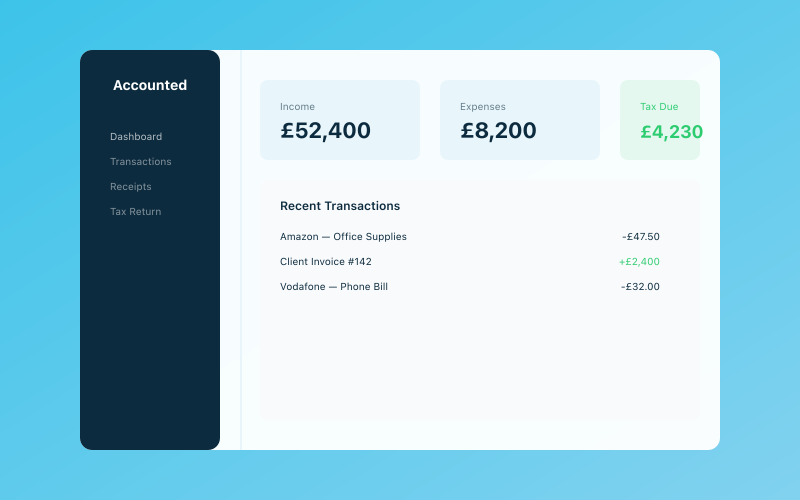 Your Accounted dashboard — income, expenses, and tax at a glance
You open it in the morning and there are 47 unread messages. Some are client enquiries that need thoughtful replies. Some are receipts you should save. Some are newsletters you subscribed to three years ago and haven't read since. And somewhere in the chaos is a message from HMRC that you really need to deal with.
Inbox Zero isn't about obsessively keeping your inbox empty at all times. It's about having a system so that every email gets dealt with appropriately and nothing falls through the cracks. When your inbox is under control, you think more clearly, respond to clients faster, and stop losing receipts in the digital abyss.
The Inbox Zero Methodology
The term "Inbox Zero" was coined by productivity expert Merlin Mann, and the "zero" refers to the amount of time you spend thinking about your inbox — not necessarily the number of emails in it.
The core principle is simple: every email that lands in your inbox should be processed into one of five categories:
- Delete — spam, irrelevant, or already dealt with
- Delegate — forward to someone better placed to handle it
- Do — if it takes less than 2 minutes, reply or act on it immediately
- Defer — move it to a "to do" folder or add it to your task list for later
- File — archive it somewhere you can find it again if needed
The magic is in processing, not just reading. Reading an email and leaving it in your inbox isn't processing — it's just adding to the pile. Every email needs to leave your inbox, one way or another.
Setting Up Your Folder and Label System
You don't need dozens of folders. In fact, the more folders you have, the more time you'll spend deciding where things go. Here's a simple system that works brilliantly for sole traders:
The Essential Folders
- Action Required — emails that need you to do something (reply, send a document, make a decision)
- Awaiting Reply — emails where you're waiting for someone else to respond
- Receipts & Invoices — financial documents you need to keep
- Reference — information you might need later (contracts, login details, important correspondence)
- Archive — everything else worth keeping but not actively needed
How the Flow Works
When you process your inbox (ideally during your admin day or at set times during the day), each email goes through the five-step process above. If it's actionable, it goes to "Action Required." If you've replied and are waiting for a response, it goes to "Awaiting Reply." If it's a receipt, it goes to "Receipts & Invoices." If it's just useful info, it goes to "Reference." Everything else either gets deleted or archived.
At the end of processing, your inbox should be empty. Your "Action Required" folder becomes your actual to-do list — a list of things that genuinely need your attention, not buried among newsletters and notifications.
Dealing with Receipts by Email
As a sole trader, a surprising amount of your email is financial: purchase confirmations, subscription receipts, client invoices, bank notifications. These emails are important for your records but they clutter your inbox if left there.
The Quick Solution
Create an email filter (rule) that automatically labels or moves emails containing words like "receipt," "invoice," "payment confirmation," or "order confirmation" to your Receipts & Invoices folder. This gets them out of your inbox immediately while keeping them accessible.
The Better Solution
Forward financial emails to your accounting software. Accounted, for instance, lets you forward receipts by email, and Penny will automatically extract the details, categorise the expense, and match it to your bank transactions. You can also just snap a photo of paper receipts via WhatsApp. Either way, the receipt is properly recorded in your books rather than just sitting in an email folder.
This matters because come tax time, having your receipts in your email isn't the same as having them in your accounting records. HMRC expects you to keep proper digital records, especially with Making Tax Digital requirements kicking in.
Separating Business and Personal Email
If you're using one email address for everything — client communications, personal Amazon orders, football newsletter subscriptions, and HMRC correspondence — you're making your life harder than it needs to be.
Why Separate Accounts Matter
- Professionalism — clients see a proper business email, not your hotmail from 2003
- Focus — when you open your business inbox, it's all business
- Tax records — easier to keep track of business-related emails and receipts
- Boundaries — you can close your business inbox outside of working hours without worrying about missing personal messages
How to Set It Up
If you have a domain name (e.g., yourname.co.uk), set up a business email through Google Workspace or Microsoft 365. If you don't have a domain, a simple Gmail or Outlook account dedicated to business works fine.
Then gradually update your business contacts, suppliers, and subscriptions with your new business email. It takes a few weeks for everything to switch over, but once it does, the clarity is worth it.
Email Scheduling — When to Check and When to Ignore
The Problem with Always-On Email
Checking email constantly is one of the biggest productivity drains for sole traders. Every time you check, you risk getting pulled into something that derails your current task. Research from the University of British Columbia found that people who checked email only three times a day were significantly less stressed than those who checked constantly.
A Realistic Schedule
For most sole traders, checking email two to three times a day is plenty:
- Morning (9am) — process overnight messages, deal with anything urgent
- Midday (12-1pm) — catch anything that's come in during the morning
- Late afternoon (4-5pm) — final check, send any replies, process to folders
Outside these times, close your email client. Yes, really. If something is genuinely urgent, people will call you.
But What If a Client Needs Me Urgently?
If you work in a field where urgent client communication is common (events, emergency services, etc.), set up email alerts for specific VIP contacts only. Everyone else can wait until your next check-in. You can also mention in your email signature: "I check email at 9am, 12pm, and 4pm. For urgent matters, please call."
Auto-Filters and Rules That Save Hours
Email filters are the unsung heroes of inbox management. Set them up once and they work quietly in the background, keeping your inbox clean.
Filters Every Sole Trader Should Have
Receipt filter:
- Trigger: Subject contains "receipt" OR "invoice" OR "payment confirmation" OR "order confirmation"
- Action: Apply label "Receipts & Invoices," skip inbox
Bank notification filter:
- Trigger: From your bank's notification email address
- Action: Apply label "Bank," skip inbox
Newsletter filter:
- Trigger: Contains "unsubscribe" (almost all newsletters have this)
- Action: Apply label "Newsletters," skip inbox
HMRC filter:
- Trigger: From @hmrc.gov.uk or @tax.service.gov.uk
- Action: Apply label "HMRC," star it, keep in inbox
Social media notifications filter:
- Trigger: From Facebook, Instagram, LinkedIn, Twitter notifications
- Action: Delete or archive automatically
How to Set Up Filters
In Gmail: Settings → Filters and Blocked Addresses → Create a New Filter
In Outlook: Settings → Mail → Rules → Add New Rule
In Apple Mail: Mail → Preferences → Rules → Add Rule
Spend 30 minutes setting up filters and you'll save hours every month. It's one of the highest-return productivity investments you can make.
When to Unsubscribe
Be ruthless. If you haven't read a newsletter in the last month, unsubscribe. If a company emails you more than once a week and you never open their emails, unsubscribe. If you signed up for something to get a free PDF and never engaged with them again, unsubscribe.
The Unsubscribe Sprint
Set a timer for 15 minutes (or one Pomodoro). Open your inbox, sort by sender, and unsubscribe from everything you don't actively read and benefit from. You'll likely cut your daily email volume by 30-50%.
The Exception
Keep subscriptions that are genuinely useful for your business: your industry newsletter, your accounting software updates, HMRC updates, and anything that directly helps you earn money or stay compliant. Everything else can go.
Email vs Other Communication Channels
Email isn't always the best tool for the job. Part of managing email overwhelm is knowing when to use other channels instead.
When Email Is Best
- Formal communications (contracts, proposals, confirmations)
- Sending documents and attachments
- Creating a paper trail you might need later
- Communicating with people you don't know well
When Something Else Is Better
- Phone call — for complex discussions, negotiations, or anything that would take more than 3 back-and-forth emails
- WhatsApp or text — for quick confirmations, running late notifications, or informal client check-ins
- Project management tools — for ongoing project communications (Trello, Asana, Notion)
- Video call — for anything that benefits from seeing facial expressions and screen sharing
Setting Expectations with Clients
It's perfectly reasonable to tell clients your preferred communication channels. Something like: "For project updates, let's use our shared Trello board. For quick questions, WhatsApp is fastest. Email is best for anything formal or with attachments." This reduces unnecessary email and often improves communication overall.
Maintaining Inbox Zero Long-Term
Getting to inbox zero is satisfying. Staying there requires habits:
The Daily Close
Spend 5-10 minutes at the end of each working day processing any remaining emails. Don't compose lengthy replies — just sort everything into the right folder. This takes the pressure off and means you start each morning with a clean inbox.
The Weekly Review
During your admin day, review your "Action Required" and "Awaiting Reply" folders. Is anything stuck? Has someone not replied to your email from two weeks ago? Chase them up. Has something in "Action Required" been sitting there for a month? Either do it, delete it, or acknowledge that it's not going to happen.
The Monthly Purge
Once a month, go through your folders and archive anything that's no longer relevant. Delete anything you definitely won't need. Check your filters are still working properly. This keeps your system lean and effective.
Your Inbox Reflects Your Business
There's a reason people talk about email management so much — for sole traders, your inbox is essentially your business communications hub. When it's chaotic, you miss client enquiries, lose receipts, forget to follow up on invoices, and feel perpetually behind.
When it's organised, you respond to clients promptly (which makes you look professional), you keep proper records (which keeps HMRC happy), and you have the mental clarity to focus on the work that actually matters.
Tools like Accounted can help by taking the financial admin out of your email entirely. When receipts are scanned via your phone, bank transactions are categorised automatically, and your books are kept up to date by Penny, there's a lot less financial clutter landing in your inbox in the first place.
Inbox zero isn't about perfection. It's about having a system that works. Start with the folder structure, set up a few filters, unsubscribe from the noise, and check email at set times. Within a week, you'll wonder how you ever managed without it.
Related Reading
Further Reading
- Better organisation starts with meeting HMRC record-keeping requirements.
- Find productivity and business guidance on GOV.UK.
Start your free trial and see how Accounted simplifies your bookkeeping.
Business & Operations Advisors
Our business advisors cover the practical side of running a UK sole trader business — from HMRC registration to managing growth. Content is written for real business owners in plain English, not accountants.
Ready to try Accounted?
Join UK sole traders who are simplifying their bookkeeping and tax.
Start your 14-day free trial