How to Batch Your Business Admin into One Day Per Week
The Problem with "Doing Admin as You Go"
Here's a scenario most sole traders know too well. You sit down on Monday morning ready to do billable work, but first you need to send that invoice from Friday. Then you notice a receipt in your email you should file. While you're in your inbox, you spot a client email that needs a reply. Oh, and you should probably check your bank balance. Before you know it, it's 11am and you haven't started any actual work.
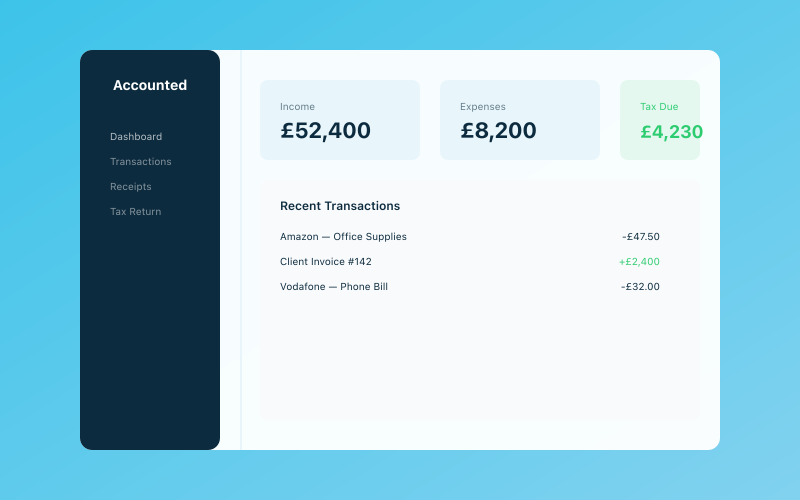 Your Accounted dashboard — income, expenses, and tax at a glance
This "little and often" approach to admin feels sensible in theory. In practice, it's a productivity killer. Every time you switch between billable work and admin, you lose focus. Studies suggest it takes an average of 23 minutes to fully regain concentration after a task switch. If you switch between admin and client work four times a day, you're losing over an hour and a half to context switching alone.
There's a better way: batch all your admin into a single, dedicated day (or half-day) per week.
Why Batching Works
Task batching is based on a simple principle — your brain works more efficiently when it does similar tasks in a row rather than jumping between different types of work. When you batch all your admin together, you:
- Enter "admin mode" once instead of switching back and forth all week
- Free up the rest of your week for uninterrupted billable or creative work
- Actually complete tasks instead of leaving them half-done
- Reduce decision fatigue because you know exactly when admin gets done
- Feel less guilty about ignoring admin on non-admin days
The mental relief alone is worth it. Once you know that Tuesday (or whatever day you choose) is your admin day, you can guiltlessly ignore that pile of receipts on Wednesday because you know it'll be handled next week.
Choosing Your Admin Day
Which Day Works Best?
There's no universally "right" day, but here are some patterns that work well:
Monday morning — get admin out of the way first, then you have a clear week ahead. Good if you like starting the week feeling organised.
Friday afternoon — your energy for creative or client work is probably lower, so admin is a good fit. Plus you can go into the weekend knowing everything's sorted.
Wednesday — splits the week nicely. You work Monday and Tuesday, do admin Wednesday, then work Thursday and Friday. Some sole traders find this rhythm really effective.
One caveat: avoid scheduling your admin day on the same day you tend to have the most client meetings. You need uninterrupted time to get through admin efficiently.
Full Day or Half Day?
For most sole traders with straightforward businesses, a half-day (3-4 hours) is plenty. If you're running a busier operation with employees, VAT returns, or complex project accounting, you might need a full day.
Start with a half-day. If you consistently can't finish, extend it. If you're done early, congratulations — you've earned a bonus afternoon off. Using the Pomodoro Technique during your admin day can help you stay focused and get through tasks faster.
What to Include on Admin Day
Here's a comprehensive list of tasks to batch into your admin day. You won't need to do all of these every week — some are weekly, some fortnightly, some monthly.
Every Week
- Bookkeeping — categorise income and expenses, reconcile bank transactions
- Invoicing — send invoices for completed work
- Payment chasing — follow up on any overdue invoices
- Receipt management — scan, upload, and file any paper receipts
- Email processing — deal with anything that needs a proper response
- Calendar review — check next week's commitments and prepare
Every Fortnight
- Cash flow check — review your bank balance and upcoming commitments
- Client communications — send updates, check in on ongoing projects
- Content or marketing — social media scheduling, blog posts, newsletters
- Business development — follow up on leads, send proposals
Monthly
- Financial review — look at your profit and loss for the month
- Tax set-aside — transfer money to your tax savings account
- Subscription audit — check you're not paying for things you don't use
- Goal review — are you on track for your quarterly and annual goals?
Quarterly
- MTD submission — prepare and submit your quarterly update if applicable
- VAT return — if you're VAT registered
- Pension contribution review — are you putting enough aside?
- Insurance check — any renewals coming up?
Setting Up Systems So Admin Day Actually Works
An admin day only works if your systems support it. Here's how to set things up so everything's ready when admin day arrives.
Create a Capture System
During the week, you'll encounter admin tasks that need doing. Instead of doing them immediately (and breaking your focus on billable work), capture them in a single place:
- A physical notebook — keep it on your desk, jot down anything that needs doing on admin day
- A notes app — Apple Notes, Google Keep, or a simple text file
- A task manager — Todoist, Things, or even a recurring list in your calendar
The key is having one place where everything goes. No sticky notes on the monitor, no "I'll remember" (you won't), no half-read emails left as "unread" to deal with later.
Automate What You Can
The less manual work you have to do on admin day, the faster you'll get through it. Here's where automation makes a real difference:
Bank feeds — connect your business bank account to your accounting software so transactions import automatically. Accounted does this seamlessly, and Penny can even categorise most transactions for you before you sit down on admin day.
Recurring invoices — if you bill the same clients the same amount regularly, set up recurring invoices. Most invoicing tools can do this.
Receipt scanning — use your phone to scan receipts as you get them during the week. Apps like Accounted let you snap a photo and the details are extracted automatically. Then on admin day, you just need to review rather than data-enter.
Direct debits — pay regular bills by direct debit so you don't need to manually process payments.
Email filters — set up rules so receipts, invoices, and bank notifications automatically go to specific folders. This makes processing them on admin day much quicker.
Prepare Your Workspace
This sounds minor but it matters. Before your admin day, make sure:
- Your desk is relatively clear
- You have your laptop charger plugged in
- Your accounting software is logged in and ready
- You have a cup of tea (or coffee — we don't judge)
- Your phone is on silent or in another room
Removing friction makes it much easier to sit down and get started rather than spending the first 20 minutes "getting ready."
Morning vs Afternoon Admin
Your willpower and focus are typically highest in the morning, so tackling admin first means you're using your best energy. On the other hand, some people find their creative energy peaks in the morning, making afternoons a better fit for mechanical, process-driven work.
The honest answer? Try both and see which works for you. It depends on your personal energy rhythms, your client commitments, and whether you're a morning or afternoon person.
A Weekly Admin Day Checklist Template
Here's a practical checklist you can adapt. Print it out, save it in your notes app, or copy it into a spreadsheet.
Opening (15 minutes)
- [ ] Open accounting software and check dashboard
- [ ] Review bank balance and recent transactions
Financial Admin (60-90 minutes)
- [ ] Categorise all new income and expenses
- [ ] Reconcile bank transactions
- [ ] Scan and file any outstanding receipts
- [ ] Send invoices for completed work
- [ ] Chase any overdue invoices (those over 14 days)
- [ ] Transfer tax set-aside to savings account (if due)
Communications and Planning (30-45 minutes)
- [ ] Process business emails requiring responses
- [ ] Reply to client queries and send project updates
- [ ] Review next week's calendar and note upcoming deadlines
- [ ] Follow up on any outstanding proposals or leads
Closing (10 minutes)
- [ ] Clear admin day task list
- [ ] Note anything that didn't get done (move to next week)
- [ ] Set up any reminders for the week ahead
Total time: approximately 2.5 to 4 hours, depending on how busy your week has been.
Dealing with Urgent Admin During the Week
"But what if something urgent comes up?" Fair question. Genuine emergencies — a bounced payment, an HMRC letter with this week's deadline, your website going down — handle those immediately regardless of what day it is.
Everything else that feels urgent but can wait (a client wanting an invoice, a receipt to file, a proposal request) goes into your capture system. Most "urgent" admin is actually just "on your mind." Write it down, let it go, and deal with it on admin day.
The one exception: if something takes less than 5 minutes and would cause problems if left, just do it. Confirming a meeting time or paying a chasing supplier isn't worth deferring.
Common Mistakes to Avoid
Trying to do everything in one day. Your admin day is for routine, recurring tasks. Big projects like writing a proposal deserve their own time.
Not protecting your admin day. Block it in your calendar. If clients try to book meetings, suggest an alternative day.
Skipping admin day when busy. This means double the work next week, late invoices, and piling receipts. If you're swamped, do a half admin day instead of none.
No plan. Sitting down thinking "what do I need to do?" is a recipe for procrastination. Use the checklist. If you find yourself scrolling through emails aimlessly, you need more structure.
The Long-Term Benefits
Once you've been doing admin days for a month or two, you'll notice something interesting: your relationship with admin changes. It stops being this looming, ever-present source of anxiety and becomes a manageable, predictable part of your week.
You'll also find that your billable days become more productive because you're not leaking time to admin tasks. Many sole traders report gaining back 4-6 hours per week after switching to a batching system — that's nearly a full extra day of billable work.
And when tax season rolls around, instead of spending weeks pulling your hair out, you'll find that your records are already in order because you've been maintaining them weekly. Your accountant will love you for it too.
If you're using Accounted, admin day becomes even shorter because Penny handles the heavy lifting — categorising transactions, matching receipts, and flagging anything that needs your attention. Your admin day shifts from data entry to review and decision-making, which is a much better use of your time.
Start This Week
Don't overthink it. Pick a day, block out 3 hours, use the checklist above, and see how it goes. Adjust the day, the time, and the checklist based on what works for you. The perfect admin day system is the one you actually stick to.
Related Reading
For step-by-step guidance, see our article on How to Automate Invoicing and Get Paid Faster.
Related reading: Batch Your Bookkeeping: Spend Less Time on Admin.
Related reading: Time Tracking for Self-Employed: Best Methods.
Start your free trial and see how Accounted simplifies your bookkeeping.
Business & Operations Advisors
Our business advisors cover the practical side of running a UK sole trader business — from HMRC registration to managing growth. Content is written for real business owners in plain English, not accountants.
Ready to try Accounted?
Join UK sole traders who are simplifying their bookkeeping and tax.
Start your 14-day free trial