How to Prepare Your First MTD Quarterly Update
If you have never submitted a quarterly update to HMRC, the prospect can feel daunting. Making Tax Digital for Income Tax introduces a completely new reporting rhythm for self-employed people and landlords, replacing the annual Self Assessment cycle with quarterly digital submissions. But once you understand what is actually required, you will find it is far simpler than it sounds.
This guide walks you through exactly what a quarterly update contains, how to prepare one, what HMRC expects, common errors to avoid, and how to submit it. If you follow these steps, your first quarterly update should take no more than a few minutes.
What Is a Quarterly Update
A quarterly update is a summary of your business income and expenses for a three-month period, submitted to HMRC through MTD-compatible software. It is not a tax return. You are not calculating tax or claiming reliefs at this stage. You are simply providing HMRC with a snapshot of your trading or property income and the expenses you have incurred during the quarter.
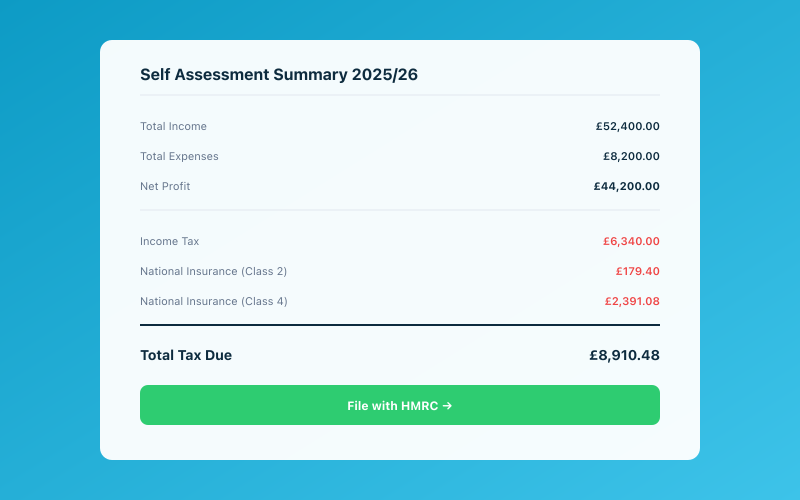 Your Accounted dashboard shows your real-time tax position
Think of it as an interim progress report. HMRC uses this data to build up a picture of your annual income over the course of the year. At the end of the year, you submit an End of Period Statement and a Final Declaration, which is where the actual tax calculation happens.
The Four Quarterly Periods
The quarterly periods align with the tax year. For 2026/27, they are as follows. Quarter one runs from 6 April to 5 July. Quarter two runs from 6 July to 5 October. Quarter three runs from 6 October to 5 January. Quarter four runs from 6 January to 5 April.
Each quarterly update must be submitted by the seventh day of the month following the end of the quarter. So your first update, covering April to July, is due by 7 August 2026.
What Data You Need to Include
Income
You need to report all business income received during the quarter. If you use the cash basis (which is the default for sole traders), this means income that actually arrived in your bank account during those three months, regardless of when the work was done or the invoice issued.
For property income, report the rent received during the quarter. Include any other property-related income such as service charges or insurance reimbursements.
Expenses
Report all allowable business expenses paid during the quarter. These should be categorised using the standard Self Assessment categories, which include cost of goods sold, office and administrative costs, travel, vehicle expenses, staff costs, financial charges, professional fees, advertising and marketing, and other allowable expenses.
You do not need to submit individual receipts or invoices with your quarterly update. However, you must keep the underlying records digitally and be able to produce them if HMRC requests them.
What You Do Not Include
Quarterly updates do not include capital allowances, pension contributions, losses brought forward, tax relief claims, or any other adjustments. These are all handled in the End of Period Statement and Final Declaration at the end of the year. The quarterly update is purely a record of cash in and cash out for the period.
Step-by-Step: Preparing Your First Update
Step 1: Ensure All Transactions Are Recorded
Before you can submit, every transaction for the quarter needs to be in your MTD software. If you have connected your bank account, most transactions will be imported automatically. Check for any cash transactions, payments from secondary accounts, or income received through payment platforms that may not flow through your main business account.
In Accounted, Penny imports transactions from connected bank accounts and categorises them automatically using AI. If you have also been sending receipt photos via WhatsApp, those will already be matched to the corresponding transactions. At this stage, your job is simply to review what Penny has done and confirm it is correct.
Step 2: Review Categorisations
Every transaction needs to be allocated to the correct income or expense category. This is where errors most commonly creep in, and it is the single most important step in preparing your quarterly update.
Look for transactions categorised as personal rather than business, or vice versa. Check that mixed-use expenses have been appropriately apportioned and that capital purchases have not been included as revenue expenses.
Penny's confidence scoring helps here. Each categorisation comes with a confidence score. High-confidence items (above 95%) are almost certainly correct and need only a quick glance. Lower-confidence items are flagged for your review, so you can focus your attention where it matters most.
Step 3: Reconcile with Your Bank Statement
Compare the total income and expenses in your software with your bank statements for the quarter. If there is a discrepancy, it usually means a transaction has been missed, duplicated, or allocated to the wrong period.
Step 4: Generate the Quarterly Summary
Your MTD software will generate a summary showing total income and total expenses for the quarter, broken down by category. Review this summary carefully. In Accounted, the quarterly summary is generated automatically and highlights any items that look unusual compared to previous quarters.
Step 5: Submit to HMRC
Once you are satisfied the figures are correct, submit the quarterly update through your software. Accounted submits directly to HMRC through their API. You will receive a confirmation that the submission has been accepted, which you should save for your records.
The submission itself takes seconds. The preparation is where the time goes, and if you have been keeping records up to date throughout the quarter, the preparation should be minimal.
Common Errors to Avoid
Including Personal Transactions
If your business bank account is also used for personal spending, make sure personal transactions are excluded from your quarterly update. This is one of the most common errors HMRC expects to see in early MTD submissions.
Double-Counting Income
If you receive payment through a platform like Stripe or PayPal, the money typically appears twice: once when the customer pays, and once when the platform pays out to your bank account. Only count it once. Accounted's bank feed integration handles this automatically by identifying platform settlement payments.
Forgetting to Include Cash Income
If you receive any income in cash, it will not appear in your bank feed. You need to add it manually. This is particularly relevant for trades such as hairdressing, personal training, and market trading where cash payments are common.
Getting the Dates Wrong
Transactions must be allocated to the correct quarter based on when the cash was received or paid, not when the work was done or the invoice issued (assuming you are using the cash basis). A payment received on 6 July belongs in quarter two, even if the invoice was dated 15 June.
Submitting Incomplete Data
It is better to submit a complete and accurate quarterly update than to rush an incomplete one. If you are missing information, resolve it before submitting. While HMRC allows amendments, repeatedly submitting and correcting figures is not a good pattern to establish.
What Happens After You Submit
HMRC will acknowledge receipt of your quarterly update. They will not respond with a tax calculation at this stage. The quarterly data feeds into an estimated tax position viewable through your HMRC online account, but no tax is due based on quarterly updates alone. Your next step is simply to continue keeping digital records for the following quarter.
How Penny Makes Quarterly Updates Effortless
The biggest concern most people have about quarterly updates is the time they will take. If you are used to spending a day or two each January pulling your Self Assessment together, the thought of doing something similar four times a year is understandably unappealing.
But a quarterly update is not a tax return. It is a summary of income and expenses that, if you are keeping records up to date, can be generated and submitted in minutes. And that is exactly how Accounted is designed to work. Penny categorises transactions as they arrive, matches receipts you send via WhatsApp, and flags anything that needs your attention. When the quarterly deadline approaches, your data is already prepared.
For accountants managing clients through MTD, Accounted's exception-first workflow means you only review the transactions Penny is uncertain about. High-confidence categorisations flow through automatically, and your attention is directed to the items that genuinely need professional judgement. With bulk operations across your client base, you can process quarterly reviews efficiently even as your MTD client numbers grow.
Start your free trial of Accounted today and experience how straightforward your first quarterly update can be when Penny has been doing the bookkeeping all quarter.
Related Reading
See how Accounted handles MTD and start your free trial.
Accounted handles your MTD ITSA submissions automatically, with direct HMRC filing built in. See how MTD works in Accounted →
Tax & Compliance Specialists
Our tax specialists have decades of combined experience in UK sole trader and small business taxation, MTD compliance, and HMRC submissions. All content is reviewed against current HMRC guidance before publication and updated quarterly to reflect legislative changes.
Ready to try Accounted?
Join UK sole traders who are simplifying their bookkeeping and tax.
Start your 14-day free trial