How to Prepare Your Bookkeeping for MTD Quarterly Submissions
Quarterly Submissions Are Coming — Are You Ready?
Making Tax Digital for Income Tax Self Assessment (MTD for ITSA) introduces something entirely new for sole traders: quarterly updates to HMRC. Instead of pulling everything together once a year for your Self Assessment return, you'll now need to submit a summary of your business income and expenses every three months.
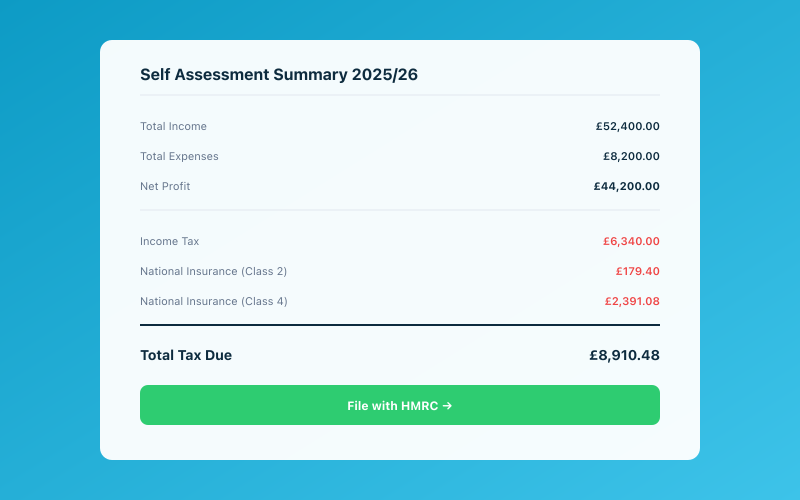 Your Accounted dashboard shows your real-time tax position
For some sole traders, this feels like an unwelcome increase in admin. For others, it's an opportunity to finally get on top of bookkeeping that's been neglected for years.
The truth? How stressful quarterly submissions feel depends almost entirely on how well you prepare. If your books are up to date throughout the quarter, submission day is a five-minute formality. If your books are a mess, it's a weekend of panic.
This guide walks you through exactly how to prepare your bookkeeping so that every quarterly submission is smooth, accurate, and stress-free.
What HMRC Expects Each Quarter
Let's start with the basics. A quarterly update under MTD for ITSA is a digital summary sent to HMRC through compatible software. It includes:
- Total business income for the quarter (money received from customers, clients, or other sources)
- Total business expenses for the quarter, broken down by HMRC's standard categories
- The period covered (each quarter aligns with the tax year: Q1 is April-July, Q2 is July-October, Q3 is October-January, Q4 is January-April)
A few important things to note:
It's a summary, not a line-by-line breakdown. HMRC doesn't want to see every individual transaction. They want totals by category — total travel expenses, total stock purchases, total office costs, and so on.
You don't calculate tax at this stage. The quarterly update is purely informational. HMRC uses the data to give you an estimated tax position, but you're not paying anything quarterly (unless you have payments on account from the previous year).
Accuracy matters. While HMRC has indicated a "soft landing" period with no penalties for minor errors in the first year, the expectation is that your quarterly summaries are a fair and accurate representation of your business finances.
Step 1: Set Up Your Categories Properly
The foundation of stress-free quarterly submissions is having your expense categories set up correctly from the start. HMRC has specific categories that map to the Self Assessment tax return, and your bookkeeping software needs to use them.
The main HMRC expense categories for sole traders are:
- Cost of goods sold (stock, raw materials, direct costs)
- Construction industry subcontractor costs (if applicable)
- Advertising, marketing, and entertainment
- Office, property, and equipment (rent, rates, utilities, office supplies)
- Car, van, and travel expenses (fuel, parking, public transport, mileage)
- Clothing costs (uniforms, protective clothing)
- Staff costs (if you employ anyone)
- Reselling or commissioning goods
- Legal and financial costs (accountancy fees, insurance, bank charges)
- Interest on bank and other loans
- Phone, fax, stationery, and other office costs
- Other allowable business expenses
If you're using Accounted, these categories are built in and Penny maps transactions to them automatically. You don't need to set anything up manually.
If you're using other software, make sure your chart of accounts or category list maps clearly to these HMRC categories. Avoid creating dozens of custom subcategories that you then need to manually consolidate at submission time. Keep it simple and aligned with what HMRC expects.
Step 2: Connect Your Bank Account
This is the single most important step. If your bank account is connected to your bookkeeping software, the vast majority of your bookkeeping happens automatically.
When your bank is connected through Open Banking:
- Every transaction flows into your bookkeeping software in near real-time
- You can't accidentally miss a transaction
- There's no manual data entry (and therefore no data entry errors)
- Your income and expense totals are always accurate
Most UK banks support Open Banking connections. If you have a business account with Starling, Monzo, Barclays, Lloyds, NatWest, HSBC, or any other major bank, you should be able to connect it directly.
Pro tip: If you use your personal bank account for business (common for sole traders), you can still connect it. You'll just need to flag which transactions are business-related and which are personal. Penny handles this automatically by asking you about transactions that look like they might be personal spending.
Step 3: Keep On Top of Receipts
Receipts are the bane of every sole trader's existence. They're small, they fade, they get lost in pockets and glove compartments, and you always seem to need the one you threw away six months ago.
Under MTD, you need to keep records of your business transactions for at least five years. While HMRC won't ask for receipts as part of your quarterly submission, they may request them during a compliance check. Having them organised and accessible is essential.
Here's how to stay on top of receipts without it consuming your life:
Capture Immediately
The number one rule of receipt management is: capture it the moment you get it. Don't put it in your pocket "to deal with later." The moment you receive a receipt, photograph it.
With Accounted, this means opening WhatsApp and sending the photo to Penny. She extracts the data, matches it to a transaction, and stores the digital copy. The whole process takes about ten seconds.
Set a Weekly Review
Even with automatic capture, it's worth spending five minutes once a week reviewing your transactions. Check that everything is categorised correctly, make sure no receipts are missing for significant purchases, and flag anything that looks unusual.
With Penny, you can simply ask "Any transactions need my attention?" and she'll highlight anything flagged or uncategorised.
Digital Storage
Stop keeping paper receipts. Once you've photographed a receipt and it's stored digitally in your bookkeeping software, the paper copy serves no purpose. HMRC accepts digital records, and digital copies don't fade, get lost, or end up in the washing machine.
Step 4: Understand Bank Reconciliation Basics
Bank reconciliation is the process of making sure the transactions in your bookkeeping software match the transactions in your bank account. When your bank is connected via Open Banking, this largely happens automatically — but it's still worth understanding the basics.
What can go wrong:
- Duplicate transactions: Rarely, a transaction might appear twice. Review your transaction list periodically to catch any duplicates.
- Missing transactions: If your bank connection drops temporarily, some transactions might not come through. Reconnecting usually pulls them in, but check for gaps.
- Cash transactions: If you receive cash payments, these won't appear in your bank feed. You'll need to record them manually.
- Transfers between accounts: Transfers between your own accounts aren't income or expenses — they need to be excluded or categorised as transfers.
With Accounted, Penny handles most reconciliation automatically. She identifies likely duplicates, flags gaps in your transaction feed, and asks about cash income so nothing falls through the cracks.
Step 5: Separate Business and Personal
If you use a single bank account for both business and personal spending, you need to clearly distinguish between the two. Only business income and expenses should be included in your quarterly submission.
The ideal solution is to open a dedicated business bank account. Many digital banks like Starling and Monzo offer free business accounts for sole traders. Having a separate account makes bookkeeping dramatically simpler because every transaction in that account is, by definition, business-related.
If you prefer to use a single account, you'll need to tag each transaction as business or personal. Penny helps with this by learning your patterns — she knows that your mortgage payment is personal and your Screwfix purchase is business — but you'll still need to confirm edge cases.
Step 6: Don't Leave It All to the End
This is the most important habit to develop. The sole traders who find quarterly submissions stressful are the ones who do three months of bookkeeping in a single sitting.
Instead, aim to keep your books current on a weekly basis. With Penny and WhatsApp, this might take as little as five minutes per week:
- Review the transactions Penny has categorised
- Confirm or correct any flagged items
- Snap photos of any receipts you haven't captured yet
- Done
If you do this weekly, your quarterly submission is literally just reviewing a pre-prepared summary and tapping "submit." There's no catching up, no scrambling, and no stress.
The Quarterly Submission Checklist
When submission time arrives, run through this checklist to make sure everything is in order:
One Week Before the Deadline
- [ ] Review all transactions for the quarter. Are they all categorised? Are there any flagged items that need your attention?
- [ ] Check for missing receipts. Are there any significant purchases without a corresponding receipt stored?
- [ ] Review income completeness. Have all invoices been paid? Is there any cash income you haven't recorded?
- [ ] Handle any personal transactions. If you use a mixed account, make sure personal spending is excluded.
On Submission Day
- [ ] Review the quarterly summary. Your software should present a summary of total income and expenses by category. Do the numbers look reasonable?
- [ ] Compare to previous quarters. Is anything dramatically different from last quarter? If your travel expenses jumped from £200 to £2,000, make sure that's genuine and not a miscategorisation.
- [ ] Submit through your software. With Accounted, you can submit directly from WhatsApp or the web app. The submission goes to HMRC through their API.
- [ ] Save the confirmation. Keep a record of the submission confirmation for your files.
After Submission
- [ ] Note your estimated tax position. HMRC will update your estimated tax liability after each quarterly submission. Review it and make sure it looks reasonable.
- [ ] Set aside money for tax. Based on the updated estimate, make sure you're putting enough aside in a savings account to cover your eventual tax bill.
- [ ] Start the next quarter fresh. Your books should already be ticking over for the new quarter. No backlog to carry forward.
How Penny Automates the Entire Process
If you're using Accounted, Penny effectively handles steps 1 through 5 of this guide automatically:
- Categories are pre-configured to HMRC standards
- Bank transactions flow in automatically and are categorised by AI
- Receipts are captured via WhatsApp and matched to transactions
- Reconciliation is handled automatically with flags for anything unusual
- Business vs. personal transactions are separated through learned patterns and confirmation prompts
When the quarter ends, Penny sends you a message:
"Your Q1 summary is ready! Total income: £12,450. Total expenses: £3,820. Would you like to review the breakdown before I submit to HMRC?"
You review, confirm, and she submits. The entire quarterly process takes less than five minutes — because the real work has been happening in the background all quarter long.
Building the Habit
The shift from annual Self Assessment to quarterly submissions is fundamentally a shift from reactive to proactive bookkeeping. You can't leave everything until January any more.
But this is actually a good thing. Sole traders who keep their books up to date throughout the year consistently report:
- Less stress around tax deadlines
- Fewer surprises when the tax bill arrives
- Better financial decisions because they know their numbers in real time
- Lower accountancy fees because their records are clean when their accountant needs them
MTD quarterly submissions are the push many sole traders needed to finally get their bookkeeping in order. And with the right tools — particularly AI-powered tools like Penny — the ongoing effort is genuinely minimal.
Make Quarterly Submissions Effortless
Accounted and Penny handle the hard parts of quarterly bookkeeping automatically. Connect your bank, let AI categorise your transactions, and submit to HMRC with a tap.
Your first quarterly submission should feel like nothing at all.
Start Your Free Trial | Learn About MTD Compliance
Related Reading
-
Self Assessment January Rush: How to File on Time Without the Stress
-
Can I Claim Clothing as a Business Expense? HMRC Rules Explained
-
Spring Statement 2026: Impact on Self-Employed and Small Businesses
Start your free trial and let Penny handle your bookkeeping automatically.
Penny, your AI bookkeeper, tracks your tax position in real time and flags opportunities to reduce your bill. Meet Penny →
Tax & Compliance Specialists
Our tax specialists have decades of combined experience in UK sole trader and small business taxation, MTD compliance, and HMRC submissions. All content is reviewed against current HMRC guidance before publication and updated quarterly to reflect legislative changes.
Ready to try Accounted?
Join UK sole traders who are simplifying their bookkeeping and tax.
Start your 14-day free trial