How to Automate Your Admin So You Can Focus on Your Craft
Nobody becomes a sole trader because they dream of spending their evenings categorising receipts. You started your business because you're brilliant at something — design, photography, plumbing, consulting, baking, writing — and you wanted the freedom to do that thing on your own terms. But somewhere along the way, admin crept in and started eating your days.
If you're spending more time on bookkeeping, invoicing, scheduling, and email management than on the actual work that earns you money, something has gone wrong. The good news is that in 2026, there are more tools and systems available to automate admin than ever before. Many of them are free or very affordable. And the time they save can be transformative.
This guide will walk you through the key areas of admin that can be automated and show you how to set up systems that run quietly in the background while you get on with the work you love.
The True Cost of Admin
Before we dive into solutions, let's quantify the problem. Research from the Federation of Small Businesses suggests that UK sole traders spend an average of 15 hours per month on administrative tasks — that's nearly two full working days. For many, it's considerably more.
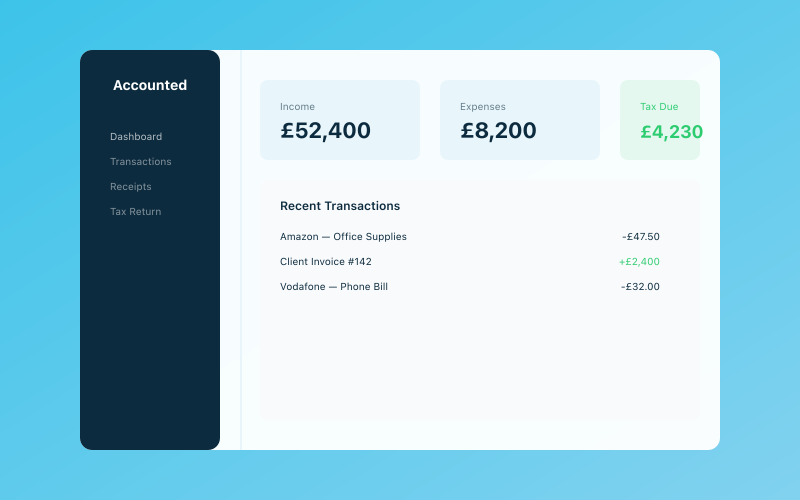 Your Accounted dashboard — income, expenses, and tax at a glance
If your billable rate is £40 per hour, 15 hours of admin represents £600 in lost earning potential every month — £7,200 a year. Even if you only recovered half that time through automation, you'd either earn an additional £3,600 or gain 90 hours of personal time. Probably a mix of both.
And that's just the financial cost. The mental cost of admin is arguably worse. Admin tasks tend to be low-energy but high-anxiety — they sit on your to-do list creating guilt, they interrupt your flow when you remember something you haven't done, and they're deeply unsatisfying even when completed. The mental health impact of administrative burden on self-employed people is well documented.
Bookkeeping and Expense Tracking
This is the big one. Bookkeeping is the administrative task that sole traders dread most, put off longest, and get into the most trouble for neglecting. It's also one of the easiest to automate.
What Automation Looks Like
Modern bookkeeping tools connect directly to your business bank account and automatically import transactions. The best ones — like Penny, the AI assistant in Accounted — go further, using artificial intelligence to categorise transactions automatically. A payment to Screwfix gets categorised as materials. A payment to BP gets categorised as fuel. A payment from a regular client gets logged as income.
This means your books are essentially kept for you, in real time, with minimal manual intervention. Instead of spending an evening a week (or a panicked weekend before your tax return is due) catching up on bookkeeping, you simply review and approve what's already been done.
Receipt Management
HMRC requires you to keep records of business expenses, and for many sole traders, this means a shoebox full of crumpled receipts. Automated receipt scanning changes this entirely. Snap a photo of a receipt with your phone, and the software extracts the date, amount, and vendor, matches it to a transaction, and files it digitally.
No more lost receipts, no more faded thermal paper, no more January panic trying to reconstruct expenses from memory. Our guide on receipt management automation covers this in detail.
Tax Calculations
Perhaps the most anxiety-inducing aspect of bookkeeping is not knowing how much tax you owe. With automated bookkeeping, your tax position updates in real time. You can see at a glance how much you've earned, what your allowable expenses are, and what your estimated tax bill will be — taking into account the £12,570 personal allowance, the 20% basic rate, and Class 2 and Class 4 National Insurance.
No surprises. No guesswork. Just clarity.
Invoicing and Payment Collection
Chasing invoices is one of the most dispiriting admin tasks. You've done the work, delivered it on time, and now you're essentially begging to be paid. Automation can't eliminate late payment entirely, but it can dramatically reduce the time you spend on it.
Automated Invoice Creation
Set up invoice templates with your branding, payment terms, and bank details. When a project is complete, generating an invoice should take seconds, not minutes. Many tools allow you to create invoices directly from time tracking entries or project records.
Automated Payment Reminders
Instead of manually emailing clients when invoices are overdue, set up automatic reminders. A polite nudge sent three days before the due date, on the due date, and at intervals after that. This takes the personal discomfort out of chasing money — it's a system, not you being pushy. Check out our guide on getting paid faster for more strategies.
Online Payment Options
Make it as easy as possible for clients to pay you. If your invoice requires a bank transfer with a long reference number, you're adding friction. Payment links, direct debit mandates, or card payment options through your invoice significantly reduce payment delays.
Scheduling and Calendar Management
If you spend time going back and forth with clients trying to find a mutually convenient time, scheduling tools will change your life.
Online Booking Systems
Tools like Calendly, TidyCal, or Cal.com allow clients to see your availability and book directly into your calendar. You set your available hours, buffer time between appointments, and any other preferences. The client picks a slot, and it appears in your calendar automatically. No emails, no phone calls, no double-bookings.
For sole traders who rely on appointments — consultants, therapists, personal trainers, tutors — this alone can save several hours a week.
Calendar Blocking
Use your calendar not just for meetings but for blocking out work time. Schedule "deep work" blocks, admin time, and personal time just as you would a client meeting. This protects your productive hours from being eroded by ad-hoc requests. Many scheduling tools can be configured to only show availability outside your blocked time.
Email Management
Email is where productivity goes to die. The average professional receives over 100 emails a day, and for sole traders juggling multiple clients, it can be even more. While you can't fully automate email (you still need to read and respond to things), you can dramatically reduce the burden.
Templates and Canned Responses
Identify the emails you send repeatedly: project confirmations, payment acknowledgements, out-of-office replies, initial enquiry responses. Create templates for each of these. Most email clients support templates or canned responses that you can insert with a couple of clicks and personalise as needed.
Filters and Rules
Set up email rules to automatically sort incoming messages. Client emails go to one folder. Newsletter and marketing emails go to another (or straight to the bin). HMRC correspondence gets flagged as urgent. This means your inbox only contains messages that actually need your attention.
Scheduled Checking
This is less about automation and more about discipline, but it's transformative. Instead of checking email continuously throughout the day (which fragments your attention and kills deep work), check it at set times — perhaps 9am, 12pm, and 4pm. Between checks, close your email client entirely. You'll be amazed at how much more you get done.
Social Media and Marketing
Many sole traders feel obligated to maintain a social media presence but find it a time-consuming distraction. Automation can help here too.
Content Scheduling
Tools like Buffer, Later, or Hootsuite allow you to create social media content in batches and schedule it to post automatically. Instead of interrupting your work to post something every day, spend an hour once a week creating and scheduling all your posts. This is a classic application of batching — a productivity technique we explore in our guide on the four-hour work week for sole traders.
Content Repurposing
Create one piece of substantial content (a blog post, a video, a case study) and then break it into smaller pieces for different platforms. A blog post can become five social media posts, a newsletter, and a short video script. This multiplies your content output without multiplying your effort.
Contracts and Proposals
If you create proposals or contracts from scratch for every new client, you're wasting time on reinventing the wheel.
Proposal Templates
Create a master proposal template that includes your standard terms, pricing structure, and process overview. For each new prospect, you only need to customise the project-specific sections. Tools like Better Proposals, Proposify, or even a well-structured Google Doc can streamline this significantly.
Digital Signatures
Eliminate the printing, signing, scanning, and posting cycle. Use digital signature tools like DocuSign, HelloSign, or the built-in signature features in many proposal tools. Contracts can be signed in seconds from a phone, dramatically reducing the time between agreement and getting started.
Building Your Automation Stack
The key to effective automation is starting small and building gradually. Don't try to automate everything at once — that's overwhelming and counterproductive. Here's a suggested approach:
Month One: Bookkeeping
This is where the biggest time savings and stress reduction lie. Set up automated bookkeeping, connect your bank account, and start letting the system categorise your transactions. This single change can save hours every week and virtually eliminate tax-time panic.
Month Two: Invoicing
Set up invoice templates and automated payment reminders. If you're currently using Word documents or PDFs created from scratch each time, this will feel like a revelation.
Month Three: Scheduling
If you have client-facing appointments, implement an online booking tool. If not, focus on calendar blocking to protect your productive time.
Month Four and Beyond
Tackle email management, social media scheduling, and proposal automation as your needs dictate. By this point, you'll have freed up enough time to actually think strategically about what to automate next.
The Goal: More Craft, Less Admin
Automation isn't about being lazy. It's about being intentional with your time and energy. Every hour you reclaim from admin is an hour you can spend on the work that made you want to be self-employed in the first place — or on rest, family, hobbies, and all the other things that make life worth living.
The technology exists to handle the vast majority of sole trader admin automatically. The only question is whether you're willing to invest a few hours upfront to save hundreds of hours over the coming years. For most people, that's an easy calculation.
Related reading:
- The Best Free Tools for Small Businesses in 2026
- Receipt Management — How to Automate It
- Digital Transformation for Small Businesses in the UK
Accounted helps UK sole traders stay on top of their bookkeeping and tax. Start your free 30-day trial at getaccounted.co.uk
Related Reading
For step-by-step guidance, see our article on How to Automate Invoicing and Get Paid Faster.
Related reading: Batch Your Bookkeeping: Spend Less Time on Admin.
Related reading: Time Tracking for Self-Employed: Best Methods.
Related reading: The One-Day-a-Week Finance System for Sole Traders.
Related reading: The Weekly Review Habit for Self-Employed.
Start your free trial and see how Accounted simplifies your bookkeeping.
Business & Operations Advisors
Our business advisors cover the practical side of running a UK sole trader business — from HMRC registration to managing growth. Content is written for real business owners in plain English, not accountants.
Ready to try Accounted?
Join UK sole traders who are simplifying their bookkeeping and tax.
Start your 14-day free trial