Cloud Accounting — How to Move Your Practice Online
If you're still running your accountancy practice primarily on desktop software — or worse, on paper and spreadsheets — you already know you need to change. Maybe Making Tax Digital has been the push, or perhaps you've simply grown tired of being tied to one computer in one office. Whatever the catalyst, moving your practice to the cloud is no longer optional. It's the foundation of a modern, efficient, scalable practice.
But knowing you need to move online and actually doing it are very different things. The process can feel daunting, especially when you're juggling client work, deadlines, and the nagging fear that something will go horribly wrong during migration. The reality, though, is that thousands of UK practices have made this transition successfully, and with a sensible plan, it's far less painful than you'd expect.
This guide walks you through the process from start to finish — no jargon, no sugar-coating, just practical advice from the trenches.
Why Cloud Matters for Your Practice
Before getting into the how, let's briefly reinforce the why. Understanding the genuine benefits helps maintain motivation when the migration gets fiddly.
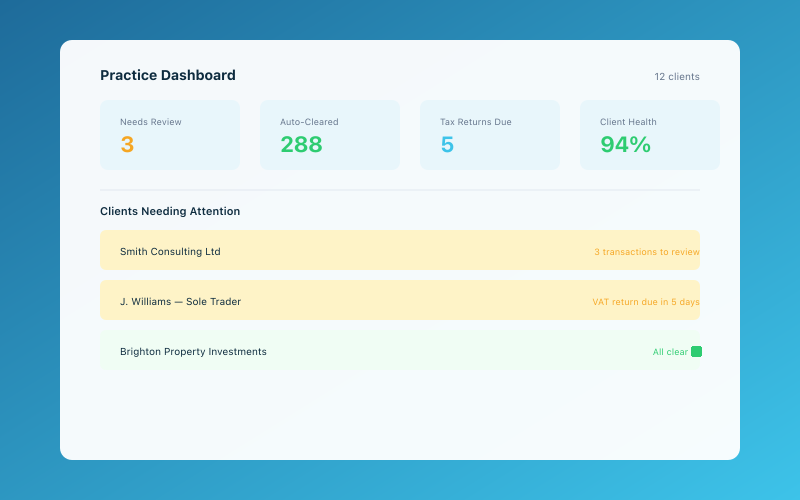 The Accounted practice dashboard — manage all your clients in one place
Access From Anywhere
This is the headline benefit, and it's genuinely transformative. Cloud software means you can work from your office, your home, a client's premises, or a coffee shop. Your team can collaborate on the same data simultaneously without emailing files back and forth or worrying about version conflicts.
Since the pandemic permanently shifted attitudes to remote and hybrid working, location-independent access has moved from "nice to have" to "essential." If you want to attract and retain good staff, offering flexible working is increasingly non-negotiable — and cloud software makes it possible.
Real-Time Collaboration
With desktop software, only one person can work on a client file at a time. With cloud software, your bookkeeper can be categorising transactions while you review the accounts and your tax manager checks the computation. No waiting, no file locking, no "Can you close that file so I can get in?"
Automatic Updates and Compliance
Cloud providers push updates automatically. When HMRC changes a form or MTD requirements evolve, the software updates itself. No more manual installations, no more checking you're on the right version, no more "the update broke something" support calls.
Bank Feeds and Automation
Cloud accounting platforms connect directly to banks, pulling in transactions automatically. Combined with AI-powered categorisation and rules, this eliminates hours of manual data entry. For your sole trader clients, tools like Accounted with its Penny AI assistant make bookkeeping almost effortless — and that means better records arriving on your desk with less chasing.
Scalability
Cloud infrastructure scales with your practice. You don't need to buy a new server when you hire another staff member. You don't need to worry about storage capacity or backup procedures. You add a user, they log in, and everything works.
Choosing Your Cloud Platform
The UK market offers several strong options for cloud accounting software. The right choice depends on your client base, your existing expertise, and your practice's specific needs.
For Client Accounting
The main players remain:
- Xero — Arguably the market leader for small businesses and practices in the UK. Strong ecosystem, excellent bank feeds, huge app marketplace.
- QuickBooks Online — Competitive alternative with good functionality and aggressive pricing.
- FreeAgent — Popular with freelancers and sole traders, particularly strong for time-based billing businesses.
- Sage Accounting — The cloud version of the venerable Sage brand, with a solid UK user base.
- Accounted — Purpose-built for UK sole traders with AI-powered categorisation through Penny, making it particularly straightforward for clients who aren't financially minded.
Many practices use multiple platforms depending on client needs. That's perfectly fine — the key is being proficient in your core platform and comfortable with the others.
For Practice Management
Your practice management software also needs to be cloud-based. For a detailed comparison of the options available in 2026, see our practice management software comparison.
For Tax and Accounts Production
Cloud options for tax and accounts production have improved enormously:
- TaxCalc — Fully cloud-capable with integrated accounts production
- Xero Tax — Integrated with the Xero ecosystem
- Taxfiler — Popular cloud-first option
- IRIS — Traditional provider with cloud migration path
Planning Your Migration
Step 1: Audit Your Current Setup
Before migrating anything, understand what you're working with:
- What software are you currently using? List every application.
- Where is your data stored? Local hard drives, a server, NAS, external drives?
- How many client files do you have?
- What file formats are involved? (Sage backup files, Excel spreadsheets, PDFs, scanned documents)
- What integrations exist between your current tools?
- Who uses each system and how?
This audit reveals the true scope of the migration. It's almost always bigger than you initially think, which is why doing it properly matters.
Step 2: Choose Your Migration Approach
There are broadly three approaches:
Big Bang — Migrate everything at once. Quickest but highest risk. Best for very small practices.
Phased Migration — Move clients across in batches over several months. Start with straightforward cases, then tackle complex ones. This is the safest approach for most practices.
Parallel Running — Run both systems simultaneously for a period. Most cautious but doubles workload temporarily.
For most small to mid-sized UK practices, the phased approach works best. It limits risk and lets you learn from early migrations before tackling complex cases.
Step 3: Clean Your Data
Migration is the perfect opportunity to clean up years of accumulated mess. Before moving data across:
- Archive inactive client files
- Delete duplicates and outdated records
- Standardise naming conventions
- Update client contact information
- Remove ex-clients who should have been purged years ago
This sounds tedious, and it is. But migrating clean data into a new system is infinitely better than migrating chaos into a new system.
Step 4: Set Up Your New Environment
Before migrating any client data:
- Create your practice structure in the new software
- Set up user accounts and permissions
- Configure default settings (chart of accounts templates, tax rates, financial year dates)
- Set up your practice's branding for client-facing documents
- Configure automated workflows and deadline tracking
- Test everything with a dummy client file
Step 5: Migrate in Batches
Start with your simplest clients — perhaps sole traders with straightforward accounts. Migrate a batch of 10-20, complete a full workflow cycle (bookkeeping through to accounts/tax return), and review the results.
Ask yourself:
- Did the data transfer correctly?
- Are the bank feeds working?
- Can the team find everything they need?
- Are the outputs (accounts, tax returns) accurate?
- What problems did we encounter?
Fix any issues before migrating the next batch. Each round should be smoother than the last.
Training Your Team
Technology changes are only as good as the people using them. Underinvesting in training is the single biggest reason cloud migrations fail.
Formal Training
Most cloud software providers offer:
- Online training courses (often free)
- Certification programmes
- Webinars and video tutorials
- Knowledge bases and help documentation
Book your team onto the relevant courses before the migration begins, not after. People need to feel confident with the new tools before they're expected to use them on live client work.
Informal Training
Beyond formal courses:
- Designate a "cloud champion" in your team who becomes the go-to person for questions
- Schedule regular show-and-tell sessions where team members share tips and tricks
- Create internal how-to guides for your practice's specific workflows
- Allow time for experimentation — people learn by doing
Expect a Productivity Dip
Be honest with your team: there will be a temporary productivity dip during the transition. Tasks that took 10 minutes in the old system might take 30 minutes while everyone gets used to the new one. This is normal and temporary. Trying to maintain full productivity during migration just creates stress and resentment.
Migrating Your Clients
Your clients need to transition too, particularly if they're moving to new bookkeeping software.
Communication Is Key
Don't just spring changes on clients. Explain:
- What's changing and why
- How it benefits them (easier record-keeping, real-time access to their numbers, better collaboration with you)
- What they need to do (sign up for new software, connect bank feeds, learn basic navigation)
- What support you'll provide during the transition
A simple email or letter covering these points, followed by a short video call or meeting to walk them through the new setup, works well for most clients. For guidance on communicating changes to clients effectively, we've covered that topic separately.
Offer Hands-On Help
Some clients will take to new software immediately. Others will struggle. Offering a 30-minute setup call where you walk them through connecting their bank feed and categorising a few transactions can save weeks of frustration.
Be Patient
Remember that for many of your clients, this is a much bigger change than it is for you. A sole trader who's been putting receipts in a folder for 20 years isn't going to become a digital-first bookkeeper overnight. Meet them where they are and celebrate small wins.
Common Pitfalls and How to Avoid Them
Trying to Replicate Your Old System Exactly
Cloud software works differently from desktop software. Trying to force it to work exactly like your old system misses the point and creates frustration. Embrace the new workflows rather than fighting them.
Neglecting Internet Connectivity
Cloud software requires reliable internet. If your office broadband is patchy, fix that before migrating. Consider a backup connection (a 4G/5G dongle) for emergencies. Test video call quality and file upload speeds.
Ignoring Security
Cloud software is generally more secure than desktop software sitting on an unpatched PC under someone's desk. But you still need to enable two-factor authentication, use strong unique passwords, control user permissions carefully, and review access regularly.
Going Too Slowly
While rushing is dangerous, going too slowly creates its own problems. Running two systems indefinitely is expensive, confusing, and demoralising. Set a realistic deadline for completing the migration and stick to it.
The MTD Dimension
Making Tax Digital continues to expand its scope, and cloud accounting is essentially a prerequisite for MTD compliance. If you haven't already moved your VAT-registered clients to MTD-compatible software, that's overdue. With MTD for Income Tax Self Assessment rolling out for sole traders and landlords, the urgency is only increasing.
Cloud software that connects directly to HMRC's systems for MTD submissions removes a significant compliance headache. For accountants, helping clients navigate MTD is also a genuine business opportunity — our piece on MTD as an opportunity for accountants explores this further.
Life After Migration
Once the migration is complete and the dust has settled, you'll wonder why you didn't do it sooner. The typical benefits practices report include:
- 30-50% reduction in time spent on data entry and manual tasks
- Significant improvement in team collaboration and communication
- Fewer missed deadlines thanks to automated tracking
- Better client relationships through real-time data access and improved communication
- Greater flexibility in where and when work gets done
- Easier scaling when adding new clients or team members
The investment in time and effort is real, but so are the returns. Cloud accounting isn't just about keeping up with technology — it's about building a practice that works better for you, your team, and your clients.
Accounted helps UK sole traders stay on top of their bookkeeping and tax. Start your free 30-day trial at getaccounted.co.uk
Related reading:
- Practice Management Software Comparison 2026
- The MTD Opportunity for Accountants
- Going Paperless — A Guide for Accountancy Practices
Related Reading
- Automating Client Onboarding — A Practical Guide for Practices
- Building a Referral Programme for Your Accounting Practice
Learn about our free accountant portal and how it saves your practice time.
Accounted gives accountants a free practice portal — manage all your clients, file to HMRC, and let Penny handle the routine work. See the accountant portal →
Editorial & Research
The Accounted editorial team covers software comparisons, technology, and the tools UK sole traders need to run their businesses efficiently. All software comparisons are based on independent research and publicly available pricing.
Ready to try Accounted?
Join UK sole traders who are simplifying their bookkeeping and tax.
Start your 14-day free trial