Practice Management Software Comparison 2026
Running an accountancy practice without proper practice management software in 2026 is a bit like trying to navigate London without a map — technically possible, but you'll waste an awful lot of time going in circles.
The right software ties everything together: client records, deadlines, workflows, billing, document management, and team collaboration. The wrong software (or worse, no software at all) leads to missed deadlines, duplicated effort, and that horrible Sunday evening feeling when you remember something you've forgotten.
But with so many options on the market, choosing the right platform can feel overwhelming. They all claim to be the best, the most intuitive, the most feature-rich. So let's cut through the marketing speak and look at what actually matters when selecting practice management software for a UK accountancy practice in 2026.
What Practice Management Software Actually Does
Before diving into comparisons, it's worth being clear about what we mean by practice management software. It's not accounting software (that's what your clients use). It's the software you use to run your practice as a business.
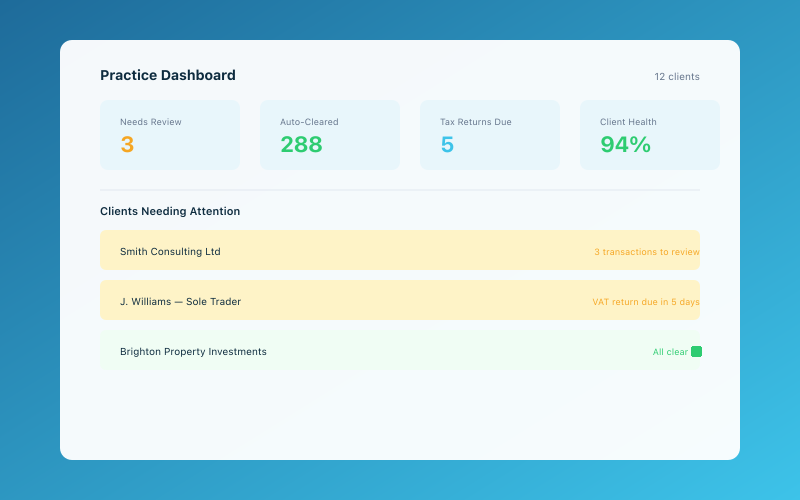 The Accounted practice dashboard — manage all your clients in one place
Core functions typically include:
- Client relationship management (CRM) — Storing client details, contact history, and notes
- Workflow and task management — Tracking jobs through stages from receipt to completion
- Deadline tracking — Monitoring statutory filing deadlines across your entire client base
- Time recording — Logging time spent on client work for billing or analysis
- Billing and invoicing — Generating fee notes and tracking payments
- Document management — Storing and organising client documents securely
- Team management — Assigning work, monitoring capacity, and tracking progress
- Reporting — Understanding profitability, utilisation, and practice performance
Some platforms do all of these well. Others excel in certain areas and fall short in others. The trick is knowing which features matter most to your practice.
The Key Players in 2026
Karbon
Karbon has established itself as one of the leading cloud-based practice management platforms for accountants globally, and its UK presence has grown significantly.
Strengths:
- Excellent workflow automation with customisable templates
- Strong email integration that links correspondence to client records automatically
- Triage feature for managing incoming work and emails
- Clean, modern interface that's genuinely pleasant to use
- Good team collaboration tools with internal comments and mentions
- Regular feature updates and responsive development team
Considerations:
- Pricing can be steep for smaller practices (starts around £40-50 per user per month)
- Learning curve is moderate — expect a few weeks before your team is fully comfortable
- Some UK-specific features like Companies House integration are less developed than competitors
- No built-in accounts production or tax computation
Karbon works best for practices with 3-50 staff who want a modern, workflow-first approach to practice management.
Senta
Senta is built specifically for UK and Irish accountants, which gives it some distinct advantages when it comes to understanding how practices here actually work.
Strengths:
- Purpose-built for UK accountancy practices
- Automated client communications based on job status
- Companies House and HMRC integration
- Excellent deadline tracking with automatic population of filing dates
- Portal for client document exchange
- Competitive pricing, especially for smaller practices
Considerations:
- Interface feels less polished than some competitors
- Workflow customisation is good but not as flexible as Karbon
- Mobile experience could be stronger
- Reporting capabilities are adequate but not best-in-class
Senta is a strong choice for UK-focused practices that want something purpose-built without the price tag of larger platforms.
TaxCalc Practice Management
TaxCalc has expanded well beyond tax software into a comprehensive practice management suite, and the integration between their products is a genuine selling point.
Strengths:
- Tight integration with TaxCalc accounts production and tax software
- Solid workflow management with good template library
- Client portal included
- UK-focused development team that understands HMRC requirements
- Competitive pricing, particularly if you're already using TaxCalc products
Considerations:
- Most valuable if you're already in the TaxCalc ecosystem
- Interface is functional rather than beautiful
- Less suited to practices that use a variety of third-party tools
- Email integration not as sophisticated as Karbon
If you're a TaxCalc practice, this is worth serious consideration. If you're not, the integration benefits are less compelling.
Pixie
Pixie has gained a loyal following among smaller UK practices, positioning itself as an affordable, easy-to-use alternative to the bigger platforms.
Strengths:
- Very affordable pricing (from around £25 per user per month)
- Quick to set up and learn
- Good proposal and engagement letter functionality built in
- Automated client onboarding workflows
- UK-focused with Companies House integration
Considerations:
- Feature set is lighter than Karbon or Senta
- Less suitable for larger practices with complex workflow needs
- Reporting is fairly basic
- Fewer integrations with third-party tools
Pixie is ideal for sole practitioners and small practices (1-5 people) who want something simple and affordable that covers the essentials.
Xero Practice Manager (XPM)
If your practice is heavily invested in the Xero ecosystem, XPM is the obvious choice — though "obvious" doesn't always mean "best."
Strengths:
- Seamless integration with Xero HQ and Xero accounting software
- Solid time recording and billing features
- Good job management and workflow tracking
- Free if you're a Xero partner (though there are some conditions)
Considerations:
- Interface feels dated compared to newer competitors
- Can be clunky to navigate, especially for complex workflows
- Best suited to Xero-only practices
- Client communication features are limited
- Reporting could be more intuitive
XPM is a sensible choice if Xero is central to your practice, but if you use a mix of accounting software for different clients, you might find it limiting.
What to Look For When Choosing
Integration With Your Existing Tools
No practice management tool exists in isolation. Think about what it needs to talk to:
- Your accounting and tax software
- Email (Outlook, Gmail)
- Cloud storage (Google Drive, Dropbox, OneDrive)
- Communication tools (Slack, Teams)
- Client-facing tools like Accounted or other bookkeeping software your clients use
The fewer manual workarounds you need, the more time you'll save. Check the integrations list carefully before committing.
Workflow Flexibility
Every practice works differently. Some follow strict sequential workflows; others are more fluid. Make sure the software can adapt to how you actually work, rather than forcing you into someone else's process.
Key questions to ask:
- Can you create custom workflow templates?
- Can different job types follow different workflows?
- Can you set up automated reminders and escalations?
- Can team members collaborate on jobs without stepping on each other?
Scalability
Think about where your practice will be in three years, not just where it is today. Switching practice management software is painful and disruptive, so choose something that can grow with you. If you're planning to expand, our guide to growing your accountancy practice covers the broader strategy.
UK-Specific Features
This is crucial and often overlooked. A platform built for the US or Australian market might be excellent software, but it won't understand HMRC deadlines, Companies House filing requirements, UK anti-money laundering regulations, or the specific rhythms of UK tax year compliance.
Look for:
- Automatic population of UK filing deadlines (SA, CT, VAT, CIS, etc.)
- Companies House integration
- HMRC agent services integration
- Understanding of UK business structures (sole trader, partnership, LLP, limited company)
- Support for UK-specific compliance requirements
Cloud vs Desktop — Is There Still a Debate?
In 2026, the answer is overwhelmingly cloud. Desktop practice management software still exists, but the advantages of cloud are now too significant to ignore:
- Access from anywhere — Essential for hybrid and remote working
- Automatic updates — No more manual installations or version conflicts
- Real-time collaboration — Multiple team members working on the same data simultaneously
- Automatic backups — No more worrying about server failures
- Lower upfront costs — Monthly subscriptions rather than large capital expenditure
If you're still running desktop software, the transition to cloud is worth prioritising. For a deeper look at making the switch, see our guide on moving your practice online.
Pricing Realities
Practice management software pricing varies enormously, and the advertised price isn't always what you'll end up paying. Watch out for:
- Per-user pricing that escalates quickly as your team grows
- Tiered features where the functionality you actually need is locked behind a higher tier
- Implementation and training costs that aren't included in the monthly fee
- Data migration charges for importing your existing client data
- Add-on costs for features like client portals or advanced reporting
As a rough guide in 2026:
- Budget options (Pixie, basic tiers): £20-30 per user per month
- Mid-range (Senta, TaxCalc PM): £30-50 per user per month
- Premium (Karbon, higher tiers): £45-70 per user per month
For a sole practitioner, even the premium options are modest. For a 20-person practice, the difference between budget and premium is significant — potentially £10,000+ per year. Make sure the extra features justify the cost.
Making the Switch
Changing practice management software is disruptive, but it doesn't have to be traumatic. Most providers offer:
- Free trial periods (typically 14-30 days)
- Data migration assistance
- Onboarding support and training
- Phased implementation options
Our advice: don't try to migrate everything at once. Start with new clients and active jobs, then backfill historical data as time allows. Run both systems in parallel for a month or two if possible.
The worst thing you can do is stay with software that isn't working simply because switching feels like too much effort. The short-term pain of migration is almost always worth the long-term gain in efficiency.
Our Recommendation
There's no single "best" practice management software — it depends entirely on your practice's size, budget, existing tech stack, and working style. But if we had to generalise:
- Sole practitioners on a budget: Pixie
- Small UK practices wanting purpose-built tools: Senta
- Growing practices wanting best-in-class workflows: Karbon
- TaxCalc-centric practices: TaxCalc Practice Management
- Xero-centric practices: Xero Practice Manager
Whatever you choose, the most important thing is that you actually use it consistently. The fanciest software in the world is worthless if half your team is still tracking jobs on sticky notes. For thoughts on how to price your services effectively once your practice is running smoothly, that's another conversation worth having.
Accounted helps UK sole traders stay on top of their bookkeeping and tax. Start your free 30-day trial at getaccounted.co.uk
Related reading:
- Cloud Accounting — How to Move Your Practice Online
- How to Grow Your Accountancy Practice in 2026
- Why Accountants Are Switching to Accounted
Further Reading
- The Institute of Chartered Accountants in England and Wales (ICAEW) provides professional guidance for accountants.
- Stay up to date with Making Tax Digital requirements from HMRC.
Related Reading
- CPD for Accountants — Staying Current Without Going Mad
- What Your Accountant Really Thinks About Your Receipts
Accounted gives accountants a free practice portal — manage all your clients, file to HMRC, and let Penny handle the routine work. See the accountant portal →
Editorial & Research
The Accounted editorial team covers software comparisons, technology, and the tools UK sole traders need to run their businesses efficiently. All software comparisons are based on independent research and publicly available pricing.
Ready to try Accounted?
Join UK sole traders who are simplifying their bookkeeping and tax.
Start your 14-day free trial