Automating Client Onboarding — A Practical Guide for Practices
Every accountant knows the feeling. A new client says yes, and then begins the tedious back-and-forth: collecting ID documents, chasing engagement letters, setting up software access, requesting bank details, and answering the same introductory questions you've answered a hundred times before. By the time everything's in place, weeks have passed and both you and the client are already a bit weary of each other.
Onboarding is one of the most important processes in any accounting practice — it sets the tone for the entire relationship — but it's also one of the most repetitive and time-consuming. That makes it a prime candidate for automation.
In this guide, we'll walk through a practical approach to automating your client onboarding, covering what to automate, what to keep personal, and the tools that can help.
Why Onboarding Matters More Than You Think
First impressions count. The onboarding experience is the first real test of what it's like to work with your practice, and clients form opinions quickly. A smooth, professional onboarding process signals competence and efficiency. A clunky one — chasing documents by email, losing track of what's been received, sending the same form three times — signals the opposite.
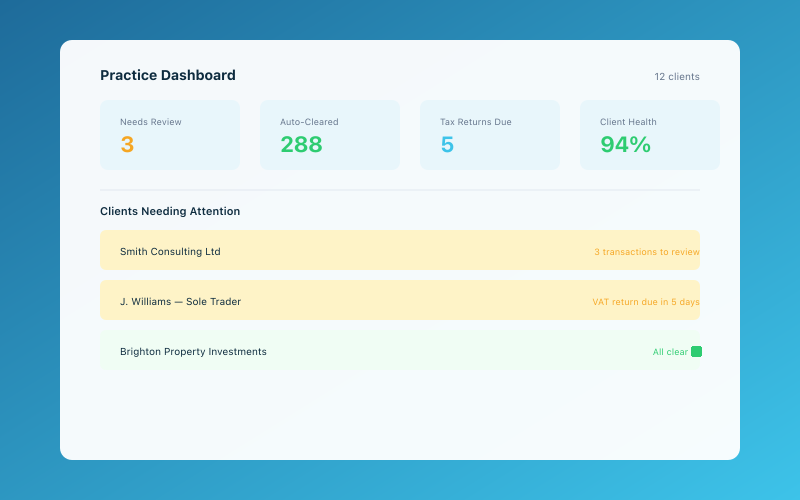 The Accounted practice dashboard — manage all your clients in one place
Beyond client perception, there's a hard cost to inefficient onboarding. If it takes your team five hours to onboard a single client, and you take on 50 new clients a year, that's 250 hours — more than six working weeks — spent on admin that adds no direct value. Automate even half of that and you've freed up meaningful capacity.
There's also the compliance angle. Anti-money laundering (AML) checks, engagement letters, data protection notices — these aren't optional, and forgetting one can have serious consequences. An automated workflow ensures nothing gets missed.
For a broader look at onboarding best practices, our guide on how to onboard new clients is a useful starting point.
What Can (and Should) Be Automated
Not everything in onboarding should be automated. Some things benefit enormously from a personal touch. The trick is knowing which is which.
Automate these:
-
Welcome emails and introductory information. Once a client signs up, trigger an automated welcome email that introduces your team, explains what happens next, and sets expectations for the onboarding timeline. This can be sent immediately, without anyone lifting a finger.
-
Document collection. Use a portal or form to collect ID documents, proof of address, business information, and bank details. Tools like Xero's client portal, Karbon, Senta, or even a well-configured Google Form can handle this. The client uploads everything in one place, and you get notifications when items arrive.
-
Engagement letters. Templated engagement letters that auto-populate with client details can be sent for e-signature via tools like DocuSign, Adobe Sign, or PandaDoc. No more printing, posting, and chasing wet signatures.
-
AML checks. Use an automated verification service to run ID checks against the client's submitted documents. Services like SmartSearch, Credas, or NorthRow can verify identity in minutes rather than days.
-
Software invitations. If you use cloud accounting software, you can often automate the process of creating client accounts and sending login invitations. Many platforms have APIs or integration features that can trigger this automatically when a new client record is created in your practice management system.
-
Task creation and assignment. When a new client comes in, there's a predictable set of tasks that need completing: set up the client file, assign a manager, schedule an initial meeting, request prior year accounts, etc. Automate the creation of these tasks in your practice management tool.
-
Follow-up reminders. If a client hasn't submitted their documents after a few days, an automated reminder email is more reliable than hoping someone on your team remembers to chase them.
Keep these personal:
-
The initial consultation. The first proper conversation should be human. This is where you understand the client's needs, answer their questions, and build rapport. No automation can replace this.
-
Reviewing submitted information. Someone on your team should review the documents and information submitted to check for accuracy, completeness, and any red flags. Automation can collect the data; a human should verify it.
-
Setting the scope of work. Whilst engagement letter templates save time, the actual scope of services should be discussed and agreed with the client personally. One-size-fits-all scopes lead to scope creep and unhappy clients later.
Building an Automated Onboarding Workflow
Here's a practical step-by-step workflow you can implement in your practice. You don't need to build everything at once — start with the highest-impact items and add layers over time.
Step 1: Trigger The workflow starts when a prospect becomes a client. This might be when they verbally accept your proposal, when they sign a letter of engagement, or when you mark them as "accepted" in your CRM. Define a clear trigger point.
Step 2: Welcome sequence Immediately send a welcome email with:
- A brief welcome message
- An outline of next steps
- A link to your document collection portal
- Expected timelines
If you have a more involved onboarding pack, consider sending it as a sequence of two or three emails rather than one overwhelming message.
Step 3: Document collection Direct the client to an online portal where they can upload:
- Photo ID
- Proof of address
- Business registration details (UTR, Company number, etc.)
- Bank statements or read-only access credentials
- Prior year accounts and tax returns
- Any other information relevant to their situation
As documents are uploaded, notify the assigned team member. If documents are outstanding after three days, trigger an automated reminder.
Step 4: Compliance checks Once ID documents are received, run AML verification automatically. If the check passes, mark the compliance step as complete. If it flags an issue, route it to a team member for manual review.
Step 5: Engagement letter Send the engagement letter for e-signature. Auto-populate it with the client's name, company details, agreed services, and fees. Once signed, file it automatically in the client's document store.
Step 6: Software setup Create the client's account in your accounting platform and send them a login invitation. If you use Accounted for your sole trader clients, you can get them set up quickly and Penny will guide them through connecting their bank and categorising their first transactions.
Step 7: Internal setup Automatically create the client file in your practice management system. Assign a manager and preparer. Create a standard set of onboarding tasks. Schedule the first review meeting.
Step 8: Handover to ongoing service Once all onboarding steps are complete, transition the client into your regular workflow. This might mean adding them to your MTD quarterly submission schedule, setting up recurring reminders for their filing deadlines, or scheduling their first bookkeeping review.
Choosing the Right Tools
You don't need expensive enterprise software to automate onboarding. Here are some practical options at different price points:
Practice management platforms — Karbon, Senta, TaxCalc Practice Management, and others have built-in workflow automation features specifically designed for accounting practices. If you're already using one of these, start there. Our practice management software guide compares the main options.
Email automation — Mailchimp, ConvertKit, or even your email platform's built-in sequences can handle welcome emails and follow-up reminders. Keep it simple — you don't need a sophisticated marketing funnel, just a few well-timed messages.
Document collection — Dedicated portals like FibreCRM or SmartVault work well for accounting practices. For a simpler setup, a shared Google Drive folder with a checklist works too.
E-signatures — DocuSign, Adobe Sign, SignRequest, or Xero's built-in signature feature for engagement letters.
Connectors — Tools like Zapier or Make (formerly Integromat) can connect different platforms together. For example, when a client is marked as "active" in your CRM, Zapier can automatically create a Trello card, send a welcome email, and create a folder in your document storage.
Measuring the Impact
Once you've automated your onboarding, it's worth measuring the results so you can refine the process over time. Track:
- Time to complete onboarding. How long from initial signup to having everything in place? The goal is to reduce this.
- Number of manual touchpoints. How many times does someone on your team need to intervene? Fewer is better (up to a point).
- Document completion rate. What percentage of clients submit everything on the first request vs. needing reminders?
- Client feedback. Ask new clients about their onboarding experience. A quick survey after the first month can reveal pain points you hadn't noticed.
- Staff time spent. Track how many hours your team spends on onboarding per client. Compare this to your pre-automation baseline.
Common Pitfalls to Avoid
A few things we've seen go wrong when practices automate onboarding:
Over-automating. If every interaction feels robotic, clients will feel like a number rather than a valued customer. Keep the personal touches where they matter — particularly the first meeting and any situation where the client has questions or concerns.
Not testing the process. Before you roll out your automated workflow to real clients, test it yourself. Sign up as a fake client and go through every step. You'll be surprised how many broken links, confusing instructions, and missing steps you find.
Ignoring edge cases. Your standard workflow won't fit every client. Some clients will be switching from another accountant and have complex histories. Others might be starting a brand-new business with nothing to transfer. Build in flexibility for non-standard situations.
Forgetting to update. Tax rules change, software updates, and your own processes evolve. Review your automated workflows at least once a year to make sure everything's still current and accurate.
For practices looking to reduce client drop-off during onboarding and beyond, our article on reducing client churn covers retention strategies that complement a good onboarding process.
Start Small, Build Up
You don't need to automate everything overnight. Pick the one part of your onboarding that takes the most time or causes the most friction — for many practices, that's document collection — and automate that first. Once it's working smoothly, add the next layer. Within a few months, you'll have a streamlined process that saves hours, reduces errors, and makes a great first impression.
The practices that get this right aren't just more efficient — they're more attractive to prospective clients and more enjoyable to work in. That's a win all round.
Related Reading
Learn about our free accountant portal and how it saves your practice time.
Accounted helps UK sole traders stay on top of their bookkeeping and tax. Start your free 30-day trial at getaccounted.co.uk.
Accounted gives accountants a free practice portal — manage all your clients, file to HMRC, and let Penny handle the routine work. See the accountant portal →
Editorial & Research
The Accounted editorial team covers software comparisons, technology, and the tools UK sole traders need to run their businesses efficiently. All software comparisons are based on independent research and publicly available pricing.
Ready to try Accounted?
Join UK sole traders who are simplifying their bookkeeping and tax.
Start your 14-day free trial