How to Keep Digital Records That HMRC Will Accept
Digital record keeping is no longer optional for many sole traders and landlords in the UK. With Making Tax Digital for Income Tax (MTD for ITSA) rolling out from April 2026, HMRC is mandating that qualifying businesses maintain their financial records digitally and submit quarterly updates through compatible software.
But what exactly does "digital records" mean in practice? What does HMRC expect you to keep, how should you store it, and what happens if your records aren't up to scratch? This guide gives you the full picture.
What Does HMRC Mean by "Digital Records"?
When HMRC talks about digital records, they're not just saying "type your receipts into a spreadsheet." The requirements are more specific than that.
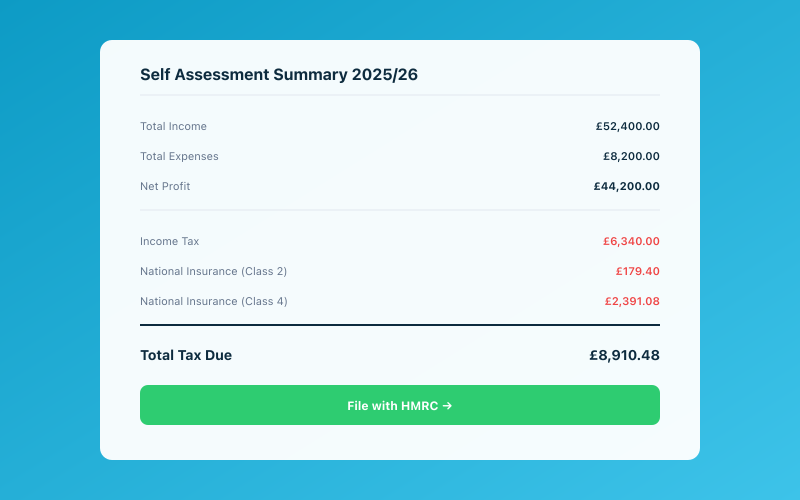 Your Accounted dashboard shows your real-time tax position
Under MTD, your digital records must be maintained using functional compatible software — that is, software that can connect to HMRC's systems and submit data electronically. The records must be created and stored digitally from the point of entry. You can't keep paper records during the year and then type them up at year-end.
The key principle is that there should be a digital link from your source records (bank transactions, invoices, receipts) through to the figures submitted to HMRC. No manual re-keying of data between systems is allowed — if data moves from one digital tool to another, it must do so electronically (via API, import/export, or automated feed).
For a broader overview of the MTD requirements, see our Making Tax Digital 2026 guide.
What Records You Must Keep Digitally
HMRC requires you to keep digital records of the following for each business you operate:
Income Records
For every transaction where your business receives money, you need to record:
- The date of the transaction.
- The amount received.
- The category of income (for example, sales, fees, commission, or other trading income).
You don't need to record the name of every individual customer for each transaction. HMRC wants summary totals by category, not a line-by-line breakdown of who paid you what — though having that detail is obviously good practice.
Expense Records
For every business expense, you need to record:
- The date of the purchase or payment.
- The amount spent.
- The category of expense (for example, office costs, travel, stock, professional fees, and so on).
Again, HMRC primarily wants categorised totals rather than individual supplier details in your quarterly submissions. But you should keep the underlying evidence (receipts, invoices) in case HMRC asks to see them.
Other Mandatory Records
Beyond income and expenses, you'll also need digital records of:
- Capital allowances claimed on business assets.
- Goods or services for personal use taken from the business.
- Any adjustments to your accounts (for example, for accruals or prepayments if you use accrual accounting).
The Categories HMRC Expects
HMRC has specified a set of standard categories for income and expenses. Your software should map your transactions to these categories automatically. The main expense categories include:
- Cost of goods sold / materials.
- Construction industry subcontractor costs.
- Staff costs (wages, salaries, NI).
- Office, property, and equipment costs.
- Car, van, and travel expenses.
- Telephone, fax, stationery, and other office costs.
- Professional and legal fees.
- Interest on bank and other loans.
- Bank, credit card, and other financial charges.
- Irrecoverable debts.
- Accountancy, legal, and other professional fees.
- Depreciation and loss on sale of assets.
- Other business expenses.
If you're using MTD-compatible software like Accounted, these categories are built in. The software will prompt you to categorise transactions into the correct buckets, and many transactions will be categorised automatically based on rules or AI analysis.
Digital Links — The Chain Must Be Unbroken
One of the most misunderstood aspects of MTD record keeping is the concept of digital links. HMRC requires that data flows digitally from its original source all the way through to the quarterly submission. This means:
- If your bank feeds transactions directly into your software, that's a digital link.
- If you export data from one system (say, a payment processor) and import it into your accounting software, that's a digital link.
- If you copy a number from a PDF invoice and type it into a spreadsheet, that's not a digital link — that's manual re-keying, and it breaks the chain.
What About Receipts?
Here's where it gets practical. When you receive a paper receipt, you can digitise it by:
- Photographing it with your phone using receipt-scanning software.
- Scanning it with a dedicated scanner.
Once the receipt is digitised, the data extracted from it (date, amount, supplier) becomes part of your digital records. The original paper receipt can be discarded if you have a clear digital copy, though many people prefer to keep the original as backup.
The important thing is that once data enters your digital system, it stays digital. Don't scan a receipt into your software and then manually re-enter the figures into a separate spreadsheet for your quarterly submission.
How Long Must You Keep Digital Records?
HMRC's standard requirement is that you must keep your records for at least five years after the 31 January submission deadline for the relevant tax year. For the 2025/26 tax year (deadline 31 January 2027), that means keeping records until at least 31 January 2032.
This applies to both the digital records in your software and any underlying evidence like scanned receipts, invoices, and bank statements.
Make sure your software provider's data retention policy covers this period. If you ever decide to switch software or close your account, export your data first. You don't want to discover that your old provider deleted your records after you cancelled your subscription.
For more detail on HMRC's record keeping expectations, see our guide on digital record keeping requirements.
What Counts as "Functional Compatible Software"?
HMRC uses the term "functional compatible software" to describe the tools that meet MTD requirements. To qualify, the software must be able to:
- Record and store digital records of income and expenses.
- Provide HMRC with information and returns through the MTD API (quarterly updates, End of Period Statements, and the Final Declaration).
- Receive information from HMRC through the API (tax calculations, for example).
HMRC publishes a list of recognised software on gov.uk. If the software you're considering isn't on this list, it doesn't meet the requirements — even if it's perfectly good bookkeeping software in every other respect.
Can You Use More Than One Piece of Software?
Yes, but they must be digitally linked. For example, you might use one tool for receipt scanning and another for your main bookkeeping. That's fine, as long as data passes between them electronically rather than being manually re-entered.
Some people use a spreadsheet for certain calculations and then feed the results into their MTD software. This is acceptable provided the transfer is done through a digital link (like a CSV import), not by copy-pasting or retyping figures.
Common Record Keeping Mistakes
Mixing Personal and Business Transactions
If you use the same bank account for personal and business spending, your digital records can quickly become a mess. Ideally, use a dedicated business bank account. If that's not possible, make sure you clearly flag which transactions are business-related in your software.
Not Recording Cash Transactions
Cash payments are easy to forget — there's no bank feed to remind you. But HMRC still expects you to record cash income and expenses. Get into the habit of recording cash transactions as they happen, either by entering them directly into your software or photographing receipts immediately.
Leaving Categorisation Until Year-End
One of the biggest advantages of MTD is that it forces you to stay on top of your records throughout the year. Don't fall into the trap of dumping all your transactions in and planning to categorise them later. Quarterly submissions mean you need your records in order every three months.
Relying on Memory
"I'll remember what that transaction was for" is a dangerous assumption. Categorise transactions when they're fresh in your mind. If you leave it three months, you'll be staring at a list of transactions with no idea what half of them were for.
Not Backing Up
Digital records are only useful if they still exist when you need them. Make sure your data is backed up — most cloud-based software handles this automatically, but if you're using desktop software or spreadsheets, set up regular backups.
What Happens If Your Records Aren't Compliant?
If HMRC determines that your digital records don't meet the requirements, the consequences can include:
- Penalties for failure to keep adequate records — up to £3,000 per tax year.
- Penalties for inaccurate returns — if poor records lead to incorrect figures being submitted.
- Additional scrutiny and potential compliance checks.
In the early stages of MTD rollout, HMRC has indicated a "soft landing" period where they'll focus on helping businesses get it right rather than immediately penalising errors. But this leniency won't last forever, so it's worth getting your systems in order sooner rather than later.
Practical Steps to Get Compliant
If you're not yet set up for digital record keeping under MTD, here's a practical checklist:
- Choose MTD-compatible software from HMRC's approved list.
- Connect your bank account so transactions flow in automatically.
- Set up expense categories that match HMRC's requirements (most software does this for you).
- Start recording transactions digitally from the beginning of the tax year.
- Photograph receipts as you receive them — don't let paper pile up.
- Review and categorise transactions regularly — weekly is ideal, monthly at minimum.
- Make your first quarterly submission on time to establish the habit.
- Keep records for at least five years after the relevant submission deadline.
Penny, the AI assistant built into Accounted, can handle much of this automatically — categorising transactions, flagging missing receipts, and keeping your records in the format HMRC requires. If you've been putting off the switch to digital record keeping, it's less painful than you think.
Related reading:
Accounted helps UK sole traders stay on top of their bookkeeping and tax. Start your free 30-day trial at getaccounted.co.uk
Related Reading
- The Making Tax Digital Deadline — A Clear, Simple Guide
- MTD and Excel — Can You Still Use Spreadsheets?
See how Accounted handles MTD and start your free trial.
Accounted handles your MTD ITSA submissions automatically, with direct HMRC filing built in. See how MTD works in Accounted →
Tax & Compliance Specialists
Our tax specialists have decades of combined experience in UK sole trader and small business taxation, MTD compliance, and HMRC submissions. All content is reviewed against current HMRC guidance before publication and updated quarterly to reflect legislative changes.
Ready to try Accounted?
Join UK sole traders who are simplifying their bookkeeping and tax.
Start your 14-day free trial