Self Assessment for the First Time — A Complete Walkthrough
Filing a Self Assessment tax return for the first time can feel overwhelming. There's a lot of jargon, a lot of forms, and the nagging worry that you'll get something wrong and end up in trouble with HMRC. But here's the reassuring truth: millions of people do this every year, and once you understand the process, it's far more straightforward than it looks.
This guide will walk you through every step — from registering with HMRC to hitting the submit button — so you can file your first Self Assessment return with confidence.
Do You Actually Need to File a Self Assessment Return?
Before we get into the how, let's make sure you actually need to do this. Not everyone does. You'll need to file a Self Assessment return if any of the following apply to you:
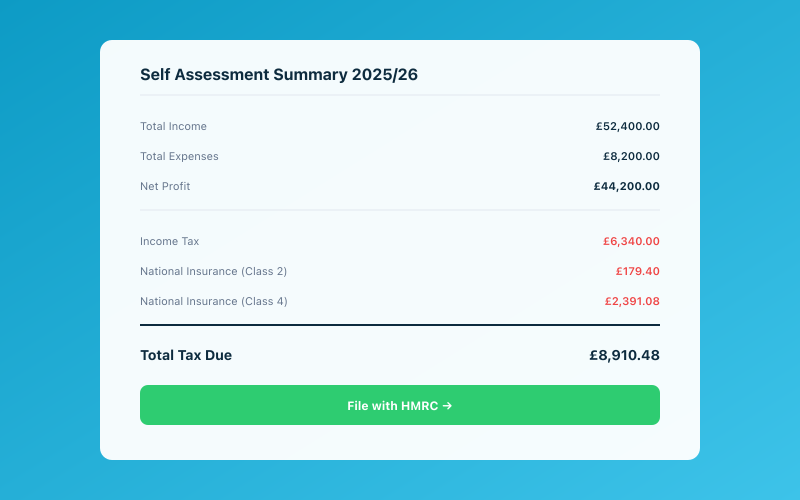 Your Accounted dashboard shows your real-time tax position
- You're self-employed as a sole trader and earned more than £1,000 in the tax year.
- You're a partner in a business partnership.
- You had untaxed income — for example, from renting out property, investments, or savings interest above your allowance.
- You earned more than £150,000 in a year (even if all your income was taxed through PAYE).
- You need to claim certain tax reliefs, such as for pension contributions.
- You received foreign income that needs to be declared.
- You're a company director (unless you're a director of a non-profit organisation with no income from the role).
If you're employed and all your tax is handled through PAYE with no other income, you probably don't need to file. But if you've started a side hustle or gone freelance, Self Assessment almost certainly applies. Check out our guide on tax when you're employed and self-employed for more on this.
Step 1: Register with HMRC
You can't file a return until you're registered for Self Assessment. If you've never done this before, here's what to do.
Registering as Self-Employed
If you're newly self-employed, you need to register with HMRC by 5 October following the end of the tax year in which you started trading. So if you started self-employment any time between 6 April 2025 and 5 April 2026, you need to register by 5 October 2026.
You can register online at gov.uk. You'll need:
- Your National Insurance number.
- Your name, date of birth, and address.
- Your business name, address, and the date you started trading.
- A contact phone number and email address.
Getting Your UTR Number
Once you've registered, HMRC will send you a Unique Taxpayer Reference (UTR) number by post. This is a 10-digit number that identifies you for Self Assessment purposes. It usually arrives within 10 working days, though it can take longer during busy periods.
Keep this number safe — you'll need it every time you file a return or contact HMRC about your tax.
Setting Up Your Government Gateway Account
To file online (which we strongly recommend — more on that shortly), you'll also need a Government Gateway account. You can create one at gov.uk, and HMRC will send you an activation code by post. This is a separate step from registering for Self Assessment, so factor in the extra waiting time.
All told, the registration process can take two to three weeks, which is why it's important not to leave it until the last minute.
Step 2: Understand the Tax Year and Key Dates
The UK tax year runs from 6 April to 5 April the following year. So the 2025/26 tax year covers 6 April 2025 to 5 April 2026.
Here are the key deadlines for the 2025/26 tax year:
- 5 October 2026: Deadline to register for Self Assessment if you're new.
- 31 October 2026: Deadline for paper returns (though there's really no reason to file on paper these days).
- 31 January 2027: Deadline for online returns and for paying any tax you owe.
Missing these deadlines means automatic penalties, so mark them in your calendar. Our Self Assessment deadlines guide has a full breakdown of what happens if you're late.
Step 3: Gather Your Records
Before you sit down to fill in your return, you'll need to have your financial records in order. This is where good bookkeeping throughout the year pays dividends.
What You'll Need
- Income records: Invoices, bank statements, P60 or P45 from any employment, records of any other income (rental, investments, etc.).
- Expense records: Receipts, bank statements showing business purchases, mileage logs, and records of any working-from-home costs.
- National Insurance contributions: Details of any Class 2 and Class 4 NI you've already paid or owe.
- Pension contributions: If you've made personal pension contributions, you may be able to claim tax relief.
- Gift Aid donations: Records of charitable donations made through Gift Aid.
Keeping Good Records
HMRC requires you to keep records for at least five years after the 31 January submission deadline for the relevant tax year. That means records for the 2025/26 tax year should be kept until at least 31 January 2032.
If you've been keeping your records in a tool like Accounted throughout the year, you'll find that much of this information is already organised and ready to go. If you've been working from a carrier bag full of receipts, now's the time to get things sorted. Our guide on keeping business records for HMRC explains exactly what you need to hold on to.
Step 4: Fill In Your Return
Now for the main event. When you log in to file your return online, HMRC will ask you a series of questions to determine which sections of the return you need to complete. You won't see every section — only the ones relevant to your situation.
The Main Sections
Here's a broad overview of what you'll encounter:
Personal details: Your name, address, UTR number, and National Insurance number. Most of this will be pre-filled if you're filing online.
Employment income: If you were employed during the tax year, enter the figures from your P60. HMRC often pre-fills this section too, but always double-check.
Self-employment income: This is where you declare your business income and expenses. You'll need your total turnover (all the money your business received) and your total allowable expenses. The difference is your taxable profit.
Other income: Rental income, savings interest, dividends, foreign income — anything else that needs declaring goes here.
Tax reliefs: Pension contributions, Gift Aid donations, and any other reliefs you're entitled to claim.
Understanding the Tax Bands
For the 2025/26 tax year, the key figures are:
- Personal allowance: £12,570 — this is the amount you can earn before paying any income tax.
- Basic rate (20%): Applies to taxable income between £12,571 and £50,270.
- Higher rate (40%): Applies to taxable income between £50,271 and £125,140.
- Additional rate (45%): Applies to taxable income above £125,140.
Your return will calculate your tax liability based on these bands. Don't worry about doing the maths yourself — the online system handles it.
National Insurance
As a self-employed person, you'll also pay National Insurance:
- Class 2 NI: A flat rate of £3.45 per week if your profits exceed the Small Profits Threshold of £6,725.
- Class 4 NI: 6% on profits between £12,570 and £50,270, and 2% on profits above £50,270.
These are calculated as part of your Self Assessment and added to your overall bill.
Step 5: Submit and Pay
Once you've filled in all the relevant sections, the system will show you a summary of your return and a tax calculation. Review this carefully.
Submitting
If everything looks correct, click submit. You'll receive an acknowledgement from HMRC confirming that your return has been received. Save this for your records.
Paying Your Tax Bill
Any tax you owe for the 2025/26 tax year is due by 31 January 2027. You can pay by:
- Direct Debit (set up through your HMRC account).
- Online bank transfer.
- Debit card through HMRC's website.
- At your bank or building society.
- By cheque (allow extra time for postal delivery).
If your bill is more than £1,000, you may also need to make payments on account — advance payments towards next year's tax. These are due on 31 January and 31 July. Our guide on payments on account explains how they work.
Step 6: What to Do If You're Stuck
First-time filers often hit a point where they're not sure what to enter or how to categorise something. Here's what to do.
Use HMRC's Guidance
HMRC provides help text throughout the online return. Click the question mark icons next to each field for explanations. Their website also has detailed guidance notes for each section of the return.
Consider Professional Help
If your tax affairs are complicated — multiple income sources, overseas income, or large sums involved — it might be worth speaking to an accountant, at least for your first return. They can make sure everything is set up correctly and give you confidence going forward.
Use Software to Simplify the Process
Bookkeeping software like Accounted can track your income and expenses throughout the year, categorise transactions automatically, and even help you prepare the figures you need for your return. Starting early and keeping things up to date is the single best thing you can do to make Self Assessment painless.
First-Time Filing Tips
A few final pointers for first-timers:
- Don't leave it until January. The online system opens in April. File early and you'll have months to sort out any issues.
- File even if you can't pay immediately. The penalty for late filing is separate from (and in addition to) interest on late payment. Always file on time, even if you need to arrange a payment plan later.
- Keep copies of everything. Save your submitted return, your tax calculation, and all supporting records.
- Check your tax code. If you're also employed, make sure your employer is using the correct tax code. Errors here can mean you end up paying too much or too little through PAYE.
- Start thinking about next year now. The best time to set up good record-keeping habits is today. You'll thank yourself next January.
Filing your first Self Assessment return is a milestone — and once you've done it, each subsequent year gets easier. The process is the same; you just get faster and more confident at it.
Related reading:
- How to File Your Self Assessment Tax Return in 2026
- Self Assessment Deadlines for 2025/26
- Common Self Assessment Mistakes to Avoid
Accounted helps UK sole traders stay on top of their bookkeeping and tax. Start your free 30-day trial at getaccounted.co.uk
Related Reading
Start your free trial and let Penny handle your bookkeeping automatically.
Accounted files your Self Assessment directly to HMRC, with your return pre-populated from your records. See Self Assessment filing →
Tax & Compliance Specialists
Our tax specialists have decades of combined experience in UK sole trader and small business taxation, MTD compliance, and HMRC submissions. All content is reviewed against current HMRC guidance before publication and updated quarterly to reflect legislative changes.
Ready to try Accounted?
Join UK sole traders who are simplifying their bookkeeping and tax.
Start your 14-day free trial