The Best CRM Systems for Accountancy Practices
When you're running an accountancy practice, client relationships are everything. Referrals, retention, repeat business — it all comes down to how well you manage the people you serve. And yet, many practices still track client interactions using a combination of email inboxes, spreadsheets, sticky notes, and memory.
That works when you have ten clients. It falls apart spectacularly when you have fifty. Or a hundred. Or when you hire your first member of staff and realise that half the client knowledge lives solely in your head.
A CRM — Customer Relationship Management system — brings structure to the chaos. It gives you a single place to track every client interaction, manage your pipeline of prospects, automate routine communications, and ensure nothing falls through the cracks.
But which CRM is right for an accountancy practice? The market is vast, and most CRMs are designed for sales teams, not professional services. Let's cut through the noise.
What Should Accountants Look for in a CRM?
Before diving into specific products, it's worth defining what a good CRM actually looks like for an accountancy practice. Your needs are different from a SaaS company or a recruitment agency, and the features that matter most reflect that.
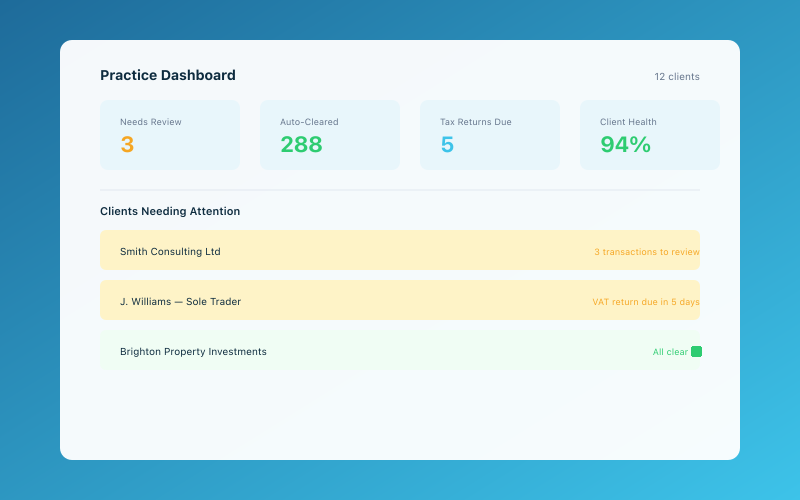 The Accounted practice dashboard — manage all your clients in one place
Client records and history. You need a complete view of each client — their contact details, services you provide, key dates (year-end, filing deadlines, VAT quarters), communication history, and any notes or documents. This is the foundation.
Pipeline management. Tracking prospects from initial enquiry through to signed engagement letter. How many leads did you get last month? Where did they come from? How many converted? Without a CRM, these questions are almost impossible to answer accurately.
Task and deadline tracking. Accountancy is deadline-driven. A good CRM (or integrated practice management tool) should help you track key dates and ensure nothing is missed.
Communication logging. Every email, phone call, and meeting should be logged against the client record. This is invaluable when a colleague needs to pick up a client relationship, or when you need to recall what was discussed six months ago.
Integration with your existing tools. Your CRM should play nicely with your email, your calendar, your accounting software, and ideally your practice management system. Isolated tools create data silos and double-entry.
Simplicity. This might be the most important factor. A CRM that's overly complex won't get used. And a CRM that doesn't get used is worse than no CRM at all, because you've spent money and time on something that sits idle.
Suitebook (Purpose-Built for Accountants)
Suitebook is one of a growing number of CRM and practice management tools designed specifically for accountancy firms. The advantage of a purpose-built tool is that it understands your workflows out of the box — you don't need to hack a generic sales CRM to fit your needs.
Strengths:
- Built around the accountancy workflow (onboarding, compliance deadlines, annual cycles)
- Client portal for document sharing and communication
- Task management with deadline tracking
- Designed for small to mid-sized practices
Weaknesses:
- Smaller user base means fewer integrations than mainstream CRMs
- May lack the flexibility of a general-purpose tool if you want to customise heavily
Best for: Practices that want an all-in-one solution without the complexity of a generic CRM.
HubSpot CRM (Free Tier)
HubSpot is one of the most popular CRMs in the world, and its free tier is genuinely generous. For a small practice on a budget, it's hard to beat.
Strengths:
- Free for up to 1,000,000 contacts (yes, really)
- Excellent email tracking and logging
- Pipeline management with drag-and-drop interface
- Huge ecosystem of integrations
- Powerful marketing tools if you want to grow into them
Weaknesses:
- Not designed for accountants, so you'll need to customise it
- The free tier has limitations on automation and reporting
- Paid tiers get expensive quickly
- Can feel overwhelming at first — there's a lot of functionality
Best for: Practices that want a robust, free CRM and are happy to spend some time setting it up for their specific needs.
Capsule CRM
Capsule is a UK-based CRM that's popular with professional services firms, including accountants. It hits a sweet spot between simplicity and functionality that many practice owners find appealing.
Strengths:
- Clean, intuitive interface that's easy to learn
- Good contact management and communication logging
- Sales pipeline tracking
- Integrates with Xero, QuickBooks, Mailchimp, and more
- Affordable pricing (starts from £14/user/month)
Weaknesses:
- Lacks some of the advanced automation features of larger CRMs
- Reporting is decent but not as deep as HubSpot or Salesforce
- No built-in practice management features
Best for: Small practices that want something simple, affordable, and well-integrated with common accounting tools.
Karbon
Karbon sits somewhere between a CRM and a full practice management platform. It's designed for accounting firms and has gained a strong following, particularly among cloud-first practices.
Strengths:
- Purpose-built for accountants
- Combines client management, workflow automation, and team collaboration
- Email integration that automatically logs communications against clients
- Triage system for managing incoming requests
- Strong workflow templates for common accountancy tasks
Weaknesses:
- More expensive than a simple CRM (pricing is per user, per month)
- Can be overkill for very small practices
- Learning curve is steeper than simpler tools
Best for: Growing practices that want a comprehensive platform combining CRM and practice management.
TaxDome
TaxDome is another accountancy-specific platform that combines CRM, client portal, document management, and workflow automation in a single tool.
Strengths:
- All-in-one platform designed for accountants
- Client portal with secure messaging and document exchange
- E-signatures built in
- Automated workflows for onboarding, tax prep, and more
- Competitive pricing for the feature set
Weaknesses:
- The interface can feel busy with so many features packed in
- Some users report a learning curve during initial setup
- Smaller UK user base compared to US
Best for: Practices that want to consolidate multiple tools (CRM, portal, document management) into a single platform.
Pipedrive
Pipedrive is a sales-focused CRM that's popular with small businesses across all industries. It's not designed for accountants specifically, but its visual pipeline management is excellent.
Strengths:
- Highly visual, pipeline-centric interface
- Drag-and-drop deal management
- Good automation features even at lower tiers
- Mobile app for managing on the go
- Affordable starting price
Weaknesses:
- Sales-oriented language and features may not feel natural for accountants
- No built-in practice management or deadline tracking
- You'll need to customise fields and stages to fit accountancy workflows
Best for: Practices that are focused on new business development and want a lightweight, visual tool for tracking prospects.
Making Your Decision
Choosing a CRM is a personal decision that depends on your practice size, budget, technical confidence, and priorities. Here's a quick decision framework:
If you're a solo practitioner with fewer than 30 clients: Start with HubSpot's free tier or Capsule. You need basic contact management and pipeline tracking, not a full practice management suite.
If you're a small practice (2–5 people) looking to systematise: Karbon or TaxDome will give you CRM plus practice management in one platform, which reduces the number of tools you're juggling.
If you're primarily focused on winning new clients: Pipedrive or HubSpot's pipeline tools will serve you well. Pair them with a separate practice management tool for ongoing client work.
If budget is your primary concern: HubSpot's free tier is hard to argue with. Capsule is the best affordable option if you want something more tailored.
Whatever you choose, the most important thing is that you actually use it. A perfectly configured CRM that nobody updates is just an expensive address book. Start simple, build the habit of logging interactions and tracking your pipeline, and expand your usage over time.
Integrating Your CRM With Your Wider Tech Stack
A CRM doesn't exist in isolation. For it to deliver real value, it needs to connect with your other tools — your email, your calendar, your accounting software, and ideally the tools your clients use too.
Most modern CRMs offer integrations with popular email platforms (Gmail, Outlook), calendar tools, and accounting software (Xero, QuickBooks). Check what's available before committing.
If your clients are sole traders using Accounted for their bookkeeping, the simplicity of their setup means less support overhead for you. Penny handles the routine categorisation and chasing, so your client interactions can focus on higher-value conversations — exactly the kind of touchpoints worth tracking in your CRM.
For practices looking to grow, our guide on how to grow your accountancy practice in 2026 explores marketing, client retention, and scaling strategies that work hand-in-hand with good CRM discipline.
And if you're thinking about specialisation as a growth strategy, our piece on building a niche accountancy practice is worth a read — niche practices often find that a CRM is even more valuable because their client base is more defined and their marketing more targeted.
Related Reading
-
How to Attract Millennial and Gen Z Clients to Your Practice
-
How to Create Recurring Revenue in Your Accountancy Practice
Accounted helps UK sole traders stay on top of their bookkeeping and tax. Start your free 30-day trial at getaccounted.co.uk
Further Reading
- The Institute of Chartered Accountants in England and Wales (ICAEW) provides professional guidance for accountants.
- Stay up to date with Making Tax Digital requirements from HMRC.
Learn about our free accountant portal and how it saves your practice time.
Accounted gives accountants a free practice portal — manage all your clients, file to HMRC, and let Penny handle the routine work. See the accountant portal →
Editorial & Research
The Accounted editorial team covers software comparisons, technology, and the tools UK sole traders need to run their businesses efficiently. All software comparisons are based on independent research and publicly available pricing.
Ready to try Accounted?
Join UK sole traders who are simplifying their bookkeeping and tax.
Start your 14-day free trial