How to Handle MTD for Multiple Clients Efficiently
Making Tax Digital for Income Tax Self Assessment is here, and for accounting practices, the operational challenge is significant. It's not the concept that's difficult — quarterly updates to HMRC, digital record-keeping, end-of-period statements — it's the sheer volume. If you've got 200 sole trader clients, you're looking at 800 quarterly submissions a year, plus 200 end-of-period statements and 200 final declarations. That's 1,200 submissions annually, compared to the 200 Self Assessment returns you were filing before.
The practices that thrive under MTD will be the ones that build efficient, scalable workflows. The ones that try to handle it the same way they handled annual returns — just four times as often — will drown. This guide is about how to set your practice up for the former.
Understanding the MTD Workload
Before we talk about solutions, let's be honest about the scale of the problem.
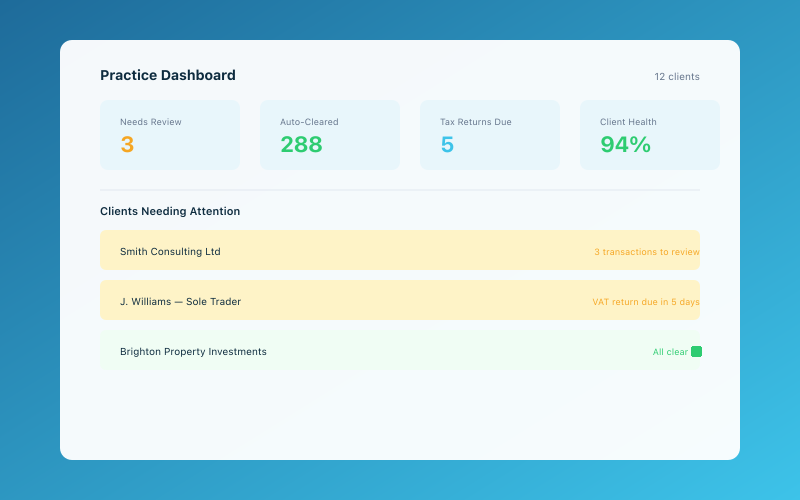 The Accounted practice dashboard — manage all your clients in one place
Under the annual Self Assessment regime, most of the heavy lifting happened between April and January. You'd collect records, prepare accounts, and file returns in a concentrated period. It was intense but predictable.
MTD changes the rhythm entirely. Quarterly update periods end on 5 July, 5 October, 5 January, and 5 April (or month-end equivalents if elected). Each update must be submitted within a month of the period end. That means you've got a rolling series of deadlines throughout the year, and they overlap — you'll be working on Q2 updates whilst Q1 corrections are still being finalised and Q3 is starting to generate data.
For a practice with a mixed client base, this means some clients are on different quarterly cycles, some are VAT-registered (adding MTD for VAT to the mix), and some have multiple income sources that need coordinating. Without a systematic approach, it's chaos.
Our guide on the MTD opportunity for accountants covers the strategic side of this — how to position MTD as a value-add rather than just a compliance burden. This article focuses on the operational nuts and bolts.
Batch Processing vs Continuous Processing
The traditional accounting practice model is built around batch processing: collect a year's worth of records, process them all at once, file the return. MTD doesn't lend itself to this approach, but many practices are trying to force it anyway — collecting a quarter's worth of records and processing them in a rush before the deadline.
A better approach is to move towards continuous processing, where client records are kept up to date on an ongoing basis and quarterly submissions become a relatively simple review-and-submit exercise rather than a major piece of work.
This requires a shift in both technology and client behaviour. Clients need to be recording their income and expenses in real time (or close to it), and you need to be reviewing and correcting their records regularly rather than leaving everything to deadline week.
Tools like Accounted make continuous processing much more achievable for sole trader clients. Penny handles transaction categorisation automatically and flags anything unusual, which means by the time you review the client's records for the quarterly submission, most of the work is already done. Your role shifts from data entry to quality assurance.
Structuring Your Team for MTD
If you're a larger practice, your team structure may need to adapt. Here are some models that work:
The dedicated MTD team. Assign a team (or individual, in smaller practices) whose primary responsibility is MTD submissions. They own the process, manage the deadlines, and develop expertise in the quarterly rhythm. The advantage is focus; the risk is creating a bottleneck if they're off sick or on holiday.
The client portfolio model. Each team member is responsible for all aspects of their client portfolio, including MTD submissions. This gives clients continuity of contact but requires every team member to be proficient with the MTD process.
The hybrid model. Junior staff or bookkeepers handle the data preparation and initial review, whilst senior staff handle exceptions, client queries, and final sign-off. This is often the most efficient approach because it matches the work to the skill level required.
Whichever model you choose, make sure someone is tracking the overall picture — a dashboard or summary that shows which clients have been submitted, which are outstanding, and which have issues that need resolving.
Technology Stack for Efficient MTD Management
Your technology choices will make or break your MTD efficiency. Here's what you need:
MTD-compatible accounting software for each client. This is non-negotiable — HMRC requires digital records and digital submission. For sole traders, options range from full accounting packages (Xero, QuickBooks, FreeAgent) to purpose-built tools like Accounted that focus specifically on what sole traders actually need. The simpler the tool, the more likely your clients will actually use it, which makes your life easier.
Practice management software with deadline tracking. You need a system that tracks submission deadlines for every client and shows you, at a glance, where things stand. Karbon, Senta, and other practice management tools can be configured to manage recurring quarterly deadlines. Our practice management software guide compares the options.
Bulk operations where possible. Some software allows you to review and submit multiple clients' updates from a single dashboard. This is significantly faster than logging into each client's account individually. Check whether your chosen software supports agent access with bulk functionality.
Automated reminders to clients. Set up automated messages prompting clients to review their records before the quarterly deadline. Something as simple as "Your Q2 records are due for review — please check that all transactions are categorised correctly by [date]" can save hours of chasing.
Standardised templates and checklists. Create a standard quarterly review checklist that your team follows for every client. This ensures consistency and reduces the risk of missing something. The checklist might include: verify bank feeds are connected, review uncategorised transactions, check for missing income, confirm expense categories, review any flagged items, submit the update.
Client Communication Strategy
Managing client expectations is half the battle with MTD. Many clients won't understand why their accountant now needs to do things four times a year instead of once, and some will resist the change.
Set expectations early. Explain to clients what MTD means for them, what you need from them, and when. Do this well before their first quarterly submission is due.
Make it easy for them. The more you can simplify the client's role, the better. If they're using Accounted, Penny handles most of the categorisation automatically, so the client's main job is to connect their bank and occasionally review flagged transactions. That's a much easier sell than asking them to code every transaction manually.
Establish a rhythm. Send quarterly reminder emails on a fixed schedule — say, two weeks before the submission deadline. Over time, clients will learn the rhythm and come to expect these touchpoints.
Group communications where possible. Rather than writing individual emails to each client, use templated communications that are personalised with the client's name and relevant dates but don't require individual drafting.
Provide a feedback loop. After the first couple of quarters, ask clients how they're finding the process. Their feedback will help you refine your approach.
Dealing with Non-Compliant Clients
No matter how well you set things up, some clients won't play ball. Their records will be incomplete, their bank feed will disconnect, or they simply won't respond to your reminders. You need a plan for this.
Escalation process. Define clear steps: automated reminder, personal email, phone call, formal letter. If a client consistently fails to provide records, you may need to have a frank conversation about whether the relationship is working.
Minimum viable submissions. HMRC requires quarterly updates to be submitted even if the data isn't perfect. In some cases, it may be better to submit what you have (with appropriate caveats and adjustments at year-end) rather than miss the deadline entirely. A late submission attracts penalties; an imperfect one can be corrected later.
Fee structures that incentivise compliance. Consider pricing your MTD service with a base fee for compliant clients and a premium for clients who require excessive chasing or catch-up work. This aligns incentives and ensures you're compensated for the extra effort.
For more on dealing with clients who don't provide records, our article on reducing client churn touches on how to manage difficult client relationships without damaging your practice.
Workflow Automation Tips
Small automations add up to significant time savings when multiplied across hundreds of clients:
- Auto-assign tasks when a quarter ends. Your practice management tool should automatically create a "Q2 review" task for each client on the relevant date.
- Auto-send reminder emails at predetermined intervals before and after the quarter end.
- Auto-flag exceptions. Use software that highlights unusual transactions, missing data, or bank feed disconnections so you can focus your attention where it's needed.
- Auto-generate reports. Set up standard quarterly reports that pull automatically from each client's accounting software, so your team can review them without manually exporting data.
- Auto-track submissions. Once a quarterly update is submitted to HMRC, automatically mark the task as complete and log the submission reference.
Planning for Peak Periods
Even with quarterly submissions spreading the work out, there will be pinch points. The month after each quarter-end is naturally busier, and the January period (when Q3 updates are due alongside annual Self Assessment returns for clients not yet in MTD) will be particularly intense.
Plan for this by:
- Front-loading work. Don't wait for the quarter to end to start reviewing records. If a client's records are up to date, you can begin the review process in the last week of the quarter.
- Staggering deadlines. If you have flexibility in which quarterly dates your clients use, consider spreading them out to avoid everyone hitting the same deadline.
- Temporary resource. Consider bringing in temporary bookkeeping support during peak periods to handle data preparation, freeing up your qualified staff for review and submission.
The Long-Term View
MTD is a significant change in how accounting practices operate, but it's also an opportunity. The practices that handle MTD efficiently will be more profitable (because they're not wasting time on manual processes), more valuable to clients (because they're providing real-time visibility into the client's tax position), and better positioned for future changes.
The key is to invest in getting the systems right now, while you have time to iterate and improve, rather than scrambling when every client is in the system at once.
Related Reading
Learn about our free accountant portal and how it saves your practice time.
Accounted helps UK sole traders stay on top of their bookkeeping and tax. Start your free 30-day trial at getaccounted.co.uk.
Accounted gives accountants a free practice portal — manage all your clients, file to HMRC, and let Penny handle the routine work. See the accountant portal →
Editorial & Research
The Accounted editorial team covers software comparisons, technology, and the tools UK sole traders need to run their businesses efficiently. All software comparisons are based on independent research and publicly available pricing.
Ready to try Accounted?
Join UK sole traders who are simplifying their bookkeeping and tax.
Start your 14-day free trial